AI for Small Business: Where It Saves Time
AI for small business is software that reads, sorts and drafts the routine work your team does every week, from answering the same customer questions to turning a supplier invoice into a spreadsheet row. It works best on tasks that repeat and follow rules you can write down. A person on your team still approves anything that goes to a customer or changes a record.
The payoff lands in three places: smoother operations, more revenue, and happier customers. The named project examples come from Frog Stone Media’s own sites, and the industry scenarios show workflows a small business can set up.
What AI Does for a Small Business, in Plain Language
Most of the AI a small business can use today does one of three jobs:
- It reads. Emails, PDFs, photos of receipts, flyers, forms and handwritten notes become organized information.
- It drafts. Replies, quotes, product descriptions, summaries and reports start from a first version instead of a blank page.
- It acts inside your tools. Connected to your email, calendar, website or spreadsheet, it prepares updates and hands them to you to approve. Software that takes these steps on its own is called an agent, and the guide to AI agents for business covers how agents work.
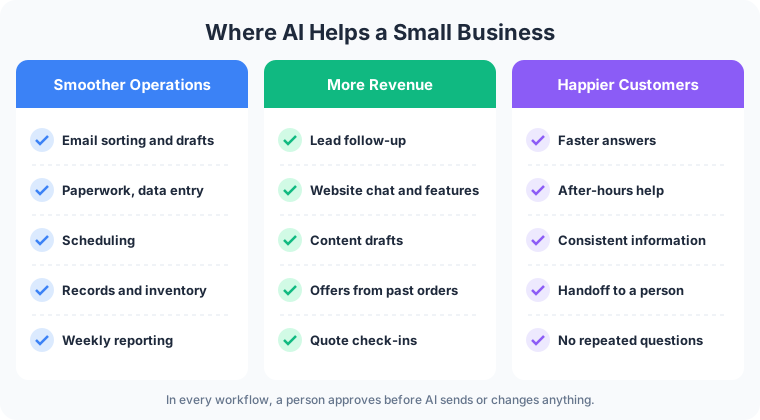
Smoother Operations: How Small Businesses Can Use AI to Save Time
Operations is where most owners feel the difference first, because the work is repetitive and the rules are already in someone’s head.
- Email. AI reads each incoming message, labels it as a quote request, a billing question or spam, and drafts a reply for the right person to edit and send.
- Paperwork and data entry. Invoices, intake forms, delivery slips and receipts get read and turned into rows in your spreadsheet or accounting system, waiting for a person to confirm.
- Scheduling. Requests for appointments get matched against the calendar, and the reply offering two open times is drafted for you.
- Records and listings. One change to your hours or a price becomes a prepared update for the website, the booking page and the spreadsheet. You approve it, and it goes live.
- Inventory. AI compares stock counts against recent sales and flags items running low, with a draft reorder list for the owner to review.
- Reporting. Weekly numbers from sales, bookings or web traffic get pulled into a short written summary you read on Monday morning.
Frog Stone Media runs this kind of work on its own sites. On SacGroceries, a Sacramento grocery price comparison site, AI reads store flyers and customer photo submissions, and a person approves the prices before anything publishes. On MK Library, AI helps manage affiliate links, suggests internal links, and spots articles that have gone stale. Building workflows like these is what the AI business automation service covers.
More Revenue From Work You Already Do
The revenue uses work on demand you already have: the leads, visitors and past customers who need a faster or more consistent response.
- Lead follow-up. A quote request that arrives at 9pm gets a drafted reply waiting at opening time, and every open quote gets a drafted check-in when it is due.
- Website chat and features. A chat that answers from your own menu, service list or policies keeps a visitor on your site instead of sending them back to search. Tools such as a price lookup or a booking helper give people a reason to return.
- Content. AI drafts product pages, service descriptions and blog posts from your notes. For content work, the pattern Frog Stone Media uses is that AI drafts, a second AI reviews, and a person approves.
- Offers from existing data. Past orders, seasonal sales and the questions customers ask every week become a drafted email offer for the customers most likely to want it.
The Weekly Driver shows the data side. Its reliability database builds a score from federal NHTSA complaint and recall data. AI helps classify the complaint and recall text and drafts buyer-guide summaries, and a person approves them before they publish. Custom website features like that are the territory of AI development for small business websites and tools.
Happier Customers
- Faster answers. Common questions about hours, parking, returns and order status get an answer in seconds, from your current information.
- After-hours help. A customer who writes at midnight gets a useful reply or a proposed time for staff to confirm, instead of silence until morning. An AI receptionist for small business does the same for phone calls.
- Consistent information. Change the return policy in one place, and the website chat, the email drafts and the FAQ page all work from the new version.
- A clean handoff to a person. When a question touches money, a complaint or anything sensitive, the conversation goes to your staff with the history attached, so the customer does not repeat themselves.
The guide to an AI customer support bot walks through how that setup answers questions and hands off to staff.
AI Snapshots by Industry
Restaurants. AI reads the week’s specials sheet and drafts the website menu update, answers questions about hours and allergens from the menu you approved, and drafts a note to regulars when a seasonal dish returns. The manager approves each change. More on restaurant websites.
Contractors. A homeowner sends photos of a cracked patio after hours. By morning, AI has prepared a job sheet entry and drafted a reply offering two site-visit times. The owner checks both and sends the reply. More on contractor websites.
Law firms. AI sorts new enquiries by practice area, checks names against the conflict list, and drafts an intake summary. Taking the case and anything resembling advice stay with the attorney. More on law firm websites.
Dental offices. AI drafts appointment reminders, answers questions about insurance accepted and new-patient forms, and routes anything clinical to the front desk. Patient health information needs a setup built for health privacy rules before AI touches it. More on dental websites.
Real estate. AI drafts listing descriptions from the agent’s notes, answers buyer questions about a property from the listing details, and drafts follow-ups after an open house. The agent edits and approves every listing before it goes public. More on real estate websites.

What Should Stay With People
AI drafts, sorts and prepares. Decisions stay with you and your staff:
- Judgment calls. Taking on a client, pricing an unusual job, hiring.
- Legal, medical and financial advice. AI can collect the details and route them. A professional gives the advice.
- Money. Refunds, discounts, price exceptions and payments.
- Upset customers. A person who is angry needs a person.
- Anything a customer sees or a record that changes. Workflows are set up so customer messages and record updates get prepared for staff approval.
How to Start Safely
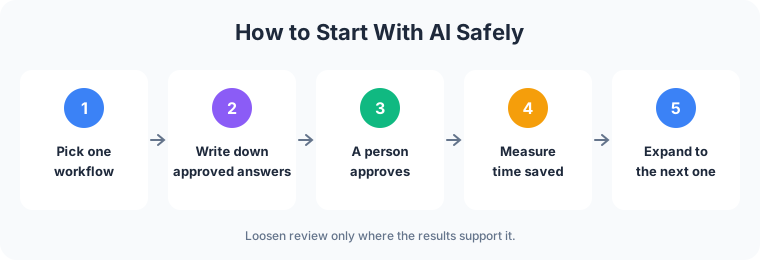
- Pick one workflow. Choose the task that eats the most time and follows the clearest pattern, such as sorting the inbox or entering invoices. Get it running well before adding a second.
- Write down the approved answers. Your hours, policies, prices, service area and the replies you already give. AI answers from that list, and you control what is on it.
- A person approves. AI drafts. Someone on your team reads, edits and sends. For anything customer-facing, that step can stay for good.
- Measure time saved. Note how long the task took by hand before launch, then compare after a few weeks of real use.
- Expand from there. Add the next workflow once the first one has earned trust, and keep staff approval before messages go out or records change.
The guide to hiring an AI consultant covers how to vet whoever builds the first workflow.
AI Solutions for Small Business: Build or Buy?
Buy when the AI you need is already a feature of software you pay for. Many email, accounting, booking and website platforms now include AI drafting or sorting, usually on a monthly plan or as an add-on. Turn it on, test it on a week of real work, and keep the review step. A roundup of the best AI tools for small businesses in 2026 sorts the options by the job they do.
Build when the work crosses several tools, depends on your own data, or needs an approval step the product does not offer. A custom setup connects your inbox, website, spreadsheet and booking system, and answers from your approved information.
A business can run both: off-the-shelf tools for common jobs and one custom workflow for the task that is particular to it. Connections between AI and your existing software often run through MCP servers, a standard way to give AI controlled access to a tool. Frog Stone Media builds these through its MCP development service, including a WordPress connection that saves new posts as drafts for a person to review.
For Your Technical Team
- Tool access through MCP. AI calls typed tools through MCP servers scoped per client, keeping each business’s data and permissions separate.
- Permissions and approval gates. Least-privilege credentials, read-only access where it fits, and write actions queued for human approval, set up per project.
- Grounding in approved sources. Answers are drawn from a maintained set of business documents, with retrieval configured per project.
- Evals and regression checks. Saved sets of real cases, re-run per project when prompts, models or data change.
- Prompt-injection defenses. Inbound email, web pages and uploaded documents are treated as untrusted data, and instructions inside them grant no permissions.
- Logging and cost limits. Tool calls can be logged per project, with step limits, token budgets and timeouts tuned to each task.
FAQ
Is AI worth it for a small business with only a few employees?
On a small team, the owner is usually the one answering email and entering invoices, so time handed back goes straight to the person running the business. Start with one task that repeats every week and compare the time it takes before and after.
Do I need technical staff to use AI in my business?
No. Off-the-shelf features run inside software you already use. A custom workflow gets built, tested with your staff, and handed over with instructions, so the person who reviews the output does not need to write code.
Is my customer data safe with AI?
Safety comes from the setup. Ask which providers see the data, whether any of it is used to train models, and what the AI is allowed to read and change. Keep sensitive data such as health or payment details out of any tool not set up for it.
What is the best first AI project for a small business?
The task someone on your team does by hand every day or every week, in the same steps, with information you already have. Inbox sorting, invoice entry and appointment reminders are common starting points.
Have a task in mind? Email what it is, which tools it touches, and who checks the result today. Scoping starts with a free email exchange, with no sales call. Send it through the contact page, or see what the AI business automation service covers first.