AI for Contractors: Win More Bids, Less Paperwork
AI for contractors is software that handles the office side of the job: it reads plans, photos and voice notes, then drafts the replies, estimates, proposals and paperwork your team writes every week. The crew still builds, the estimator still prices, and a person approves anything that touches a price, a contract or a customer before it goes out.
The payoff lands in three places: smoother operations, more bids won, and happier customers. The examples below show workflows a general contractor, remodeler or specialty trade can set up.
What AI for Contractors Does, in Plain Language
Most AI a contracting business can use today does one of three jobs:
- It reads. Plan sets, site photos, supplier quotes, inspection notices and the voice memo recorded in the truck become organized information.
- It drafts. Lead replies, estimate line items, proposals, change orders, daily logs and emails start from a first version instead of a blank page.
- It works inside your tools. Connected to your email, calendar, estimating software or project spreadsheet, it prepares updates and hands them to you to approve. Software that takes these steps on its own is called an agent, and the guide to AI agents for business explains how agents work and where to set their limits.
Smoother Operations: Less Paperwork After Hours
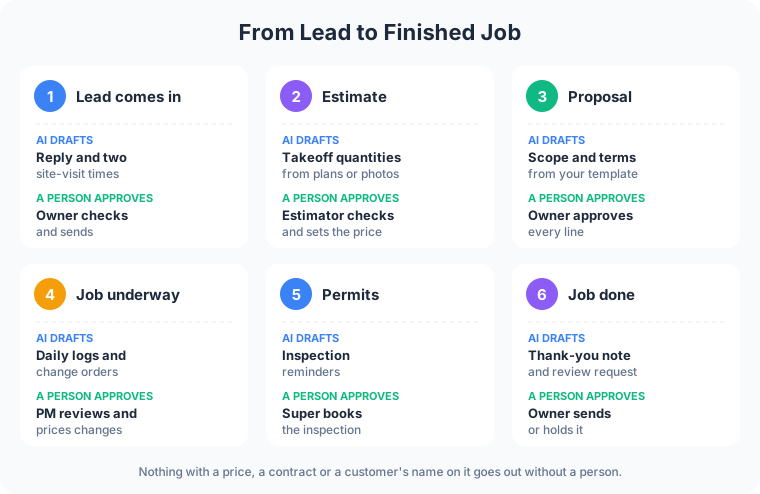
AI takes the first pass at the paperwork that usually follows a contractor home.
- Daily logs from voice notes. The superintendent records two minutes on the drive home: crew on site, weather, deliveries, what got inspected. AI turns it into a formatted daily log for the project file, and the superintendent reads it before it saves.
- Change orders. A homeowner asks to move a doorway during framing. The lead records the request, and AI drafts the change order with the scope described and the price lines left for the estimator to fill. Nothing reaches the customer until the owner signs off.
- Permit and inspection reminders. AI tracks each job’s permit status and inspection sequence from your checklist, and flags what is due this week, such as the rough electrical inspection before drywall goes up.
- Subcontractor and supplier emails. Schedule confirmations to the plumber, a lumber order, a request for a revised quote. AI drafts each one from the job notes, and the project manager edits and sends.
The same read, draft and approve pattern runs on Frog Stone Media’s own sites. On SacGroceries, AI reads store flyers and customer photo submissions, and a person approves the prices before anything publishes. Setting up workflows like these for a contractor is what the AI business automation service covers.
AI-Powered Construction Estimating, With the Estimator in Charge
Takeoffs eat estimator hours, and that time decides how many jobs a company can bid. AI-powered construction estimating tools read a plan set, measure areas and lengths, and count symbols such as outlets, doors and fixtures, then hand the estimator a quantity list to check.
Dedicated takeoff products include:
- Togal.AI describes itself as an AI-powered takeoff tool that detects and measures from drawings and compares drawing sets to show what changed between revisions. It sells per-user subscriptions billed annually, with custom plans for larger teams.
- STACK offers takeoff and estimating with AI that auto-counts symbols, suggests measurements, and flags gaps and pricing drift before a bid goes out. It sells per-user subscriptions and lists a free version of its Takeoff & Estimate product.
The best AI for construction estimating is the one that fits the plans you bid and the way your estimator already works, so test any tool on two or three past jobs where the real quantities are known. For smaller residential work, AI can also prep a rough scope from site photos and the homeowner’s description. The estimator reviews every quantity, sets every price, and owns the number that goes on the bid.
More Revenue: Faster Replies, More Bids Out the Door
- Lead response. A homeowner fills out the website form at 8pm with photos of a sagging deck. By morning, AI has drafted a reply that answers the first questions and offers two site-visit times from the calendar. The owner checks it and sends it before the crew leaves the yard.
- Proposal drafts. Once the estimate is approved, AI assembles the proposal from your templates: scope, exclusions, schedule, warranty language and payment terms. The owner reviews every line before the customer sees it.
- Follow-up on open bids. Every proposal waiting on an answer gets a drafted check-in when it is due, even in a busy week.
- Website pages that bring in work. AI drafts project gallery write-ups from job photos and notes, plus service area pages for the towns you cover. You edit them before they publish. A contractor website built around those pages gives the drafts somewhere to send homeowners.

Happier Customers
- Quick, clear answers. A homeowner asking when the tile arrives or whether the inspection passed gets a drafted update from the project notes, reviewed by the project manager before it goes out.
- Changes in writing. Change orders written up the day of the request, with scope spelled out, help keep the final invoice free of surprises.
- Review requests at the right moment. When the final walkthrough is signed off, AI drafts a thank-you note with a link to leave a review. The owner approves each request, and every finished job gets one, happy customer or not.
What a Person Approves
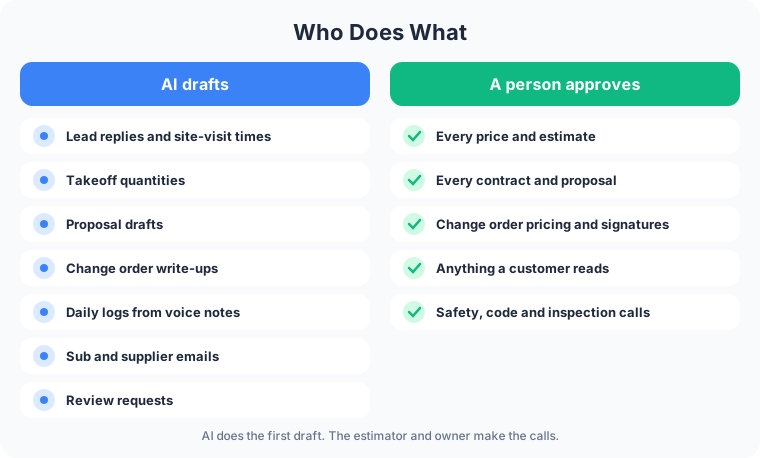
AI drafts, measures and reminds. Decisions stay with you and your team:
- Prices. Every estimate, bid, change order amount and discount.
- Contracts. Proposals, scope, exclusions, warranty and payment terms.
- Customers. Any message a homeowner, general contractor or property manager reads.
- Safety and code. Means and methods, code questions and inspection calls stay with licensed people.
How to Start
- Pick one workflow. Lead replies and daily logs are common first choices because they repeat every day and touch no prices.
- Write down your standards. Your service area, the jobs you take and turn down, your proposal template and your exclusions. AI drafts from that list.
- Keep the approval step. AI drafts. Someone on your team reads, edits and sends.
- Compare the time. Note how long the task takes by hand now, then check again after a few weeks of real use.
- Add the next one. Move to proposals or estimating prep once the first workflow has earned trust.
For Your Technical Team
- Tool access through MCP. AI reaches email, calendars, file storage and estimating exports through MCP servers scoped to the business, set up per project.
- Approval gates. Write actions such as sending email or updating a job record are queued for human approval, with least-privilege credentials.
- Document handling. Plan sets, photos and voice notes are processed through extraction steps configured per project, with outputs checked against known jobs before launch.
- Prompt-injection defenses. Inbound email, attachments and supplier documents are treated as untrusted data, and instructions inside them grant no permissions.
- Logging and limits. Tool calls can be logged per project, with step limits and timeouts tuned to each task.
FAQ
What is the best AI for construction estimating?
It depends on what you bid. Commercial and multifamily estimators working from full plan sets look at dedicated takeoff tools such as Togal.AI and STACK. Residential remodelers often get more from AI that drafts scopes from photos and notes inside the tools they already use. Test on past jobs with known quantities before you trust it on a live bid.
Will AI replace my estimator?
No. AI speeds up the measuring and counting. The estimator still checks the quantities, knows the local labor and material costs, and decides the price.
Do I need new software to use AI in my contracting business?
Not always. Many email, scheduling and project management tools already include AI drafting. A custom workflow connects the tools you have, such as your inbox, calendar and job spreadsheet, and gets handed over with instructions your office can follow.
Is AI for construction safe to use with customer and job data?
Safety comes from the setup. Ask which providers see the data, whether any of it trains their models, and what the AI is allowed to read and change. Keep payment details out of any tool not set up for them.
Have a task in mind? Email what it is, which tools it touches, and who checks the result today. Scoping starts with a free email exchange, with no sales call. Send it through the contact page, or see what the AI business automation service covers first.