AI Customer Support Bot: A Small Business Guide
An AI customer support bot answers the questions your customers ask every week from information your business has already approved, drafts replies for your staff, and passes everything else to a person. In AI customer service for small business, that means the question about Saturday hours gets answered at 10pm, the reply to a booking request is drafted before anyone opens the inbox, and the complaint about a late order reaches the owner with the full conversation attached.
What an AI Customer Support Bot Does
The bot works on the channels your customers already use: the chat window on your website and your email inbox.
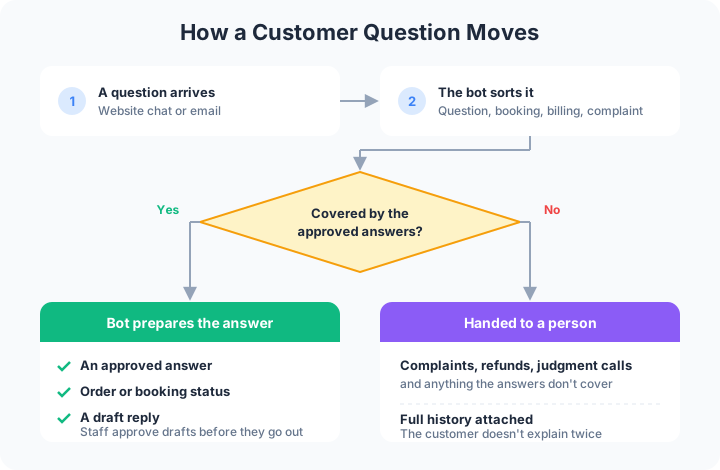
- Answering common questions from approved information. Hours, parking, service area, return policy, what to bring to a first appointment. The bot answers from a set of approved answers and website pages your team wrote and signed off. When a question falls outside that set, it tells the customer a person will follow up and passes the message on.
- Drafting replies for staff to approve. In the inbox, the bot reads each message and writes a draft reply with the right details in your tone. Your staff read it, change what needs changing, and send it.
- Order and booking status lookups. A customer wants to know whether an order shipped or what time an appointment starts. The bot checks the order system or booking calendar with read-only access and drafts the answer with the real status.
- Sorting and prioritizing. Every message gets a tag: question, booking, billing, complaint or spam. Urgent messages move to the top instead of sitting under a stack of newsletters.
- After-hours coverage. A question that arrives at night gets an approved answer or a note that a person will reply in the morning, and the drafted reply is waiting when staff log in.
- Handing off to a person. When a message touches money, a complaint, or anything the approved answers don’t cover, the bot routes it to the right person with the whole history attached, so the customer doesn’t explain twice.
Take an auto repair shop. A customer emails at 7am asking whether the brake job is done. The bot checks the shop’s job board, sees the car is waiting on a part, and drafts a reply with that status. The service writer reads the draft, adds the expected pickup day, and sends it.
Happier Customers
- Faster first answers. A customer who asks on your website at night gets a useful answer or a clear note about when a person will reply, instead of silence until the next business day.
- Consistent information. Every answer comes from the same approved source. Change the return policy in one place, and the bot is built to answer from the new version on the website and in email drafts alike.
- No repeating the story. A handoff carries the full conversation to your staff, so the person who picks it up already knows the order number and the problem.
Smoother Operations
- Less repetitive typing. Staff edit a draft instead of writing the same answer about shipping times from scratch again.
- A sorted inbox. Complaints and urgent booking changes rise to the top. Spam and routine questions stop crowding them out.
- Fewer status calls. When customers can get order and booking status without phoning, the front desk spends more time on the people standing in front of it.

More Revenue
- Fewer lost leads. A quote request that comes in after closing gets acknowledged that night, and the drafted reply is ready first thing. The lead hears back while still comparing options.
- Quicker follow-up. The bot flags open requests that haven’t had a reply, so a booking enquiry doesn’t sit unanswered in a shared inbox.
- Answers right before a purchase. Questions about sizes, availability or service areas come just before someone buys. A quick, accurate answer helps keep the customer from leaving to check a competitor.
Chatbot or AI Agent for Customer Support?
A basic chatbot answers questions from a script. An AI agent for customer support goes further: it looks things up in your order system or calendar, sorts the inbox, and prepares replies inside the tools your staff already use. Vendors sell this as AI customer service agents, a customer support AI agent, or an AI help desk. Whatever the label, ask two questions: what can it read and change in your systems, and who approves its work before a customer sees it. The guide to AI agents for business covers how agents work beyond customer service.
What Stays With People
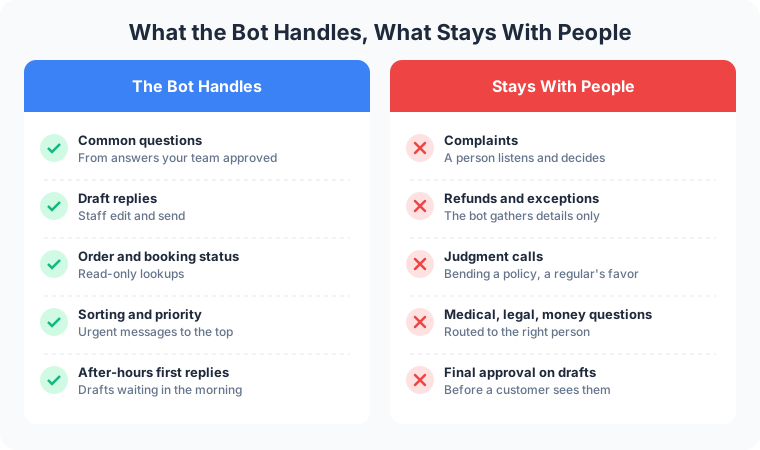
- Complaints. An upset customer needs a person who can listen and decide what to offer.
- Refunds and exceptions. The bot collects the order number, photos and details. A person decides whether to refund, replace or make an exception.
- Judgment calls. A request that bends a policy, a question about a medical or legal matter, or a long-time customer asking for a favor.
A bakery shows where the line sits. A customer emails that a birthday cake arrived damaged. The bot tags it as a complaint, pulls up the order, asks for a photo, and hands the whole case to the owner. The owner decides on the refund and writes the reply.
How to Start
- Pick one channel and the top questions. Start with the channel that gets the most traffic, usually the main inbox or the website chat. List the questions your staff answer most often.
- Write approved answers. Pull them from your website, your policies and the best replies your staff have already sent. The owner signs off on each one.
- Run it with drafts first. Every reply is a draft that staff approve before it goes out. Watch what they change, and fix the approved answers to match.
- Expand one step at a time. Add order lookups, after-hours replies or a second channel once the drafts need few edits. Complaints, refunds and anything outside the approved answers stay with a person.
How Frog Stone Media Builds Support Bots
Claude Code builds. OpenAI Codex reviews. Human verified and approved.
The same approval pattern runs on Frog Stone Media’s own projects. On SacGroceries, a Sacramento grocery price comparison site, AI reads store flyers and customer photo submissions, and a person approves everything before it publishes.
For Your Technical Team
- Grounding in approved content. Small answer sets, like a policy page, FAQ and price sheet, go into the model’s context directly, which keeps setup simple. Larger or fast-changing libraries use retrieval (RAG) to pull only the relevant passages with a reference back to the source. The choice is made per project.
- Evals on real past tickets. A test set built from past customer messages and the replies staff sent, used to check accuracy, tone and handoff decisions before launch and after each prompt or model change.
- Prompt-injection defenses. Customer messages, attachments and linked pages are treated as untrusted data. The bot holds read-only access to order and booking systems and has no permission to issue refunds or change records.
- PII handling. Names, emails and order details go only to the systems that need them, with redaction and retention rules set per project.
- Human handoff rules. Written triggers, such as a complaint, a refund request, a money question, low confidence, or a customer asking for a person, route the conversation to staff with the full history.
- Logging. Conversations, retrieved sources, drafts and staff edits can be logged per project, so a reply traces back to the answer it came from and staff edits feed the next round of evals.
Have an inbox full of the same questions? Email which channel it is, the questions customers ask most, and who answers them today, and the reply comes back with a scoped plan, no call needed. Send it through the contact page, or see what the AI chatbots and website features service covers first.