AI Agents for Business: A Small Business Guide
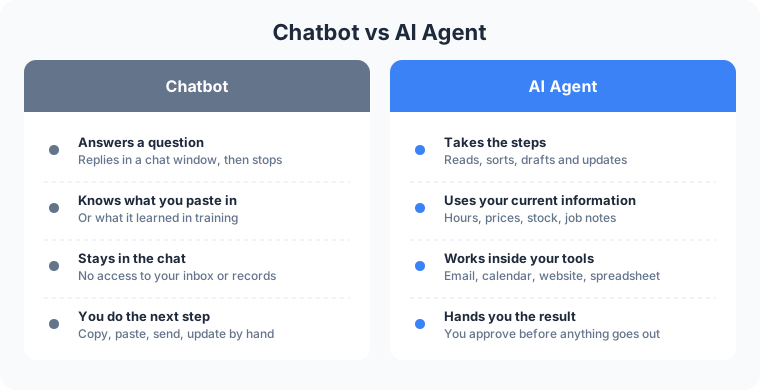
An AI agent is software that takes steps on its own inside the tools you already use, within limits you set. A chatbot answers a question. An agent reads the question, looks up the order, drafts the reply, prepares the record update, and hands the work to you to approve before anything changes. That ability to act is why AI agents for business have moved out of tech demos and into offices, shops, kitchens and job sites.
The same kind of setup runs on Frog Stone Media’s own publications and tools. Here is what an agent does, where it earns its keep, and how to start without handing your business over to software.
What an AI Agent Is, in Plain Language
Picture a new assistant with a short ring of keys. They can open your inbox, read a PDF, check the calendar and fill in a form, but only the doors you gave them keys to. That is an agent. A chatbot is the same assistant with no keys at all: it can talk, but it can’t open anything.
Three things separate an AI agent for business from a chat window:
- It acts. It reads an email, decides what kind of request it is, and files it or drafts the reply.
- It works inside your tools. It works with your email, scheduling system, spreadsheet, and website through connections you authorize.
- It follows limits you set. You decide what it reads, what it changes, and what waits for a person.
Vendors sell the same idea as an “AI assistant for small business,” a “digital employee,” or a “copilot.” Whatever the label, ask what it can do inside your systems and who approves its work.
Smoother Operations
Every small business has work that follows the same pattern every time.
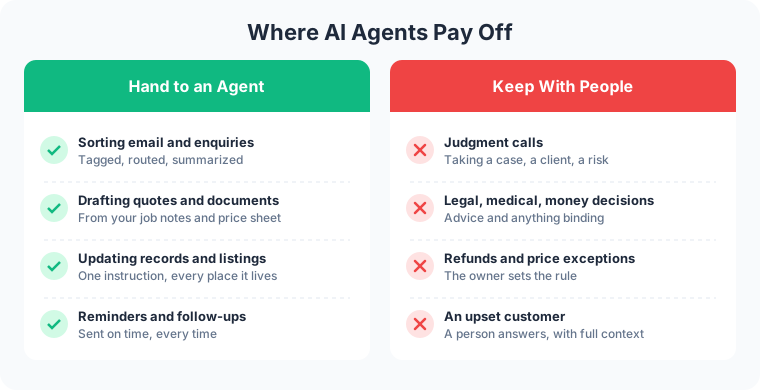
- Sorting inbound email and enquiries. The agent reads each message, tags it as a quote request, a billing question, a complaint or spam, and routes it to the right person with a two-line summary on top.
- Preparing documents and quotes. It pulls the customer’s details, the job notes and your price sheet into a draft quote or intake form. You check it and send it.
- Updating records and listings. New holiday hours, a sold-out item, a changed price: one instruction, and the agent prepares the updates for the website, the spreadsheet and the booking page. You approve them, and they go live.
- Routine follow-ups. Appointment reminders, “your order is ready” notes, and the review request after a finished job.
Take a contractor. A homeowner emails three photos of a cracked patio at 9pm. By morning the agent has prepared a job sheet entry with the address and drafted a reply offering two site-visit times from the calendar. The owner reads both over coffee, changes one line, approves the job sheet entry, and sends the reply.
Revenue Growth
- Faster replies to leads. A lead who hears back the same morning is still talking to you, not to the next name on the search results page.
- Follow-up nobody forgets. The agent tracks every open quote and drafts the check-in when it’s due.
- Turning data you already have into offers or content. Past orders, seasonal menus and the questions customers ask every week become an email offer, a product page or a blog draft for you to edit.
A restaurant shows how this works. The agent reads the week’s specials sheet from the kitchen, drafts the website menu update, and drafts a short email to regulars who ordered that dish last season. The manager approves both before the menu changes or the email goes out.

Happier Customers
- Accurate answers from your current information. An agent connected to your real hours, policies and stock answers from them. Change the return policy in one place, and the agent is built to answer from the updated version.
- Quick handoff to a person. When a question goes past what the agent knows, or touches money, health or a complaint, it passes the conversation to your staff with the full history attached. The customer doesn’t repeat themselves.
At a clothing shop, a customer asks on the website whether the blue jacket in medium is in stock downtown. The agent checks inventory, says yes, and offers to hold it until closing. When the next customer wants to return a damaged item, the agent collects the order number and photos and hands the case to the manager.
Where AI Agents Pay Off, and Where They Don’t
Agents pay off on work that repeats, follows rules you can write down, and draws on information already in your systems. The more often the task comes up, the more hours the setup can hand back to your team.
They don’t belong on judgment calls or sensitive decisions. Whether to take on a client, how to price an unusual job, what to tell a customer who is angry, anything involving legal, medical or financial advice: those stay with a person.
A law office draws the line clearly. The agent sorts new enquiries by practice area, checks names against the conflict list, and drafts an intake summary. Deciding whether to take the case, and any advice to the client, stays with the attorney.
How to Start Safely
- One workflow first. Pick the task that eats the most time and follows the clearest pattern. Get it running well before you add a second.
- A person approves before anything goes out. The agent drafts; it doesn’t send. For anything a customer sees, that approval step can stay in place for good.
- Clear limits on what the agent can touch. Read access to the inbox, permission to write drafts, no access to payments, no permission to delete records.
- You own the setup. The instructions, the connections and the data belong to your business, written down and handed over, so you are never renting a black box.
How Frog Stone Media Builds AI Agents for Business
Claude Code builds. OpenAI Codex reviews. Human verified and approved.
Claude Code is the primary tool for planning and building. Codex reads the work independently and flags anything that looks off. Then Michael checks the workflow the way your staff and customers will use it and approves it before launch.
The same pattern runs on Frog Stone Media’s own projects. On SacGroceries, a Sacramento grocery price comparison site, AI reads store flyers and customer submissions, and a person approves everything before it publishes. For content work, AI drafts, a second AI reviews, and a person approves.
For Your Technical Team
- Tool use and MCP connections. Agents call typed tools through MCP servers scoped to each client, which keeps one business’s data and tools separate from another’s.
- Permissions and approval gates. Least-privilege credentials, read-only access where it fits, and write actions queued for human approval, set up to fit the project.
- Logging and tracing. Tool calls, inputs and outputs can be logged per project, so an action traces back to the request that caused it.
- Evals and regression checks. Test sets of real cases, used per project to check prompt and model changes.
- Prompt-injection defenses. Inbound email, web pages and documents are treated as untrusted data. Instructions hidden inside them grant no permissions.
- Cost and latency limits. Per-run step limits, token budgets, timeouts and caching, tuned to keep each task fast and its cost in check.
Have a task in mind? Email what it is, which tools it touches, and who checks the result today, and the reply comes back with a scoped plan, no call needed. Send it through the contact page, or read what the AI business automation service covers first.