AI Tools for Nonprofits: Do More With a Small Team
AI tools for nonprofits take on the writing and sorting that eats a small team’s week: first drafts of grant sections, donor thank-you notes, volunteer shift reminders, event follow-ups and the numbers behind an impact report. A development director who also runs the volunteer program and the website gets time back for the work only a person can do, such as meeting donors and running programs. A person on staff writes or approves every final piece before it goes to a funder, a donor or a volunteer.
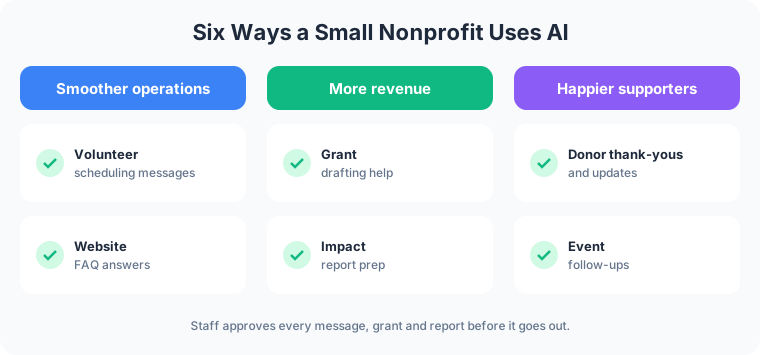
The payoff lands in three places: smoother operations, more revenue from donors and funders, and happier supporters.
What AI Does for a Nonprofit, in Plain Language
Most AI a small nonprofit can use today does one of three jobs:
- It reads. Program spreadsheets, sign-up sheets, event lists and past grant reports become organized notes.
- It drafts. Letters, emails, grant sections and report outlines start from a first version instead of a blank page.
- It prepares work inside your tools. Connected to your email, donor list or website, it sets up the next message and waits for a staff member to approve it.
The broader picture across small organizations is in the guide to AI for small business.
Smoother Operations for a Small Team
Volunteer scheduling messages
A food pantry needs eight people for Saturday’s distribution and has five. AI reads the sign-up sheet, drafts a reminder for the five who are confirmed, and drafts a short request to past Saturday volunteers who have not signed up yet. The volunteer coordinator reads both, adjusts the tone, and sends them.
Website FAQ answers
Visitors ask the same questions every week: when the pantry is open, what donations are accepted, how to volunteer, whether a gift is tax-deductible. A website assistant answers from content the staff approved and hands anything else to a person with the question attached. When the drop-off hours change, staff updates one list and the answers follow.
More Revenue From Donors and Funders
Grant drafting help
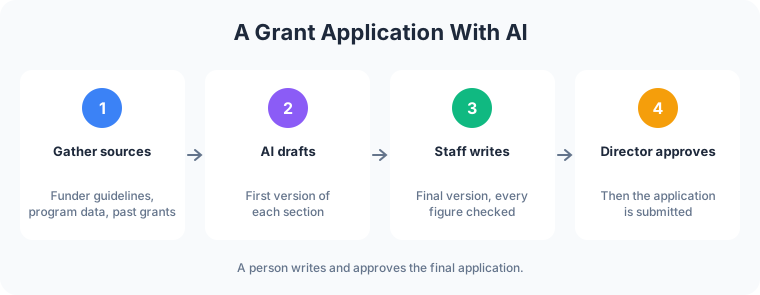
Grant applications repeat the same sections: organization history, need statement, program description, budget narrative, evaluation plan. AI drafts a section from the organization’s past applications, program notes and the funder’s guidelines. A staff member writes the final version, checks every figure against the records, and the director approves it before it is submitted. Outcomes and numbers come from the program data, and a person confirms each one.
Impact report prep from program data
Program data sits in spreadsheets: meals served, families enrolled, volunteer hours, workshop attendance. AI totals the figures by quarter and drafts a plain summary for the board or an annual report. Staff checks the totals against the source sheets and writes the story around them.
A first draft in hand helps a small team take on more applications in a season, and clear impact reports show funders and major donors what their money did.

Happier Donors, Volunteers and Guests
Donor thank-you and update drafts
A gift comes in on Tuesday. AI drafts a thank-you that names the program the donor gave to, using details from the donor record. The executive director reads it, adds a personal line, and sends it. Later in the year, AI drafts a short update to the same donors on what that program accomplished, using figures staff already approved.
Event follow-ups
After a fundraising dinner, AI drafts three versions of the follow-up: a thank-you for attendees, a note to people who registered and missed it, and a thank-you for the volunteers who ran it. The event lead edits and approves each before it goes out.
The website is where donors give and volunteers sign up. Nonprofit web design covers donation pages, volunteer sign-ups and the event calendar that these messages point back to.
AI Tools for Nonprofits: Vendor Programs
Several large software companies run programs for eligible nonprofits:
- Google for Nonprofits. Google’s program page lists Gemini and Gemini Notebook among the features of Google Workspace for Nonprofits, at no cost for eligible organizations.
- Microsoft. Microsoft’s nonprofit page lists Copilot at a discount for eligible nonprofits, and it requires a qualifying Microsoft 365 plan.
- OpenAI for Nonprofits. OpenAI offers discounted ChatGPT Business and ChatGPT Enterprise plans for eligible nonprofits, with eligibility checked through a third-party verification service called Goodstack.
Eligibility rules and discounts change, so check each program’s current terms before planning a budget around it. For a wider list sorted by the job each tool does, see the roundup of the best AI tools for small businesses in 2026.
How to Start Safely
- Pick one workflow. Donor thank-yous and volunteer reminders are common first choices because they repeat weekly and a person already reviews them.
- Protect donor and client data. Keep sensitive details, such as the people a program serves, out of any tool not set up for them. Ask each vendor whether your data is used to train its models.
- Write down the approved content. FAQ answers, program descriptions and the facts used in grants come from staff, and staff controls the list.
- A person approves. AI drafts. Someone on staff reads, edits and sends. For grants, a person writes the final version.
- Expand once it earns trust. Add the next workflow after the first one runs well for a few weeks.
Frog Stone Media builds custom workflows using this review process: Claude Code builds. OpenAI Codex reviews. Human verified and approved. Before launch, a person reviews the work and how it fits your organization.
For Your Technical Team
- Data handling. Vendor terms reviewed for retention, training use and access before donor or program data flows, with data limited to the tools the organization approves.
- Tool access through MCP. AI calls typed tools through MCP servers scoped per organization, with read-only access to donor and program records where it fits and outgoing messages queued for approval.
- Grounding in approved sources. The website FAQ and grant drafts work from a maintained set of approved documents and program data, with retrieval configured per project.
- Prompt-injection defenses. Inbound email, form submissions and uploaded files are treated as untrusted data, and instructions inside them grant no permissions.
- Logging. Drafts, approvals and tool calls can be logged per project, so each message traces back to the person who approved it.
Have a workflow in mind? Email what it is, which tools it touches, and who checks the result today. Scoping starts with a free email exchange, with no sales call. Send it through the contact page, or see how nonprofit web design ties the website into it first.