Dental AI Software: Where It Helps a Practice
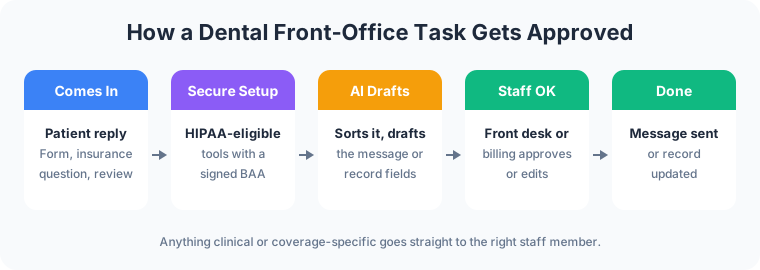
Dental AI software takes on the front-office work that fills a coordinator’s day: reminder messages, rescheduling, insurance questions, new-patient paperwork, recall lists and review replies. It reads, sorts and drafts. A person on your team approves before anything goes to a patient or into the patient record.
Clinical AI exists too. Pearl and Overjet both sell FDA-cleared software that analyzes dental X-rays and flags findings for the dentist to review. What to do with those findings is a clinical decision. This guide stays at the front desk, where AI for a dental office helps on three fronts: smoother operations, more revenue, and happier patients.
Patient Data Comes First
Patient names, appointments, insurance details and treatment notes are protected health information under HIPAA. For a HIPAA-covered practice, vendors that create, receive, maintain or transmit patient information on its behalf need business associate agreements (BAAs) and proper safeguards. Staff don’t paste patient details into an AI chat tool that isn’t covered by one.
Every workflow below keeps a person in the approval step: the AI drafts, and staff approve before a message goes out or a record changes. This is a description of how the work is set up, not legal advice. The practice’s own compliance advisor confirms what its setup needs.
Smoother Operations
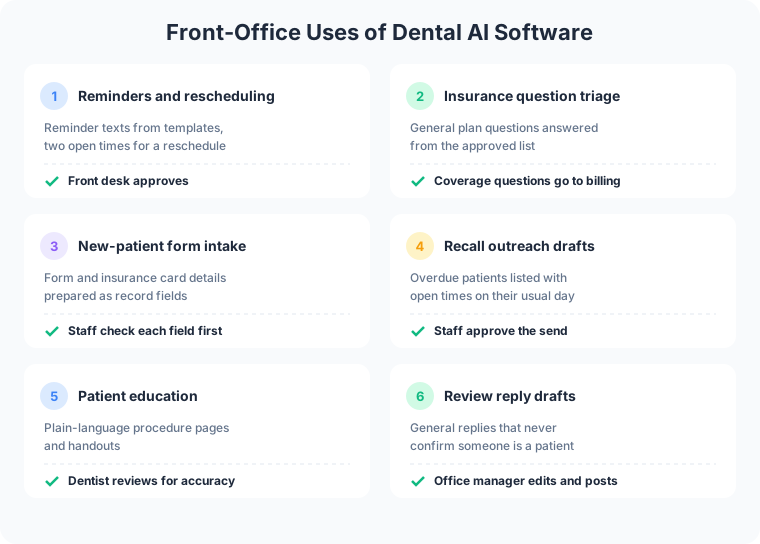
Appointment reminders and rescheduling drafts. AI drafts the reminder texts and emails for tomorrow’s schedule from the practice’s own templates. When a patient replies that they can’t make it, AI reads the reply, finds two open times that fit the appointment type, and drafts the rescheduling message. The front desk approves it and confirms the new time in the schedule.
Insurance question triage. Insurance questions arrive by phone, email and the website form all day. AI sorts them. General questions, such as which plans the practice accepts or what to bring to the first visit, get an answer from the practice’s approved list. Questions about a specific patient’s coverage, a claim or a balance go to the billing coordinator with a short summary on top. The AI doesn’t quote coverage or estimate what a patient owes. Some vendors go further: Overjet, for example, lists automated eligibility and benefits verification among its products.
New-patient form intake. A new patient fills in forms online, or sends a photo of an insurance card. AI reads the forms and prepares the matching fields for the practice management system: contact details, insurance carrier and member ID, medical history answers. Staff check each field against the form and approve it before it enters the patient’s record. Typing the same details twice drops out of the coordinator’s day.
More Revenue
Recall outreach drafts. AI pulls the overdue list from the schedule and drafts a personal message to each patient, with open times that match their usual day. Staff review the list, remove anyone who shouldn’t get the message, and approve the send.
Patient education content. AI drafts plain-language pages and handouts that explain a procedure, what recovery looks like, and the questions patients ask most often. The dentist reviews every page for clinical accuracy before it goes on the website or into the waiting room. Clear explanations help patients understand the treatment plan before they decide on it, and well-written pages give search engines something to show when a local patient searches a procedure.
New-patient calls answered. A new-patient call during a busy morning gets an answer instead of voicemail. AI answers the general questions and takes the details, and the front desk calls back with the full picture.

Happier Patients
Faster, consistent answers. Hours, parking, accepted plans and new-patient steps come from one approved source, so the answer on the phone matches the answer on the website. The guide to an AI customer support bot walks through how that setup answers questions and hands the rest to staff.
Review reply drafts. AI drafts a reply to each new review in the practice’s voice. Replies stay general: they never confirm that the reviewer is a patient or mention their treatment, which keeps patient information out of a public reply. The office manager edits and posts each one.
A person for anything clinical. Pain, swelling, a broken crown or a question about medication goes straight to staff. The AI’s job on those messages is to route them quickly with the details attached.
What Stays With Your Team
- Clinical judgment. Diagnosis, treatment plans and any reading of an X-ray belong to the dentist, including when clinical AI flags something.
- Coverage and money. Benefit estimates, balances, payment plans and claim disputes stay with the billing coordinator.
- Urgent and upset patients. A person answers, with the full message history in front of them.
- What enters the record. AI prepares the fields, and staff approve each one.
How to Start With Dental AI
- Confirm the setup first. Choose tools that offer a HIPAA-eligible setup and a signed BAA before any patient data goes in.
- Pick one workflow. Reminders and recall outreach are common first choices because they follow the same pattern every day.
- Write the approved answers. Accepted plans, office policies, new-patient steps and message templates. The AI answers from these.
- Keep the approval step. Staff approve every message and every record change. Read the first week of drafts closely and fix what was wrong before adding the next workflow.
Online booking, new-patient forms and a clear insurance page are where most of these workflows start. More on dental website design.
How Frog Stone Media Builds Dental AI Workflows
Claude Code builds. OpenAI Codex reviews. Human verified and approved.
Claude Code is the primary tool for planning and building. Codex reads the work independently and flags anything that looks off. Then a person reviews the work and how it fits your practice before it goes live.
The approval pattern matches Frog Stone Media’s own projects. On SacGroceries, a Sacramento grocery price comparison site, AI reads store flyers and customer photo submissions, and a person approves the prices before anything publishes. In a dental office, the same step sits between the AI’s draft and the patient.
For Your Technical Team
- BAA-covered services. Model providers, hosting and messaging services handling patient data are chosen for HIPAA eligibility and a signed BAA, confirmed per project.
- Minimum necessary data. Each workflow receives only the fields it needs, and test environments use synthetic records.
- Access controls and approval gates. Least-privilege credentials, read access where it fits, and record writes and outbound messages queued for staff approval.
- Audit logging. Reads, drafts and approvals can be logged per project, so an action traces back to the request and the person who approved it.
- Prompt-injection defenses. Patient messages, forms and reviews are treated as untrusted data. Instructions hidden inside them grant no permissions.
- Integrations. Practice management and scheduling systems connect through their available APIs or exports, scoped per project.
Have a front-office task in mind? Email what it is, which systems it touches, and who handles it today. Scoping starts with a free email exchange, with no sales call. Send it through the contact page, or see what AI business automation covers first.