AI Software for Lawyers: A Small Firm Guide
AI software for lawyers takes on the office work around the practice of law: reading intake forms, preparing conflict-check lists, offering consultation times, filing incoming documents, and drafting routine letters for an attorney to approve. For a small firm, that office work often lands on the attorneys themselves, after hours. The legal judgment stays where it is. An attorney reviews everything the software prepares before it reaches a client, a court or the billing system.
This guide covers business operations at a small firm, not legal research. The benefits fall into three buckets: smoother operations, more revenue from the inquiries the firm already gets, and happier clients.
What AI Does for a Law Firm, in Plain Language
Most AI tools for law firms do one of three jobs:
- They read. Intake forms, emails, scanned letters and PDFs become organized notes.
- They draft. Letters, emails, summaries and billing descriptions start from a first version instead of a blank page.
- They prepare work inside your tools. Connected to the calendar, the document folders or the website, they set up the next step and wait for a person to approve it.
Nothing on that list gives legal advice, and nothing goes out on its own. The general picture of how this works across industries is in the guide to AI for small business.
Smoother Operations at a Small Firm
Client intake and conflict-check prep
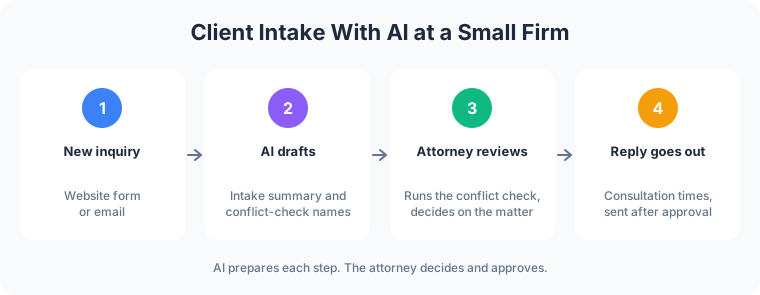
A potential client fills in the website form at 10pm with a long description of a dispute with a former business partner. By morning, AI has turned the form into a one-page intake summary: who is involved, the dates mentioned, the type of matter, and the documents the person says they have. It also pulls every party name into a list for the conflict check. The attorney runs the check, reads the summary, and decides whether to take the consultation. AI prepares the list, and the attorney makes the conflict decision.
Consultation scheduling
Once the attorney says yes, AI drafts a reply offering two open times from the calendar, along with the firm’s standard note on what to bring. Staff reads it and sends it. Reminders before the consultation get drafted the same way.
Document intake and organizing
Clients send documents in every format: phone photos of letters, forwarded email chains, scanned contracts. AI reads each one, suggests a name and a matter folder, and pulls out dates that look like deadlines for a person to confirm against the file. Staff approves the filing, and the attorney confirms any date that goes on the calendar.
First-draft letters and emails
Engagement letters, status updates, document requests and appointment confirmations follow patterns the firm already uses. AI drafts them from the firm’s own templates and the matter notes. The attorney edits and approves each one before it goes out.
Billing narrative cleanup
Time entries written in a hurry (“call w/ cl re docs”) turn into clear descriptions a client can understand. AI suggests the cleaned-up wording. The attorney approves it, and the recorded hours stay as entered.
More Revenue From Inquiries the Firm Already Gets
Law firm AI earns its keep on the revenue side by shortening the gap between an inquiry and a reply.
- Faster replies to new inquiries. Prepared consultation replies help staff respond while the inquiry is fresh.
- Fewer dropped leads. Every open inquiry gets a drafted follow-up when it is due, so open inquiries stay visible during a busy trial week.
- More attorney time for billable work. Hours that went to sorting email and retyping intake notes go back to client matters.
- Clearer invoices. Readable billing narratives help clients understand a bill without calling the office to ask.
Many of those inquiries start on the website. A firm site built around a clear intake form and fast contact options is the focus of law firm web design, and the intake workflow above plugs into that form.
Happier Clients
- Answers to routine questions at any hour. A website FAQ assistant answers questions about office hours, location, parking, practice areas, what to bring to a consultation and how to reach the office. It answers only from content the firm approved.
- No legal advice to visitors. When a visitor asks about their own situation, the assistant says it cannot give legal advice and offers a consultation request instead.
- Status updates that arrive on time. Drafted updates mean clients hear from the firm at the points they expect to.
- A clean handoff to a person. Anything sensitive, urgent or emotional goes straight to staff with the conversation attached, so the client does not repeat themselves.

Ethics: The Attorney Stays Responsible
The professional conduct rules still apply when software prepares the work, and the attorney is responsible for the result.
The American Bar Association issued Formal Opinion 512 on generative AI tools in July 2024. It applies the existing Model Rules to AI use, including competence, confidentiality, communication with clients, supervision of staff and reasonable fees. Among its points:
- Competence. Lawyers do not need to be AI experts, but they need a reasonable understanding of what the specific tool can and cannot do.
- Confidentiality. Client information goes only into tools vetted for how they store, use and share data. The opinion also addresses when a client’s informed consent is needed before client information goes into a generative AI tool.
- Review. AI output gets checked before anyone relies on it, especially anything headed to a court.
- Fees. A lawyer can bill for time spent working with a tool on a matter and reviewing its output, but generally not for time spent learning the tool.
- Supervision. Partners set clear policies on which tools staff may use and how.
State bars publish their own guidance as well, so check the rules where the firm is licensed. In every workflow in this guide, a lawyer reviews the work, and the tools that touch client information are chosen for confidentiality first.
How to Start With AI Software for Lawyers
- Pick one workflow. Intake summaries and scheduling replies are common first choices because they repeat daily and carry low risk when an attorney reviews them.
- Vet the tools for confidentiality. Ask where client data is stored, whether it is used to train models, who at the vendor can see it, and how it gets deleted.
- Write down the approved content. The FAQ answers, letter templates and intake questions the AI works from come from the firm, and the firm controls the list.
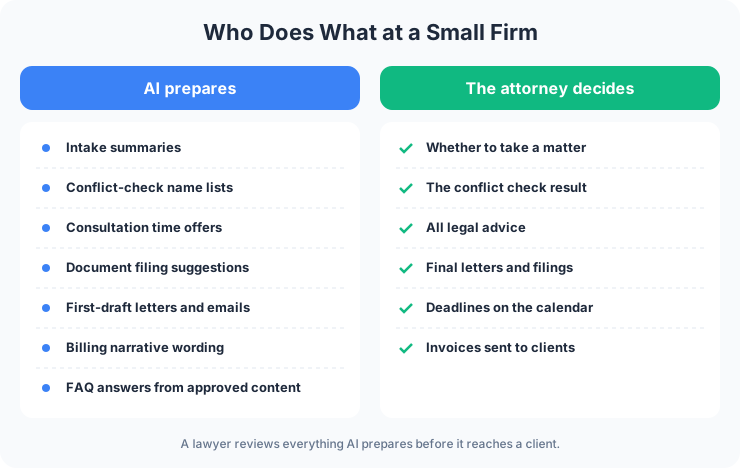
- An attorney approves. AI drafts. A lawyer reads, edits and approves before anything goes to a client or changes a record.
- Expand once it earns trust. Add the next workflow after the first one runs well for a few weeks.
Frog Stone Media builds these workflows using this review process: Claude Code builds. OpenAI Codex reviews. Human verified and approved. Before launch, a person reviews the work and how it fits your firm.
For Your Technical Team
- Data handling. Vendor terms reviewed for retention, training use and access controls before any client data flows, with data kept to the tools the firm approves.
- Tool access through MCP. AI calls typed tools through MCP servers scoped per firm, with read-only access where it fits and write actions queued for approval.
- Grounding in approved sources. The website FAQ answers from a maintained set of approved content, with retrieval configured per project and a fixed refusal path for requests for legal advice.
- Prompt-injection defenses. Inbound email, uploaded documents and form text are treated as untrusted data, and instructions inside them grant no permissions.
- Logging. Drafts, approvals and tool calls can be logged per project, so each action traces back to the request and the person who approved it.
Have a workflow in mind? Email what it is, which tools it touches, and who checks the result today. Scoping starts with a free email exchange, with no sales call. Send it through the contact page, or read what AI business automation for law firms and other small businesses covers first.