Restaurant AI: Practical Uses for Local Restaurants
Restaurant AI is software that answers the phone, reads your menu and sales reports, and drafts the routine messages and paperwork that pull a manager off the floor. It works from information you approve: your hours, your menu, your allergen sheet, your catering prices. A person on your team approves anything that changes the menu, goes to a guest, or turns into an order with a supplier.
The work it takes on falls into three buckets: smoother operations, more revenue, and happier guests. The examples below show where AI for restaurants fits during a normal week, and where the work stays with your staff.
What Restaurant AI Does, in Plain Language
Most AI tools for restaurants do one of three jobs:
- It answers. Phone calls, website chat and email questions about hours, parking, the menu and reservations, answered from the information you gave it.
- It reads. Sales reports, inventory counts, catering enquiries, supplier invoices and the specials sheet from the kitchen become organized information.
- It drafts. Menu updates, review replies, order sheets and catering quotes, ready for a manager to check and approve.
It takes the repeat questions and the first drafts off the host, the chef and the manager.
Smoother Operations
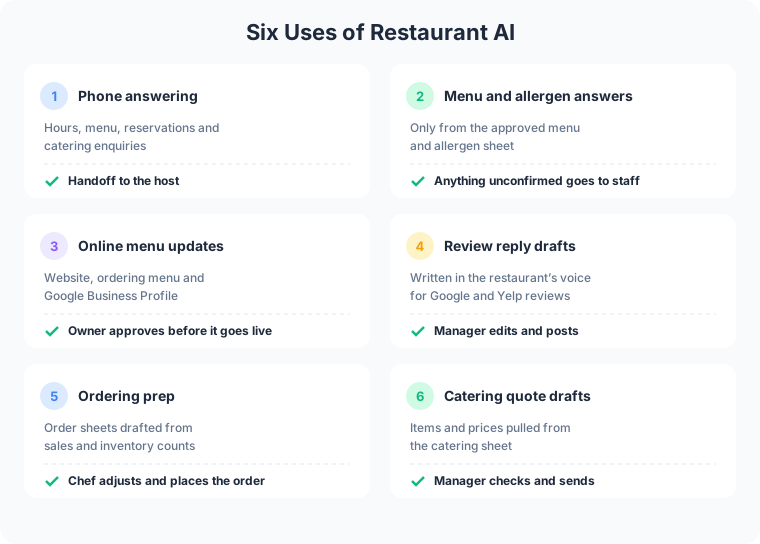
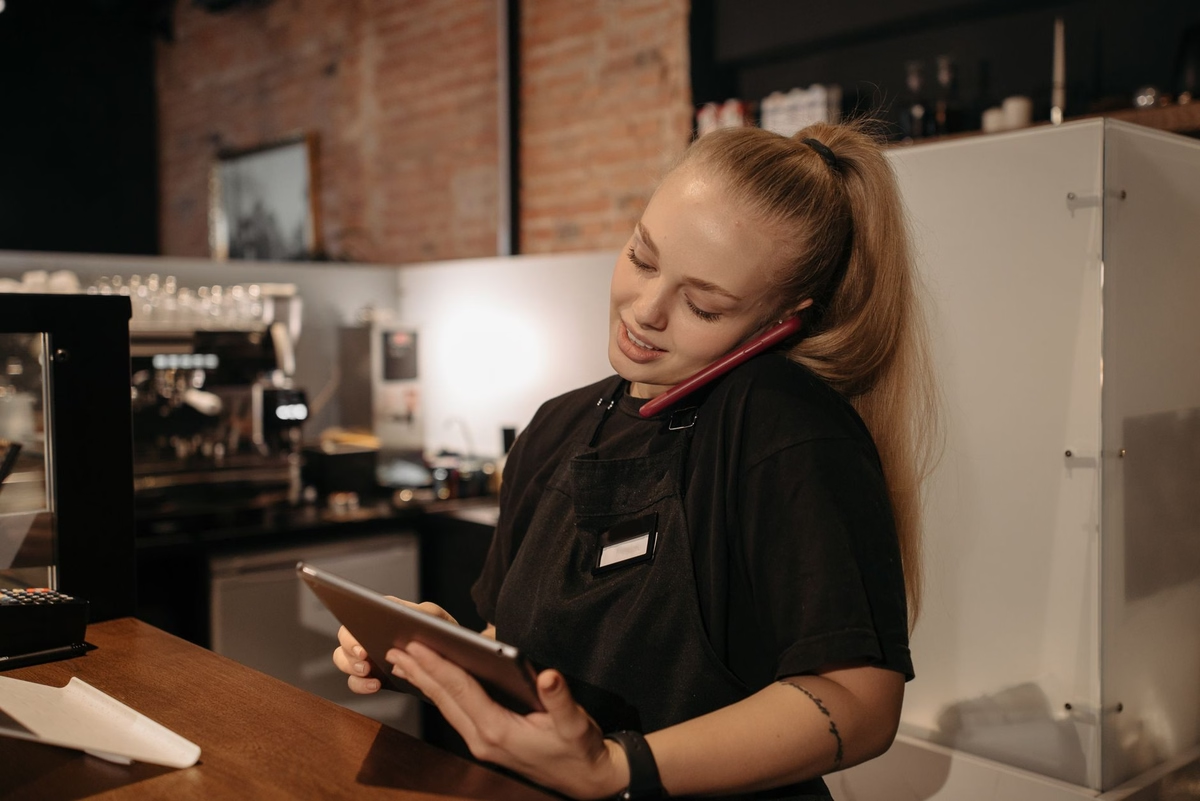
Phone answering with a handoff. During the dinner rush, the phone rings with the same questions: are you open Monday, is there parking, is there a table for six on Friday, do you cater. An AI answering service for restaurants picks up, answers from your approved information, collects a reservation request or a message for the host to approve before it enters the reservation system, and passes catering enquiries and anything unusual to a person with a short summary. The host stays with the guests in the room.
Restaurant-specific phone products exist. Slang.ai, for example, sells an AI phone agent for restaurants that answers from the restaurant’s approved information and connects with reservation systems including OpenTable and SevenRooms. The guide to choosing an AI receptionist for small business compares phone options and what to check before signing up.
Ordering prep from sales data. AI reads last week’s sales report from the point-of-sale system alongside the current inventory count and drafts an order sheet for each supplier. The chef adjusts quantities for the weekend forecast, the private party on Saturday and the produce that looked tired on Tuesday, then places the order. The draft takes care of the counting and copying.
Online menu updates. The kitchen hands over a new specials sheet, or a supplier runs out of halibut. AI drafts the change for the website menu, the online ordering menu and the Google Business Profile, and the owner approves it before anything goes live. Guests see the same menu everywhere, and nobody updates three places by hand at 4pm.
More Revenue
Catering quote drafts. A catering enquiry arrives by email with a date, a headcount and a rough idea of the food. AI reads it, pulls the matching items and prices from your catering sheet, and drafts a quote with the questions still open, such as dietary needs, delivery address and setup time. The manager checks the numbers, adjusts anything special, and sends it. A quote that goes out the same day reaches the customer while they are still deciding.
Calls that used to go to voicemail. A call answered during the rush is a reservation or a takeout order instead of a hang-up. When the AI collects a reservation request, the host approves it before it enters the reservation system you already use, and anything outside the rules, such as a party of fourteen, goes straight to a person.
Turning sales data into offers. The same sales report that feeds the order sheet shows which dishes sell on which nights. AI drafts a slow-Tuesday special or an email to regulars when a seasonal dish returns. The owner decides whether it runs.
Happier Guests
Menu and allergen answers from the approved menu. A guest asks whether the pesto has nuts or whether the fries share a fryer with the fish. AI answers only from the menu and allergen sheet you approved. When the answer isn’t on that sheet, or the guest mentions a severe allergy, it says so plainly and hands the question to staff instead of guessing. Keep the allergen sheet current, because the AI answers from whatever version you gave it.
Review reply drafts. AI reads new reviews on Google and Yelp and drafts a reply in your voice: thanks for the regular who loved the brisket, an apology and an invitation to call for the guest whose order was late. The manager edits and posts each one.
Consistent answers. Change the Sunday hours in one place, and the phone, the website and the chat answer from the updated version. Guests stop getting three different answers depending on who picked up.
What Stays With Your Staff
AI handles the repeat questions and the first drafts. A person keeps:
- Anything about a guest’s health. Severe allergies, cross-contact questions the sheet doesn’t cover, and anything medical go to staff.
- Money decisions. Refunds, comps, deposits and catering prices for an unusual job.
- Upset guests. A complaint gets a person, with the full message attached so the guest doesn’t repeat themselves.
- What goes on the menu. AI drafts the update, and the owner decides what the restaurant serves and what it says about it.
How to Start With AI for Restaurants
- Pick one job. Phone answering and review replies are common first choices because they repeat every day and the approved answers are easy to write down.
- Write the approved answers. Hours, parking, reservation policy, the current menu and the allergen sheet. The AI answers from this, so it has to be right.
- Keep the approval step. The AI drafts and a person approves before anything reaches a guest, a supplier or the website.
- Check a week of real work. Read the call summaries and drafts from the first week, fix the answers that were wrong or missing, and only then add the next job.
The broader guide to AI for small business covers how to choose between an off-the-shelf tool and a custom setup.
How Frog Stone Media Builds Restaurant AI
Claude Code builds. OpenAI Codex reviews. Human verified and approved.
Claude Code is the primary tool for planning and building. Codex reads the work independently and flags anything that looks off. Then a person reviews the work and how it fits your restaurant before it goes live.
The same approval pattern runs on Frog Stone Media’s own projects. On SacGroceries, a Sacramento grocery price comparison site, AI reads store flyers and customer photo submissions, and a person approves the prices before anything publishes. A menu update or an allergen answer gets the same treatment.
For Your Technical Team
- Grounded answers. Phone and chat answers draw from a single approved source for hours, menu and allergens, set up per project so one edit updates every channel.
- Integrations. Point-of-sale exports, reservation systems and online ordering menus connect through their available APIs or exports, scoped to read access where it fits.
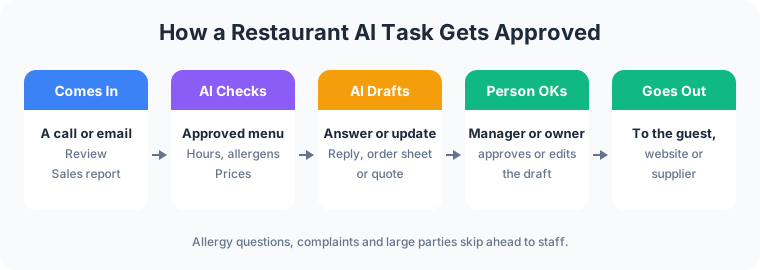
- Approval gates. Menu changes, review replies, supplier orders and quotes are queued as drafts for human approval, with write access limited to the draft step.
- Handoff rules. Allergy, complaint and large-party triggers route to staff with the transcript attached.
- Logging. Calls, drafts and approvals can be logged per project, so an answer traces back to the menu version it came from. Calls are recorded or transcribed only with the consent the law requires, and California requires every party on the call to consent.
- Prompt-injection defenses. Reviews, emails and catering enquiries are treated as untrusted data. Instructions hidden inside them grant no permissions.
Have a job in mind for your restaurant? Email what it is, which systems it touches, and who handles it today. Scoping starts with a free email exchange, with no sales call. Send it through the contact page, or see how restaurant web design handles menus, ordering and reservations first.