Website Design Requirements: The Checklist to Run Before Starting Every Project
Every DevSac website starts with a requirements document. Not a wish list, not a mood board, not “make it look modern.” A structured list of what the site must do, how it must perform, and what systems it must connect to. When requirements get skipped, the result is predictable: scope creep, missed deadlines, and a final product that looks nice but does not actually generate leads.
The problem is that most businesses approach a website project backwards. They start with “we need a new website” and jump straight into design conversations about colors and layouts. The requirements that actually determine whether the site succeeds or fails, SEO, conversion paths, analytics, accessibility, get treated as afterthoughts.
Here is the checklist to work through before any design work begins. Every item on this list directly affects whether the website generates business or just looks pretty.
The Website Requirements That Actually Matter
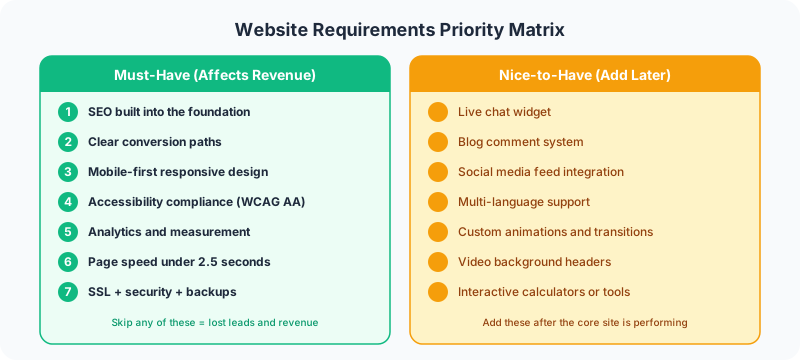
1. SEO Built Into the Foundation
Search engine optimization is not something you bolt on after the site launches. It affects the navigation structure, the page inventory, the copywriting, and the development approach. Every DevSac build includes SEO as a structural requirement from day one.
What this means in practice:
- Keyword research before the sitemap. The pages you build should target specific search terms. Keywords get mapped to pages before anyone opens a design tool.
- Semantic HTML and proper heading hierarchy. H1 tags on every page, logical H2/H3 structure, descriptive alt text on images.
- Schema markup. LocalBusiness, FAQ, BreadcrumbList, and other structured data that helps Google understand your content.
- Core Web Vitals compliance. Pages that load in under two seconds, no layout shift, responsive to interaction.
On a recent Sacramento law firm project, the keyword research revealed that their potential clients searched for specific practice areas (“sacramento estate planning attorney”) rather than the generic “law firm” terms. That research changed the entire sitemap from four pages to twelve, each targeting a specific practice area keyword. Without making SEO a requirements-phase activity, those twelve pages would not exist.
This connects directly to internal linking strategy. The page structure you define in requirements determines the link architecture that drives rankings.
2. Clear Conversion Paths
A website without a conversion strategy is a digital brochure. Every page needs to answer two questions: what does the visitor want, and what do you want them to do next?
Requirements for conversion:
- Primary CTA on every page. Phone number, contact form, or booking link. Above the fold, not buried in the footer.
- Secondary CTAs for visitors who are not ready. Newsletter signup, downloadable guide, or “view our work” link.
- Form strategy. Which pages have forms, what fields they include, where submissions go.
- Thank you pages (not inline messages). Separate URLs for each conversion point so analytics can track them.
Conversion rates get tracked on every DevSac build. The difference between a site with intentional conversion paths and one without is typically 2 to 5x in lead volume. That is the difference between a website that pays for itself and one that just costs money.
3. Mobile-First Responsive Design
More than half of all web traffic comes from mobile devices. For local Sacramento businesses, that number is often 60 to 70 percent because people search on their phones while driving between appointments or waiting in line.
Mobile requirements:
- Responsive across all screen sizes. Not just “works on iPhone” but tested across tablets, Android devices, and various viewport widths.
- Touch-friendly tap targets. Buttons at least 44x44 pixels, adequate spacing between clickable elements.
- Readable without zooming. Body text at 16px minimum, adequate line height, proper contrast.
- Fast on cellular connections. Optimized images, minimal JavaScript, no render-blocking resources.
Every build gets tested on real devices, not just browser emulators. The hamburger menu that works perfectly in Chrome DevTools sometimes fails on a three-year-old Android phone with a slow connection. Requirements need to specify which devices and browsers are in scope.
4. Accessibility Compliance
Web accessibility is a legal requirement, not a nice-to-have. ADA lawsuits against websites have increased every year since 2018. Beyond the legal risk, accessible sites are simply better sites. The changes that help screen reader users also improve the experience for everyone.
Accessibility requirements:
- WCAG 2.1 Level AA compliance. This is the standard most courts reference.
- Color contrast ratios. 4.5:1 for normal text, 3:1 for large text. No information conveyed by color alone.
- Keyboard navigation. Every interactive element reachable and operable without a mouse.
- Alt text on all images. Descriptive, not “image1.jpg” or blank.
- Proper form labels. Every input field has a visible label and an associated label element.
On a medical practice website, the accessibility audit caught a contrast issue where the appointment booking button failed the minimum ratio. That one fix, changing the button color from light blue to dark blue, made the button more visible to every visitor, not just those with visual impairments.
5. Analytics and Measurement
If you cannot measure it, you cannot improve it. Analytics setup is a requirement, not a post-launch task.
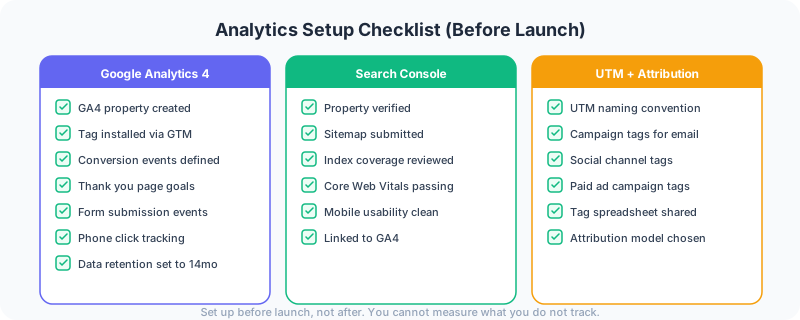
Analytics requirements:
- Google Analytics 4 properly configured. Not just the tag installed, but events, conversions, and goals set up correctly.
- Form submission tracking. Every contact form, quote request, and newsletter signup tracked as a conversion event.
- Thank you page destinations. Conversions drive to unique URLs so you can build conversion funnels.
- Search Console verified. Indexing status, search performance, and Core Web Vitals monitored.
- UTM parameter strategy. Every marketing channel tagged so you know which traffic sources generate leads.
GA4 and Search Console go live on every project before launch, not after. DevSac’s own site tracks traffic sources across organic search, direct, and referral channels from day one. That data informed content strategy decisions within the first month.
6. Content Management System
Every business website needs a way to update content without calling a developer. The CMS choice affects what you can publish, how fast you can publish it, and what it costs to maintain long-term.
CMS requirements:
- Text, image, and page editing without code. Non-technical staff need to add blog posts, update service descriptions, and swap out photos.
- Media library with organization. Upload, resize, and manage images in one place.
- User roles and permissions. Different access levels for content editors, administrators, and developers.
- Backup and version history. Ability to revert changes if something goes wrong.
Marketing sites get built with Astro backed by Markdown or a headless CMS. For clients who need to publish frequently and manage content independently, WordPress remains the right choice. The requirements conversation determines which approach fits. Either way, the site needs to be updateable without developer involvement for routine content changes.
7. Page Speed and Performance
A site that loads in five seconds loses roughly half its visitors before they see a single word. Speed is a ranking factor, a conversion factor, and a user experience factor.
Performance requirements:
- Largest Contentful Paint under 2.5 seconds. The main content visible quickly.
- Cumulative Layout Shift under 0.1. Nothing jumping around as the page loads.
- Interaction to Next Paint under 200ms. The site responds to clicks immediately.
- Optimized images. Modern formats (AVIF, WebP), proper sizing, lazy loading below the fold.
- Minimal third-party scripts. Every chat widget, analytics tag, and marketing pixel adds weight.
DevSac.com is built with Astro specifically because it ships zero JavaScript by default. Pages load in under a second. For web design projects where the client needs WordPress, caching, image compression, and minimal plugin usage hit the same performance targets.
8. Security and Hosting
A hacked website destroys trust instantly. Security is a requirements-phase conversation, not something you think about after a breach.
Security requirements:
- SSL certificate (HTTPS). Non-negotiable. Google penalizes HTTP sites in rankings.
- Regular updates. CMS, plugins, themes, and server software kept current.
- Automated backups. Daily backups stored offsite with easy restoration.
- Web Application Firewall. Protection against common attacks (SQL injection, XSS, brute force).
- Uptime monitoring. Alerts when the site goes down so you can respond immediately.
Website maintenance is part of every project conversation because security is ongoing. A beautiful website that gets hacked three months after launch is worse than an ugly one that stays online.
9. Brand Consistency
The website must look and sound like your business. This seems obvious, but plenty of redesigns produce a new site that feels like a completely different company.
Brand requirements:
- Color palette, typography, and logo usage defined. No guessing or “creative interpretation.”
- Voice and tone guidelines. How formal, how technical, how much personality.
- Photography direction. Stock vs. custom, style preferences, subjects to avoid.
- Consistency with offline materials. Business cards, signage, and print materials should feel connected to the website.
10. Post-Launch Support Plan
The launch is the beginning, not the end. Every website needs ongoing maintenance, content updates, and periodic improvements based on analytics data.
Post-launch requirements:
- Hosting and maintenance plan. Who monitors the server, applies updates, and handles issues.
- Content update process. Who publishes new content and how often.
- Performance review schedule. Monthly or quarterly review of analytics, rankings, and conversion data.
- Improvement roadmap. Prioritized list of enhancements based on real user data.
The Requirements Document Template
Before starting any project, DevSac creates a one-page requirements document that covers all ten areas above. It includes:
- Business goals: What the website needs to accomplish (leads, sales, awareness)
- Target audience: Who visits and what they need
- Page inventory: Every page with its purpose and target keyword
- Technical requirements: CMS, hosting, integrations, performance targets
- Design constraints: Brand guidelines, accessibility standards, responsive breakpoints
- Timeline and milestones: Wireframe review, design approval, development, launch
- Success metrics: How you will know the project succeeded
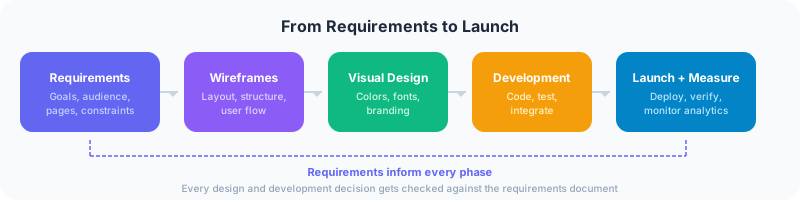
This document takes a few hours to produce. It saves weeks of back-and-forth during the project. Every decision during design and development gets checked against the requirements. “Does this support the stated business goals?” is a question with a clear answer when the requirements are written down.
FAQ
What is a website design requirements document?
A website design requirements document lists everything your website must do, how it must perform, and what it must integrate with. It covers SEO, conversion goals, mobile responsiveness, accessibility, analytics, content management, performance, security, branding, and post-launch support. It is the foundation that every design and development decision builds on.
How detailed should website requirements be?
Detailed enough that two different web designers reading the same document would build structurally similar sites. Vague requirements like “modern design” and “fast loading” lead to misaligned expectations. Specific requirements like “WCAG 2.1 AA compliance” and “LCP under 2.5 seconds” leave no room for interpretation.
Should I write requirements before getting quotes?
Yes. A requirements document lets you compare quotes accurately because every vendor is pricing the same scope. Without requirements, one quote includes SEO and another does not, making comparison impossible. The requirements document also protects you from scope creep by defining what is and is not included.
What is the most overlooked website requirement?
Analytics setup. Most businesses install Google Analytics and never configure it. They launch a site with no conversion tracking, no event tracking, and no way to measure whether the site is working. Setting up analytics properly during the build costs nothing extra and provides the data needed to improve the site after launch.
A website that checks all ten boxes on this list generates leads, ranks in search, and serves every visitor well. A website that skips even one or two of these requirements creates problems that compound over time. The requirements document is the cheapest insurance policy in web design. Spend the hours up front and save weeks of fixes later.
Ready to start your project with the right foundation? Get in touch about your requirements.