Website Navigation Best Practices: 8 Rules for Every Project
Your navigation menu appears on every page of your website. That makes it the single most impactful element you can optimize. A bad menu buries your best content. A good menu drives visitors to exactly the right page on the first click.
Frog Stone Media has built navigation systems for sites ranging from 5-page service businesses to a 1,000+ page nutrition reference. The pattern is the same every time: the menu is where SEO and UX intersect. The labels you choose affect your search rankings. The structure you pick affects your conversion rate. Getting navigation right is not optional.
Here are 8 rules that apply to every project.
1. Use Descriptive Labels, Not Generic Ones
“Services” does not tell anyone what you do. Neither does “Products” or “Solutions.” These labels are vague for visitors and worthless for search engines.
Descriptive navigation labels solve both problems at once. A label like “Web Design” tells a visitor what they will find on that page. It also tells Google what that page is about. Since your navigation appears on every page of your site, those links carry extra weight in search algorithms.
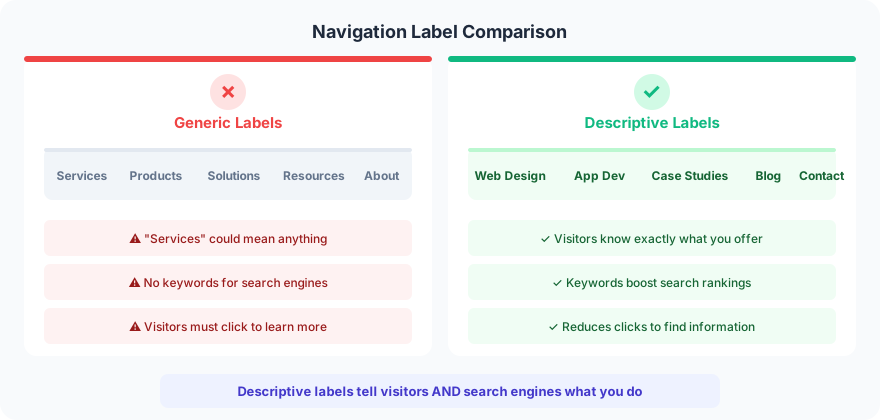
Test this with a simple rule: could these nav labels belong to any other company? If the answer is yes, the labels are too generic. “Web Design,” “App Development,” “Case Studies” only fits a web development company. “Services,” “Products,” “Resources” fits everyone, which means it differentiates no one.
Every page on your site has a chance of ranking in search results, but only if it focuses on a specific topic. A single “Services” page listing everything will never outrank a dedicated page targeting one keyphrase. This is why your homepage structure matters as much as the menu itself.
2. Limit Your Menu to 5-7 Items
More items in your navigation means less authority flowing to each page. Your homepage carries the most link equity (external sites link to it more than any interior page), and that equity gets divided among every link on the page.
A homepage with 50 navigation links passes 1/50th of its authority to each linked page. Cut that to 10 links and each page gets 5x more authority. The math is straightforward.

Beyond SEO, there is a cognitive limit. Eight items is visually much harder to scan than seven. Visitors’ eyes skip past important items when the menu is too crowded. Aim for five items on every project and only go to seven when the business model requires it.
If you need more than seven top-level items, group them. A mega menu with clear categories works better than a flat list of 15 items. But for most service businesses, five items covers everything: what you do, proof it works, how to learn more, and how to get in touch.
3. Put Your Most Important Items First and Last
There is a cognitive bias called the serial-position effect that directly applies to menu design. People remember items at the beginning of a list (primacy effect) and items at the end (recency effect). Everything in the middle gets forgotten.
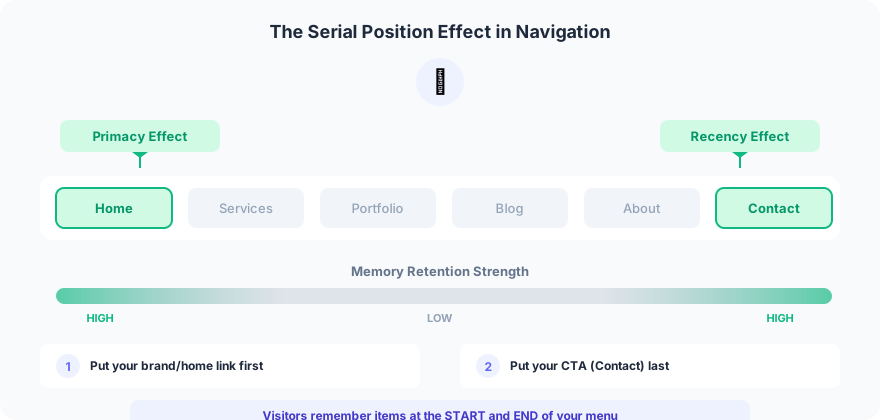
This pattern applies to every site. The first item is the primary service or product. The last item is the call to action (usually “Contact” or “Get Started”). Everything in between supports the journey but does not need to be the first thing a visitor notices.
This is also why the footer design matters. It is the natural “end” of a page, and visitors who scroll that far are engaged. Your footer navigation should include the items that did not make the cut for the main menu.
4. Add a Call-to-Action Button in the Header
55% of marketing websites put a contact button in the top right corner of the header. It is a web design standard that visitors expect. If your header does not have one, visitors ready to reach out will not know where to go.
The specific wording matters. “Contact Us” is fine. “Get a Free Quote” is better because it tells the visitor what they will get. Headers with specific CTAs have seen 15-20% higher click-through rates vs. generic ones.
Make the button visually distinct. Use a contrasting color against your header background. A button that blends in is a button that gets ignored.
5. Skip the Small Dropdown Menus
Small dropdown menus (the kind that show 3-4 items when you hover) create friction. Visitors move their eyes faster than their mouse. By the time they move the cursor to a menu item, they have already decided to click. Then the dropdown appears and forces them to make another decision.
Worse, dropdowns encourage visitors to skip important landing pages entirely. If “Web Design” has a dropdown showing “WordPress,” “Shopify,” and “Custom,” visitors jump straight to the sub-page and miss the main service page that has your best conversion content.
Mega menus (large dropdowns with groupings, descriptions, and icons) belong only on sites with 50+ pages. For sites under 30 pages, a flat navigation with no dropdowns outperforms every time. Check your analytics to confirm. Look at the page path from your homepage. If visitors are skipping your main service pages, your dropdowns are the problem.
6. Keep Social Media Icons Out of the Header
Social media icons in the header are exit signs. They are colorful, high-contrast, and positioned at the top of every page. They grab attention and send visitors away from your site to a platform full of distractions, competitor ads, and cat videos.
13% of websites still put social icons in their header. Traffic is hard to win and easy to lose. Facebook has plenty of traffic already.
Put social icons in the footer. Visitors who scroll to the bottom of your page and still want to connect on social media will find them there. That is an engaged visitor making a deliberate choice, not a distracted visitor clicking the first colorful thing they see.
7. Design Mobile Navigation with Touch in Mind
Check your analytics. A significant percentage of your visitors (often 50-60%) are on mobile devices. Your mobile menu needs to work flawlessly.
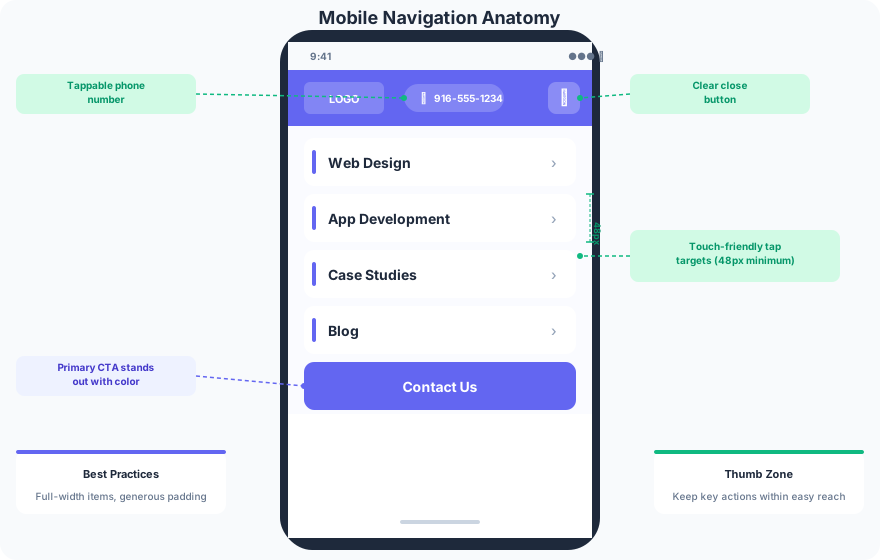
Three rules for mobile navigation:
Make tap targets at least 48px tall. Apple and Google both recommend this minimum. Anything smaller and visitors hit the wrong link, get frustrated, and leave.
Make the phone number tappable. If your header shows a phone number, visitors expect to tap it and make a call. This is a single line of HTML (<a href="tel:...">) that web developers miss constantly. A good mobile website makes your phone ring.
Test on real devices. Responsive design previews in Chrome DevTools are not enough. Test every mobile menu on at least two physical phones before launch. Swipe behavior, scroll locking, and touch sensitivity all feel different on real hardware.
8. Optimize Your Navigation with Analytics
Your navigation design is a starting point, not a final answer. GA4 path explorations show exactly how visitors move through your site from the homepage. You can see what gets clicked, what gets ignored, and where visitors drop off.
Active client sites get this analysis monthly. Common patterns that turn up:
- A menu item getting 2% of clicks means it is not earning its spot. Remove it or rename it.
- If 20% of visitors click “Careers,” you need to filter those out of your conversion analysis.
- Menu items that get heavy traffic but low conversions need better landing pages, not a different menu structure.
The basic framework: remove items nobody clicks, rename items that are unclear, and reorder based on what your visitors actually want. Your internal linking strategy should evolve alongside your navigation as you learn what content performs.
FAQ
What is website navigation?
Website navigation is the system of menus, links, and buttons that help visitors find content on your site. It includes the main menu (header), footer links, sidebar navigation, and breadcrumbs. Good navigation reduces the number of clicks between a visitor and the page they need.
How many items should be in a website navigation menu?
5-7 items is the ideal range. Fewer than 5 feels sparse. More than 7 creates cognitive overload and dilutes the link equity flowing from your homepage to interior pages. If you need more than 7 top-level items, use groupings or a mega menu structure.
How do I improve website navigation for SEO?
Use descriptive labels that match your target keywords (e.g., “Web Design” instead of “Services”). Limit the number of menu items to concentrate link authority. Create dedicated pages for each service or product instead of listing everything on one page. Keep your most important pages one click from the homepage.
Your navigation menu is one of the first things visitors see and one of the last things most businesses optimize. The changes above take an afternoon to implement and affect every page on your site. Start with your labels, then trim the item count, then check your analytics in 30 days.
If your navigation is not converting visitors into leads, get in touch to fix it.