Why Frog Stone Media Builds Websites with Astro Instead of WordPress
Frog Stone Media runs WordPress sites for clients and manages over 2,200 WordPress articles across multiple publications. ContentMK was built specifically to manage WordPress at scale. The WordPress knowledge runs deep.
And for most new websites, it is not the tool.
Astro is. Here is why, with real numbers from production sites.
Performance Is Not Close
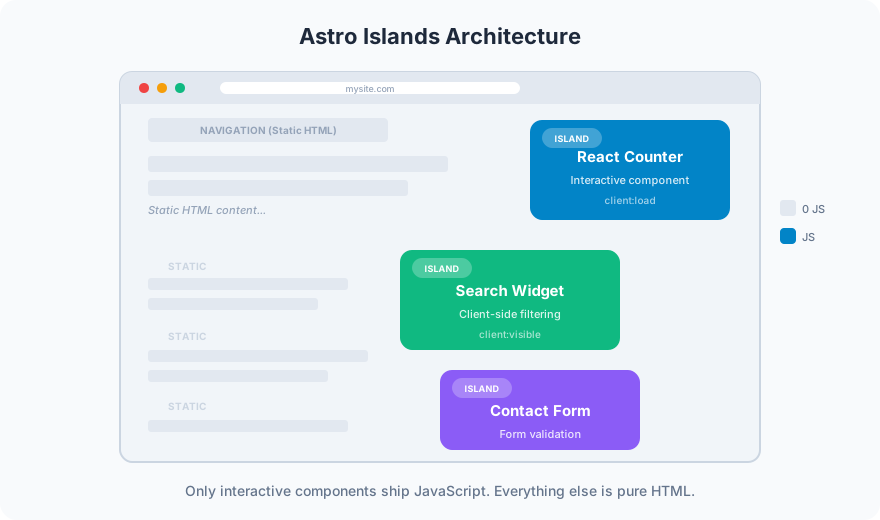
This site (DevSac.com) is built with Astro. It has 93 pages, including service pages, blog posts, project pages, and location pages. Every page loads in under 1 second on mobile. The entire site is static HTML, CSS, and optimized images served from a CDN. No server processing. No database queries. No PHP execution.
A typical WordPress site with the same amount of content requires: a PHP server, a MySQL database, a caching plugin (because without caching, each page load queries the database), a security plugin (because WordPress is the most-targeted CMS on the internet), and an optimization plugin (because WordPress ships more JavaScript than most sites need).
The performance gap is measurable:
- Astro site (this one): Sub-second load, zero server processing, 100% uptime since no server to crash
- Typical WordPress site: 2-4 second load (with caching), server processing on every uncached request, vulnerability to traffic spikes
For WHFoods.info, Astro generates 1,000+ pages in under 30 seconds. Those pages serve instantly from a CDN. A WordPress site with 1,000 pages would need aggressive caching, a beefy server, and constant optimization to match that performance.
Security Is Simpler
WordPress powers 43% of the web, which makes it the biggest target for automated attacks. Every WordPress site needs: regular core updates, plugin updates, theme updates, a firewall, brute force protection, file integrity monitoring, and database backups. Skip any of these and you are a target.
An Astro site is static HTML files. There is no server to hack, no database to breach, no login page to brute force, no plugins with vulnerabilities. The attack surface is effectively zero. Security maintenance is limited to keeping the CDN and DNS configured correctly.

This does not mean Astro is always more secure. If your site has user accounts, form submissions, or dynamic content, you need a backend regardless of the frontend framework. But for business websites where the primary function is presenting information and generating leads, static sites eliminate an entire category of risk.
Hosting Costs Disappear
WordPress hosting ranges from $10/month (shared hosting, slow, oversold) to $50-200/month (managed WordPress hosting like WP Engine or Kinsta). For a site that gets meaningful traffic, you need the managed tier.
Astro sites are static files. Hosting options include:
- Cloudflare Pages: Free for most sites, unlimited bandwidth
- Netlify: Free tier covers most small business sites
- Traditional hosting: Static files on any $5/month hosting plan
The cost difference is $50-200/month for managed WordPress versus $0-5/month for Astro. Over 5 years, that is $3,000-12,000 in hosting savings alone.

When WordPress Is Still the Right Choice
WordPress wins in specific scenarios:
Content that non-technical users update frequently. If a marketing team publishes blog posts three times a week, WordPress’s admin interface is purpose-built for that workflow. Astro requires editing markdown files and triggering a build, which is fine for developers but not for a marketing coordinator who needs to publish a blog post between meetings.
E-commerce with complex product management. WooCommerce handles inventory, variations, shipping rules, and tax calculations. Building this from scratch on a static site is not practical.
Sites that need plugins for specific functionality. WordPress has 60,000+ plugins. Need a booking system, membership management, LMS, or forum? There is probably a WordPress plugin that does it. With Astro, you build it or integrate a third-party service.
Existing WordPress sites that work. If your WordPress site performs well, ranks well, and your team knows how to use it, there is no reason to rebuild it on Astro. WordPress site maintenance and tools to manage those sites better are part of the work too. The framework is not the problem. Poor implementation is.
The Astro Advantage for Business Websites
For a typical small business website (10-50 pages, updated monthly or less, primary goal is lead generation), Astro delivers:
- Faster load times that improve both user experience and Google rankings
- Lower hosting costs that compound over years
- Better security with no plugins to update or databases to protect
- Simpler maintenance with fewer moving parts to break
- Better SEO through faster Core Web Vitals and cleaner HTML output
The trade-off is that content updates require a developer or a build pipeline. For businesses that update their website monthly (which is most small businesses), this is not a meaningful limitation.
The Recommendation
If you are building a new website for a business where the primary goal is lead generation, brand presence, or content marketing, and content updates happen monthly or less, Astro is the better choice.
If you need frequent content updates from non-technical users, complex e-commerce, or plugin-dependent functionality, WordPress with proper optimization is the right call.
Both are in the toolkit. The technology should serve the business, not the other way around. Get in touch about which approach fits your project.