Building a 1,000 Page Nutrition Site with Astro
WHFoods.info is a nutrition reference library with 135 foods, 700+ recipes, 43 nutrients, 15 condition-specific meal plans, 225+ articles, and 30+ FAQs. Over 1,000 pages, all statically generated with Astro, all cross-referenced, all loading instantly.
Building a site this size forced decisions about content architecture, data modeling, and build performance that most web projects never face. Here are the lessons.
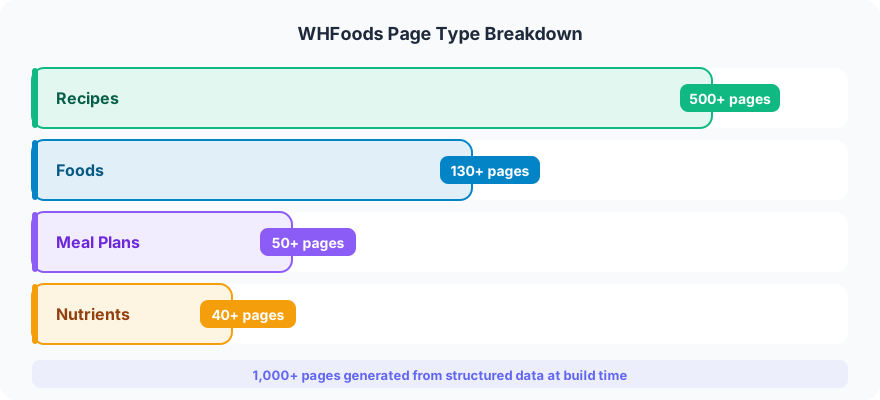
The Content Architecture Problem
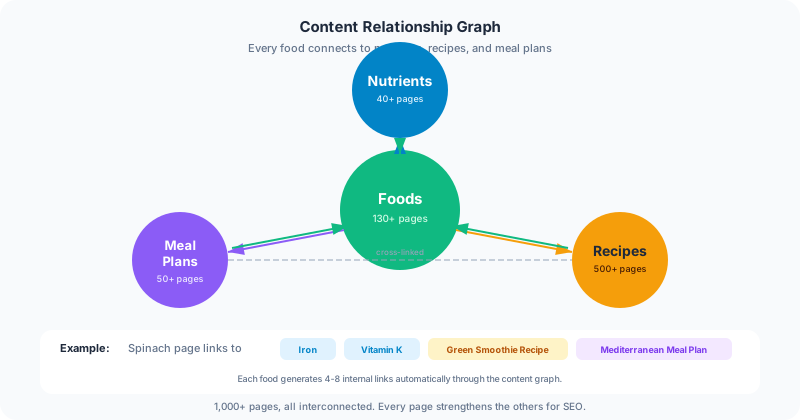
A nutrition reference site is not a blog with categories. Every piece of content references other content in multiple directions:
- A food page (like spinach) lists its nutrient density ratings, links to recipes that use it, and connects to meal plans for conditions it helps with (iron deficiency, bone health).
- A nutrient page (like Vitamin K) shows which foods are richest in it, explains absorption factors, and links to conditions where intake matters.
- A recipe references its ingredients (foods), lists its nutritional highlights (nutrients), and belongs to one or more meal plans.
- A meal plan (like the diabetes management plan) references specific foods, specific recipes, and explains which nutrients matter for that condition.
That is a many-to-many web of relationships, not a tree. If you model it wrong, you end up with circular dependencies, orphaned content, or a build process that chokes on cross-references.
Modeling It in Astro
Astro’s content collections provided typed, validated content with frontmatter schemas. But the real work was designing the reference system between collections.
Each food has a nutrients array listing nutrient slugs and density ratings. Each nutrient has a topFoods array listing food slugs ranked by density. Recipes have an ingredients array of food slugs. Meal plans have arrays of both recipe slugs and food slugs, organized by meal type and day.
The key decision was making these references one-directional at the data level and bidirectional at the build level. Spinach’s frontmatter lists its nutrients. But the spinach page also shows “Recipes with Spinach,” which is computed at build time by scanning all recipes for spinach in their ingredients. This avoids maintaining the same relationship in two places (which always drifts out of sync) while still rendering bidirectional links.
Astro’s getCollection() and getEntry() functions make this efficient. At build time, the full recipe collection loads once, gets grouped by ingredient, and the filtered set passes to each food page. The build resolves all cross-references statically, so there is zero runtime lookup cost.
Search Across 1,000+ Pages
Users need to find content across six different content types from a single search box. Someone searching “vitamin C” should see the Vitamin C nutrient page, foods rich in Vitamin C, recipes highlighting citrus, and articles about immune health.
A client-side search index gets generated at build time. Each content type contributes entries with a title, description, content type label, and URL. The search index is a JSON file that loads on demand (not on every page load) and uses prefix matching with content type filtering.
The alternative was a server-side search API, but that defeats the purpose of a static site. The search index file is about 180KB gzipped for 1,000+ entries, which is acceptable for a one-time load when a user starts searching.
Schema.org Markup at Scale
Every food page has Recipe schema for associated recipes, NutritionInformation schema for nutrient data, and BreadcrumbList for navigation. Every recipe has full Recipe schema with ingredients, prep time, cook time, yield, and nutritional highlights. Every nutrient page has MedicalWebPage schema.
With 1,000+ pages, you cannot hand-write schema markup. Schema generation is built into the page templates. Each content type has a schema template that pulls from frontmatter and computed data. The food page template automatically generates Recipe schema for every associated recipe, pulling ingredient lists from the recipe collection and nutrient data from the food’s own frontmatter.
This is one of the biggest advantages of static generation for content-heavy sites. The schema markup is computed once at build time, validated during the build process, and served as static JSON-LD. No runtime computation, no API calls, no risk of serving malformed schema because a database query timed out.
Build Performance
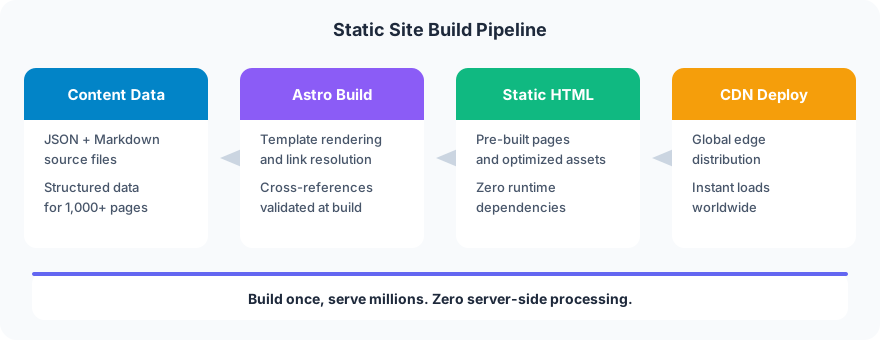
Astro generates all 1,000+ pages in under 30 seconds. That includes resolving every cross-reference, generating every schema block, and building the search index. Cold builds (no cache) take about 45 seconds.
The main performance factor is how you handle cross-collection references. If you call getCollection() inside a page template (which runs once per page), you are loading the entire collection 1,000+ times. Instead, collections load once in a shared data module, which passes filtered subsets to templates. This dropped build time from over 3 minutes to under 30 seconds.
Astro’s static output also means the hosting requirements are minimal. The entire site serves from a CDN with no server-side processing. Page loads are sub-second on mobile connections because there is no server render time, just static HTML, CSS, and images.
What to Do Differently Next Time
Content validation should be stricter. Manual review caught several broken cross-references (a recipe referencing a food slug that did not exist). A build-time validation step that checks every slug reference against the actual collection would have caught these automatically.
Image optimization should be automated. With hundreds of food photos and recipe images, image processing happened manually with ImageMagick. A build pipeline that converts source images to AVIF/WebP at multiple sizes would save time and ensure consistency.
The search index should be segmented. Loading the full search index works at 1,000 pages. At 5,000, it would not. Splitting the index by content type and loading segments on demand would scale better.
Why This Matters for Your Project
Most websites are not 1,000 pages. But the architecture decisions scale down just as well as they scale up. Content collections with typed schemas catch errors before they reach production. Cross-references computed at build time are faster and more reliable than runtime lookups. Static generation means your hosting bill stays flat no matter how much traffic you get.
If you are building a content-heavy website, whether it is a 50-page service business site or a reference library with thousands of entries, the architecture matters more than the technology. Astro, Next.js, Hugo, the framework is a tool. The content model, the reference system, the schema strategy, that is what makes a site work at scale. It is the same thinking that goes into every web design project, whether the site has 10 pages or 1,000.
Frog Stone Media builds websites that handle complex content architectures without sacrificing performance or SEO. If your project involves structured data, cross-referenced content, or any situation where “just add pages” is not going to cut it, get in touch.