How to Build a Scalable Website That Handles Growth
Most business websites never have a scalability problem. A site getting 500 visitors a month does not need a load balancer, a CDN, or a distributed database. It needs reliable hosting and clean code.
But some sites do outgrow their infrastructure. WHFoods.info was built as a 1,000+ page nutrition reference site. That required an architecture designed for scale from day one. The choices made at the start, static generation, edge caching, aggressive image optimization, meant the site handles traffic spikes without any infrastructure changes.
Here is how to build a website that grows with your business instead of breaking under pressure.
What Scalability Actually Means
Scalability is the ability of your website to handle more traffic, more content, and more features without degrading performance. A scalable site loads in 2 seconds whether it has 100 visitors or 10,000 visitors.
There are two types of scaling:
Vertical scaling (scaling up): Adding more power to your existing server. More CPU, more RAM, faster storage. This is simple but has a ceiling. A single server can only get so powerful.
Horizontal scaling (scaling out): Adding more servers to distribute the load. This is more complex but has no ceiling. Every major website uses horizontal scaling.
For most business websites, the right answer is neither. The right answer is architecture that does not need to scale because it minimizes server work in the first place.
The Scalable Architecture Stack
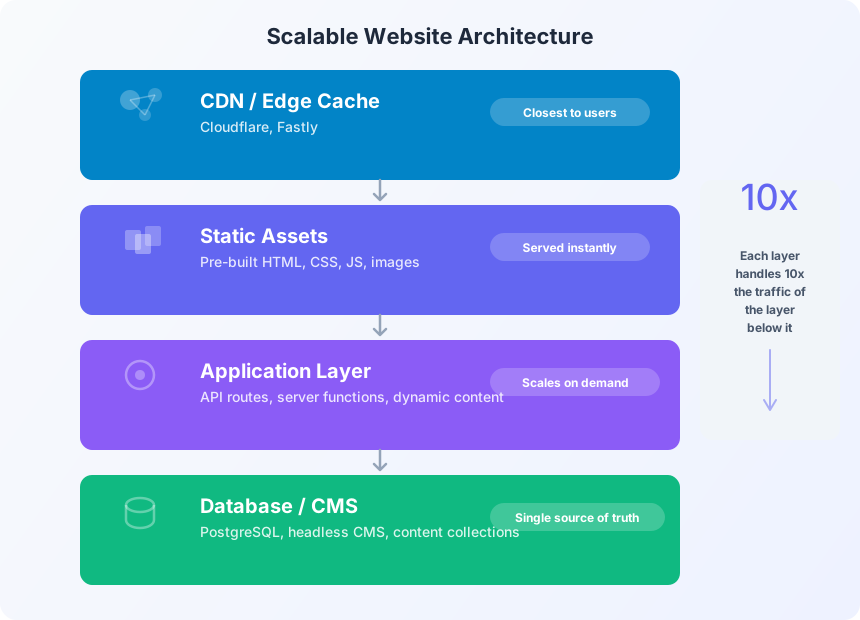
A well-architected website has four layers, and each layer handles 10x the traffic of the layer below it.
CDN / Edge Cache. Content delivery networks like Cloudflare serve your static files from data centers worldwide. A visitor in Sacramento gets your files from a server in San Jose, not from your origin server in Virginia. This alone eliminates 90% of server load.
Static Assets. Pre-built HTML, CSS, JavaScript, and optimized images. These files are generated at build time, not request time. Serving a static HTML file is essentially free from a computing perspective. There is no database query, no server-side rendering, no computation.
Application Layer. API routes, server functions, and dynamic content. This layer only handles requests that require real-time data: form submissions, authentication, personalized content. By keeping this layer thin, you minimize the work that requires actual server resources.
Database / CMS. The source of truth for your content. With static generation, the database is only queried at build time, not at request time. This means your database could go down entirely and your site would continue serving visitors without interruption.
Static vs. Dynamic: The Scalability Decision
The single most impactful architecture decision is whether to pre-build your pages (static) or render them on each request (dynamic).
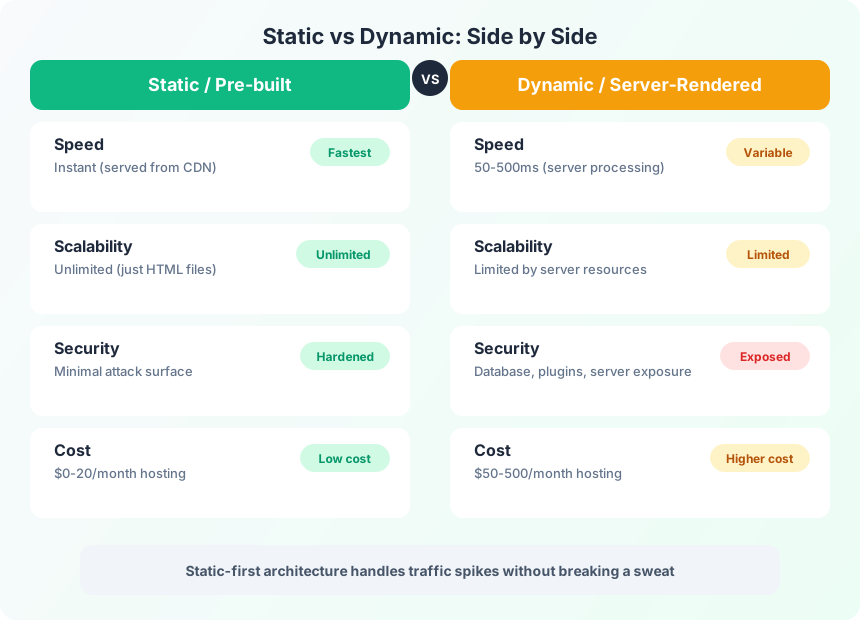
Frog Stone Media builds with Astro, a static-first framework that generates plain HTML files at build time. The result is a site that:
- Loads instantly from a CDN (no server processing delay)
- Scales to any traffic level (just serving files, no computation)
- Has minimal attack surface (no database exposed to the internet)
- Costs $0-20/month to host (no application servers needed)
Dynamic sites (WordPress, traditional server-rendered applications) process every request through a server. The server queries a database, renders HTML, and sends it back. This takes 50-500ms per request and consumes server resources that scale linearly with traffic.
This does not mean dynamic sites are bad. If your content changes every minute (stock prices, social feeds, real-time dashboards), dynamic rendering is necessary. But for business websites where content changes weekly or monthly, static generation is faster, cheaper, and infinitely more scalable.
Scaling Strategies by Growth Stage
Not every scalability technique is worth implementing on day one. Match your investments to your actual traffic level.
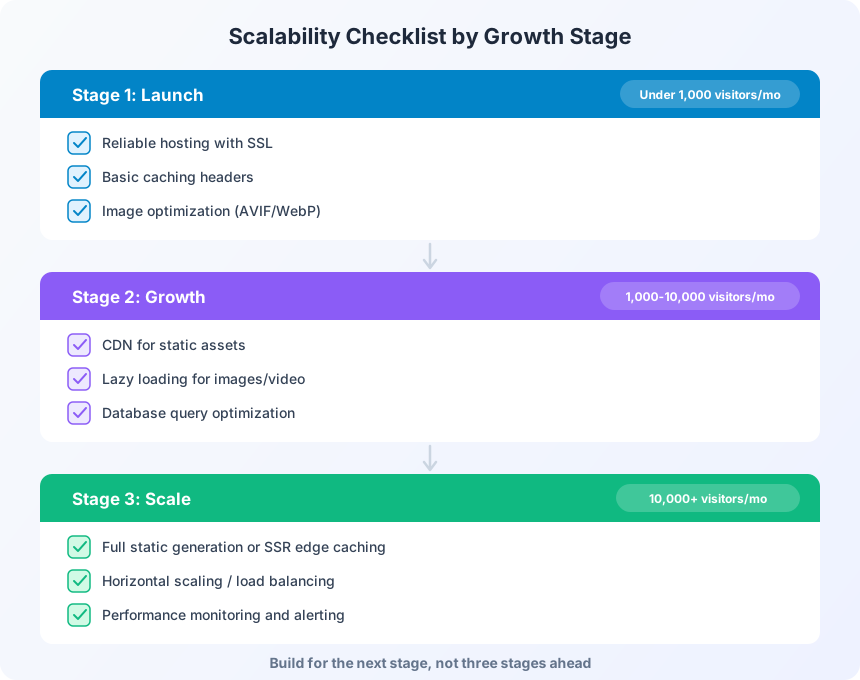
Launch Phase (Under 1,000 visitors/month)
At this stage, focus on fundamentals:
Reliable hosting with SSL. A $5-20/month shared hosting plan or a free static hosting service (Cloudflare Pages, Netlify, Vercel) handles this traffic level without thinking about it.
Basic caching headers. Set Cache-Control headers on static assets so browsers do not re-download images, CSS, and JavaScript on every page load. This reduces bandwidth and improves perceived speed.
Image optimization. Serve images in modern formats (AVIF, WebP) at appropriate sizes. A 5MB hero image takes as long to load as an entire optimized page. Every blog image on this site uses AVIF at quality 90. The files are 10-20x smaller than unoptimized JPEGs with no visible quality loss.
Growth Phase (1,000-10,000 visitors/month)
Now performance starts to matter:
CDN for static assets. Put Cloudflare (free tier) in front of your site. It caches your static files at edge locations worldwide and absorbs traffic spikes that would overwhelm a single server.
Lazy loading for images and video. Only load images when they scroll into view. This reduces initial page weight and speeds up the first contentful paint. Native loading="lazy" works in all modern browsers.
Database query optimization. If you are running a dynamic site, audit your database queries. The most common performance killer is the N+1 query problem: loading a list of items, then running a separate query for each item’s related data. Fix these with joins or eager loading.
Scale Phase (10,000+ visitors/month)
This is where architecture decisions from launch pay off:
Full static generation or edge SSR. If you chose static-first, you are already here. Your site handles 100,000 visitors the same as 10,000. If you are on a dynamic platform, evaluate migrating to a static generator or implementing edge-side rendering through Cloudflare Workers or similar.
Horizontal scaling. For dynamic applications that cannot go static, add more servers behind a load balancer. Most cloud providers (AWS, GCP, Azure) offer auto-scaling groups that add servers during traffic spikes and remove them when traffic drops.
Performance monitoring. Set up real-user monitoring (RUM) to track actual page load times from real visitors. Synthetic monitoring (lab tests) misses the reality of slow connections, old devices, and geographic distance.
Common Scalability Mistakes
Over-engineering from day one. A site getting 200 visitors a month does not need Kubernetes, microservices, or a multi-region database. That infrastructure costs more in time and money than the problem it solves. Build for the next stage, not three stages ahead.
Ignoring the CMS. WordPress sites with 30 plugins, each querying the database on every page load, are the most common performance bottleneck. Either reduce plugin count, add aggressive caching (WP Super Cache, WP Rocket), or migrate to a static generator.
Not testing under load. Your site loads fast with one visitor. Does it load fast with 500 concurrent visitors? Tools like k6, Artillery, or Locust can simulate traffic spikes before they happen in production.
Skipping image optimization. Images account for 50-80% of page weight on most websites. Optimizing images is the single highest-impact performance improvement you can make, and it costs nothing.
FAQ
How do I know if my website can handle more traffic?
Run a load test using a tool like k6 or Artillery. Simulate 10x your current peak traffic and measure response times. If response times stay under 3 seconds, your site can handle the load. If they spike above 5 seconds, you need to optimize before that traffic arrives.
What is the most scalable website architecture?
Static site generation served through a CDN is the most scalable architecture for content-driven websites. It eliminates server-side processing entirely, making each page request as simple as serving a file. This architecture handles millions of visitors on free or near-free hosting.
When should I switch from shared hosting to dedicated infrastructure?
When your site consistently uses more than 50% of shared hosting resources, or when traffic spikes cause noticeable slowdowns. For most business sites, this happens around 10,000-50,000 monthly visitors. Moving to a VPS or cloud hosting at that point gives you dedicated resources and room to grow.
Scalability is not about building for millions of visitors on day one. It is about making architecture decisions that do not create a ceiling. Static-first, CDN-backed, image-optimized sites grow with your business without requiring emergency infrastructure overhauls.
Need a site built to scale? Get in touch about an architecture that grows with you.