Why Image Sliders Hurt Your Website (and What to Use Instead)
Image sliders (carousels, rotating banners) are one of the most requested features in web design. They are also one of the worst-performing elements you can put on a homepage.
DevSac stopped building sliders for clients three years ago. The data is clear, and the firsthand results match: removing a slider and replacing it with a static hero image improves conversion rates on every site tested.
Why Sliders Fail

Only 1% of visitors click past slide 1. The first slide gets 89% of all clicks. By slide 3, you are reaching 3% of your audience. Slides 4+ are invisible to 98% of visitors. You are spending design time on content almost nobody sees.
Sliders slow your page load. Each slide is a high-resolution image. A 5-slide carousel loads 5 images, animation JavaScript, and touch-swipe libraries. This directly hurts your Core Web Vitals, particularly LCP (Largest Contentful Paint).
Banner blindness is real. Visitors have been trained by years of web browsing to ignore anything that looks like an ad. A rotating banner with promotional text triggers the same mental filter. Your most important message gets skipped because it looks like advertising.
Mobile performance suffers. Touch-swipe conflicts with native scrolling. Images resize poorly. Auto-rotation drains battery. Layout shift happens when slide dimensions change between frames, hurting your CLS score.
The Data
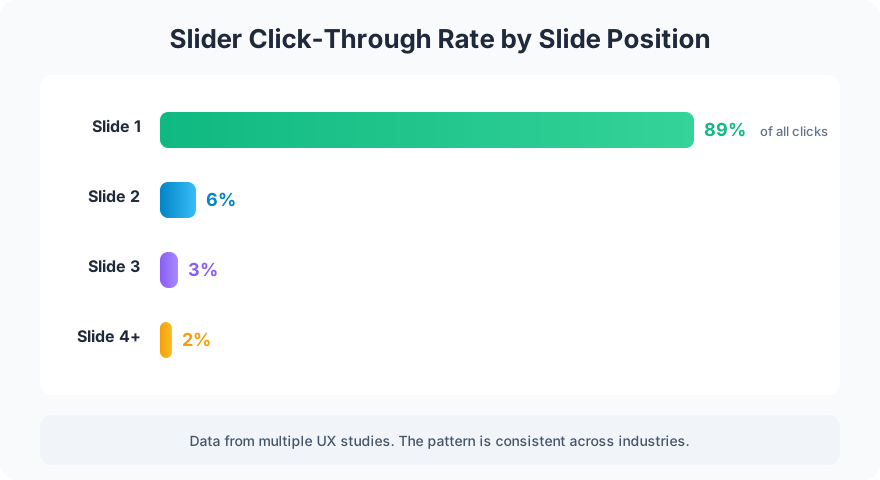
Multiple UX studies confirm the pattern. Notre Dame University tested their homepage slider and found 1% total interaction rate. Conversion XL documented similar findings across e-commerce sites. The Nielsen Norman Group recommends against auto-rotating carousels entirely.
The core problem: sliders try to say five things at once and end up saying nothing. A homepage with one clear message outperforms a homepage with five competing messages every time.
What to Use Instead

Static hero image with one clear headline. This is the default for every homepage build. One image, one headline, one CTA. The visitor knows exactly what you do and what to do next. It loads faster, converts better, and is easier to maintain.
Video background. A 15-30 second looping video (muted, no controls) is more engaging than a slider without the drawbacks. It delivers one message with motion instead of five messages in rotation. Keep the file size under 5MB.
Tabbed content. If you genuinely need to show multiple messages, let the visitor choose. Tabs put the visitor in control. They click what interests them instead of waiting for the slider to rotate to the right slide.
FAQ
Are there any cases where sliders work?
Product image galleries on e-commerce product pages work because the user is actively browsing product photos. This is different from a homepage carousel because the user initiated the interaction. Auto-rotating promotional banners on homepages consistently underperform.
My client insists on a slider. What do I do?
Show them the data. If they still want one, disable auto-rotation and add clear navigation indicators (dots, arrows). A manually-controlled gallery performs better than an auto-rotating one because the visitor controls the pace.
Sliders feel productive because they let you show everything. But showing everything means highlighting nothing. One strong hero image with one clear message will outperform a 5-slide carousel every time.
Want a homepage that converts instead of rotates? Get in touch about your homepage.