Who Owns My Website? Ownership and Terminology Explained
Business owners ask this question at least twice a month: “If I stop working with my web developer, do I lose my website?” The answer depends on how your site was set up, and most business owners do not know the details until it is too late.
Website ownership is not one thing. It is four separate things, and you need to own or control all four.
The Four Pieces of Website Ownership
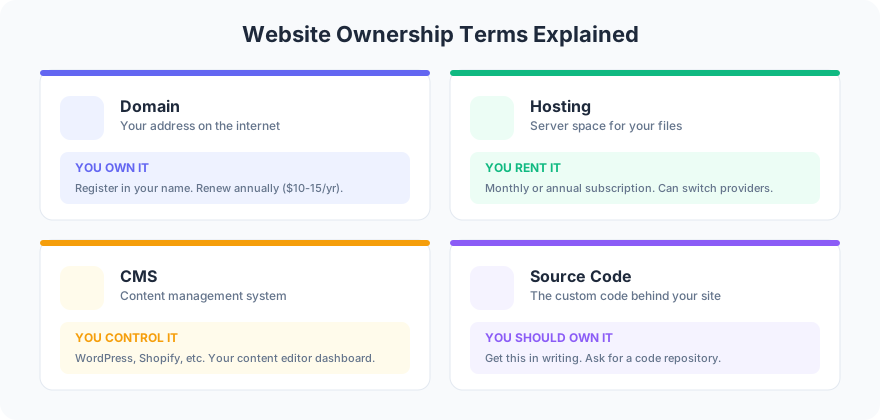
1. Domain Name: You Own It
Your domain name (like yourbusiness.com) is registered through a registrar like Namecheap, Google Domains, or GoDaddy. You pay an annual fee, typically $10-20 per year. The registrant on record is the legal owner.
What to demand: Your name and email on the registration. Your own account at the registrar. If your developer registered it under their account, have them transfer it to yours. This takes 5 minutes.
2. Hosting: You Rent It
Hosting is the server space where your website files live. You pay monthly or annually, ranging from $5/month for shared hosting to $50+ for managed hosting. You do not own the server. You rent space on it.
What to demand: Your own hosting account with your own login credentials. If your developer manages hosting, make sure you have admin access and the ability to transfer if you switch providers.
3. CMS Access: You Control It
Your content management system (WordPress, Squarespace, Shopify) is where you edit pages, add blog posts, and manage content. CMS admin access is separate from hosting access.
What to demand: An administrator-level account with your email address. Not an editor account, not a contributor account. Full admin access so you can add or remove users, install plugins, and export your data.
4. Source Code: You Should Own It
Source code includes custom themes, templates, plugins, and any code written specifically for your site. This is where ownership gets complicated. If your developer wrote custom code, who owns it depends on your contract.
What to demand: A clause in your contract stating that all custom code created for your project is “work for hire” and ownership transfers to you upon final payment. Without this clause, the developer may retain copyright.
Red Flags to Watch For
Your developer will not give you hosting login credentials. Your domain is registered under someone else’s email. You cannot export your content from the CMS. There is no contract, or the contract does not mention code ownership.
Frog Stone Media has helped business owners recover from all of these situations. The recovery is always more expensive and stressful than setting it up correctly from the start.
When you are evaluating what features your website needs, ownership and access should be the first items on your checklist. Features do not matter if you cannot control or move your own site.
The Ownership Checklist
Before signing any web development contract, confirm these four items in writing: domain registered in your name, hosting account in your name, CMS admin credentials delivered to you, and source code ownership transferred on final payment.
FAQ
What happens to my website if my developer disappears?
If you own all four pieces (domain, hosting, CMS access, source code), nothing happens. Your site keeps running and you hire someone else to maintain it. If your developer controlled any of those pieces under their account, you will need to go through recovery processes with each provider, which can take weeks.
Do I need to own the source code if I use WordPress or Squarespace?
WordPress itself is free and open source, so you always have the CMS. But custom themes, custom plugins, and any code written specifically for your site are separate works. You should own those. Squarespace and Shopify are different because you do not own the platform, but you should own any custom code or integrations built for your store.
Not sure who controls your website assets right now? Reach out for help auditing your ownership and locking down access.