Essential Website Features: What Your Business Site Actually Needs
Every business owner who starts a website project arrives with a feature wishlist. “I want a blog, e-commerce, live chat, multilingual support, personalization, and a customer portal.” By the time the project is scoped, that wishlist has doubled the budget and tripled the timeline.
The fix is prioritization. Not every feature delivers equal value. Some features (SSL, mobile design, analytics) are non-negotiable. Others (AR product views, AI chatbots, personalization engines) sound impressive but add complexity without proportional return.
Frog Stone Media has built sites with 5 features and sites with 50. The ones that perform best are not the ones with the most features. They are the ones where every feature earns its place.
Feature Tiers: Essential, Important, Advanced
Website features fall into three tiers. Start at the top and work down. Do not skip tiers.
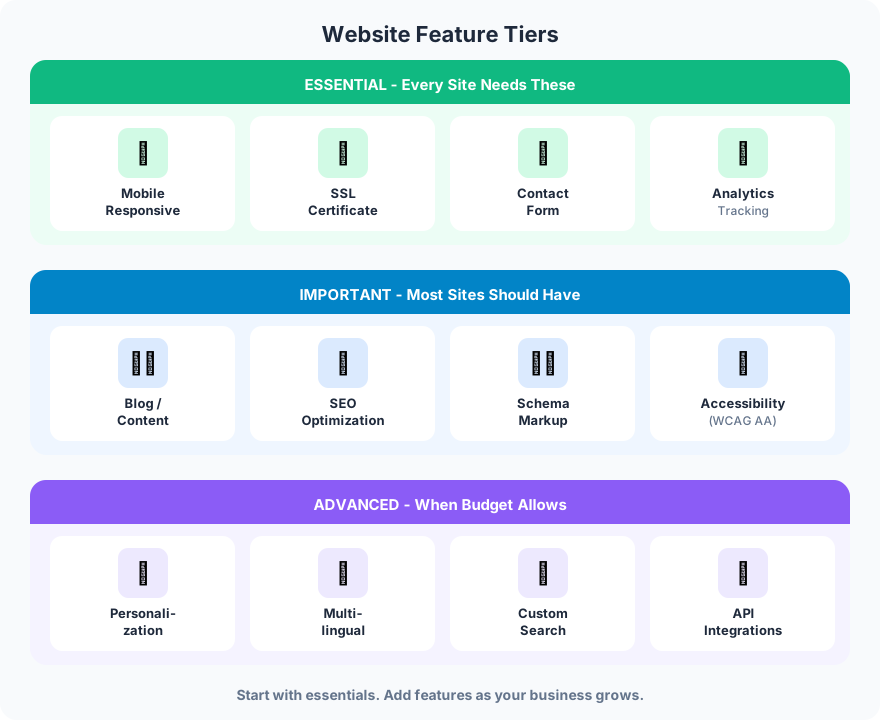
Essential Features (Every Site Needs These)
Mobile responsive design. Over 60% of web traffic is mobile. A site that breaks on phones is a site that loses the majority of its visitors. Responsive design is not a feature to add. It is the foundation everything else sits on.
SSL certificate. The padlock icon in the browser bar. Google penalizes sites without SSL in search rankings, and browsers show security warnings to visitors. SSL is free through Let’s Encrypt and takes 15 minutes to configure. There is no reason to launch without it.
Contact form. Your website exists to generate business. A working contact form with email notifications is the minimum viable conversion tool. Test it before launch and test it monthly after.
Analytics. GA4 is free and takes 30 minutes to install. Without analytics, you are running your business blind. You need to know which pages get traffic, where visitors come from, and what they do on your site. Every other optimization decision depends on this data.
Important Features (Most Sites Should Have)
Blog or content section. Content drives organic traffic. A service business without a blog is limited to direct and referral traffic. With a blog, you can target hundreds of keywords and bring in visitors who are actively searching for what you sell. See the guide on internal linking for how blog content supports your service pages.
SEO optimization. Title tags, meta descriptions, heading structure, image alt text, and XML sitemap. These are not optional if you want search traffic. Most CMS platforms handle the technical side. The content side requires research and intention.
Schema markup. Structured data tells search engines what your business is, where it is located, what services you offer, and what reviews you have received. Schema does not directly affect rankings but it improves how your site appears in search results, including rich snippets and knowledge panels.
Accessibility (WCAG AA). ADA compliance is both a legal requirement and a business advantage. Basic accessibility (alt text, keyboard navigation, heading structure, color contrast) benefits every visitor, not just those with disabilities. WCAG AA is the build standard on every project.
Advanced Features (When Budget Allows)
Personalization. Showing different content to different visitors based on behavior, location, or segment. Powerful for large sites with diverse audiences. Overkill for most small business sites. The complexity and maintenance cost rarely justify the marginal improvement in conversion rates.
Multilingual support. If your audience speaks multiple languages, this is not optional. If your audience is primarily English-speaking in a specific geography (like Sacramento), it adds cost without impact. Be honest about your actual audience before investing here.
Custom search. Useful once your site exceeds 50-100 pages. Below that threshold, good navigation handles discovery. Above it, a search bar with autocomplete and filtering saves visitors time.
API integrations. CRM connections, booking systems, payment processing, inventory management. Each integration adds value but also adds a maintenance obligation. Every API is a dependency that can break.
Prioritizing Features by Impact
Not all features cost the same, and not all features deliver the same business value. This matrix helps prioritize where to invest.
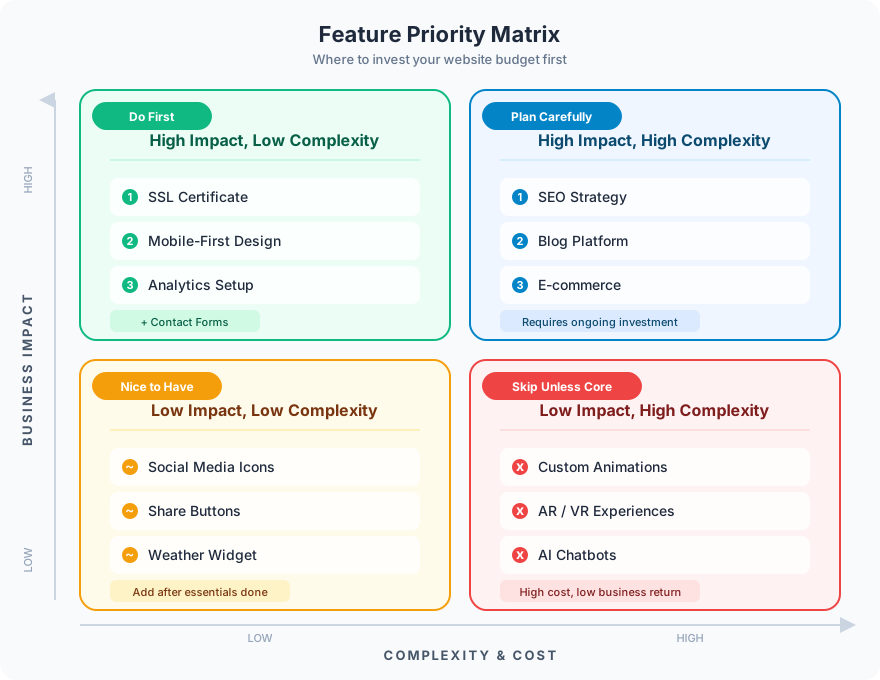
Do first: High impact, low complexity. SSL, mobile design, analytics, and contact forms. These features cost almost nothing relative to a project budget and have the highest ROI.
Plan carefully: High impact, high complexity. SEO strategy, blog platforms, and e-commerce. These features drive significant business value but require thoughtful implementation. Rushing them creates technical debt.
Nice to have: Low impact, low complexity. Social media icons, share buttons, weather widgets. They take 30 minutes to add but do not move the needle on leads or revenue.
Skip unless core: Low impact, high complexity. Custom animations, AR/VR experiences, AI chatbots for sites with low traffic. These features cost thousands to build and maintain but rarely improve conversion rates for most businesses.
The Pre-Launch Checklist
Before worrying about advanced features, make sure the fundamentals are in place.

Every site runs through this checklist before it goes live. Missing any of these items means the site is not ready, regardless of how many advanced features it has.
Performance and security: SSL installed, page load under 3 seconds, mobile responsive on all screen sizes, custom 404 error page, XML sitemap submitted to Google Search Console.
Content and conversion: Clear CTA on every page, contact form tested and confirmed working (including email delivery), Google Analytics connected and tracking, schema markup for your business type, accessibility basics (alt text on all images, proper heading hierarchy).
Features Clients Get Talked Out Of
Part of the job is saying no. These are the features most often recommended against:
Homepage sliders/carousels. Studies consistently show that only 1% of visitors click past the first slide. The remaining slides are invisible. A single strong hero image outperforms a carousel every time.
Auto-playing video. It increases bounce rate, consumes bandwidth, and annoys mobile users on data plans. If you have a video, let visitors choose to play it.
Pop-up chat widgets on low-traffic sites. If your site gets 200 visitors a month, nobody is going to use live chat. A contact form does the same job without the monthly software cost.
Social media feeds on the homepage. They slow your page load, push visitors off your site, and the content is not under your control. A bad tweet showing up on your homepage is a real risk.
FAQ
What features does every business website need?
At minimum: mobile responsive design, SSL certificate, a working contact form, and Google Analytics. These four features are non-negotiable regardless of industry, budget, or business size. Everything else is a priority decision based on your specific goals.
How do I decide which website features to add?
Start with features that have high business impact and low complexity (SSL, analytics, contact forms). Then invest in features that drive revenue (SEO, blog content, e-commerce). Only add complex features like personalization or custom integrations when you have the traffic volume to justify the investment.
How much do advanced website features cost?
Basic features (SSL, analytics, contact forms) are free or included in most hosting plans. Mid-tier features (blog platform, SEO optimization, schema markup) add design and build time to a project. Advanced features (personalization, multilingual, custom integrations) are each a project of their own and require ongoing maintenance budgets.
The best websites are not the ones with the most features. They are the ones where every feature serves a purpose. Start with the essentials, measure what works, and add features only when the data supports the investment.
Need help scoping the right features for your project? Get in touch about what your site actually needs.