FAQ Page Design: 5 Best Practices That Improve SEO and Conversions
A good FAQ page does three jobs. It answers real questions that your prospects are asking. It reduces the support burden on your team. And it gives you extra real estate in search results through FAQ schema.
Most FAQ pages fail because they answer questions nobody is asking, bury useful information in walls of text, or skip the schema markup that makes FAQs valuable for SEO.
FAQ sections go on every service page and blog post in a DevSac build. Here are the 5 practices that make them work.
1. Structure with Accordion Layout
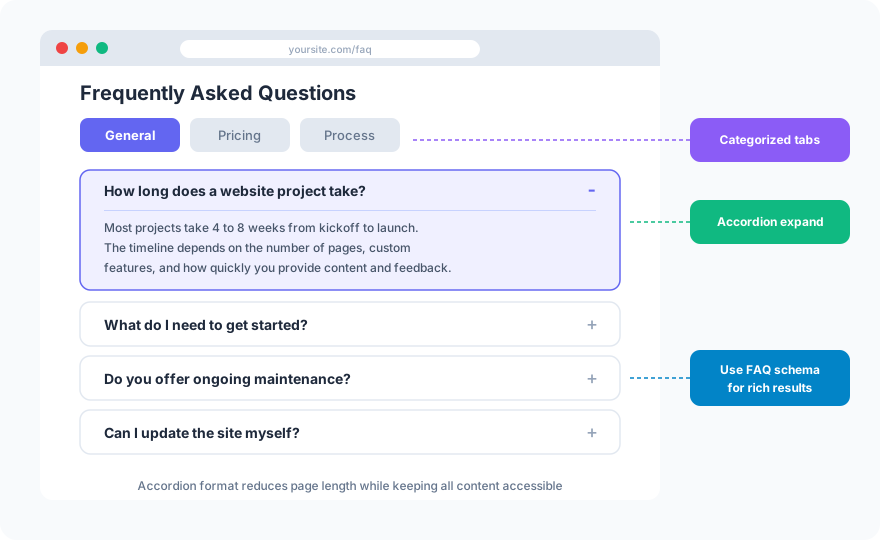
Accordion-style FAQs (click to expand) let visitors scan questions quickly without scrolling through answers they do not care about. Each question is a heading. Clicking it reveals the answer.
Organize questions into categories if you have more than 10. Tabs or section headers (General, Pricing, Process, Technical) help visitors find the right section fast.
Keep answers concise. 2-4 sentences per answer is ideal. If an answer requires 500+ words, it deserves its own blog post, not an FAQ entry.
2. Source Questions from Real Conversations
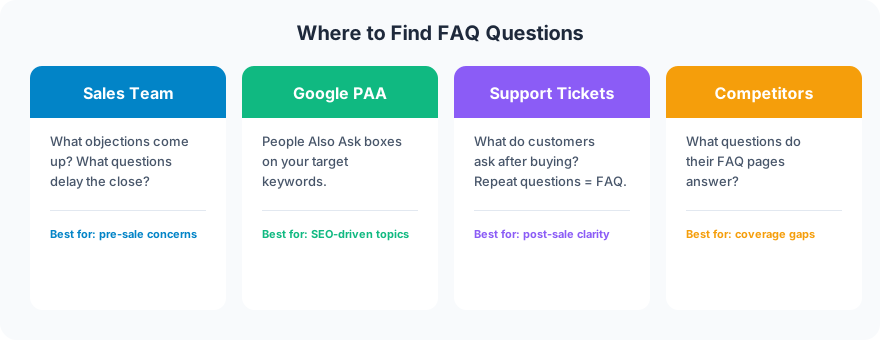
The best FAQ questions come from your actual customers and prospects, not from brainstorming sessions.
Ask your sales team. What questions come up on every call? What objections delay the close? These are the questions your FAQ should answer proactively.
Mine Google’s People Also Ask. Search for your target keywords and note the PAA questions. These are real questions real people are asking. Answering them gives you a chance to appear in the PAA box itself.
Review support tickets. What do customers ask after purchasing? These post-sale questions reduce support workload when answered on the site.
Check competitor FAQs. What questions do their pages answer? Cover those plus the ones they miss.
3. Add FAQ Schema for Rich Results
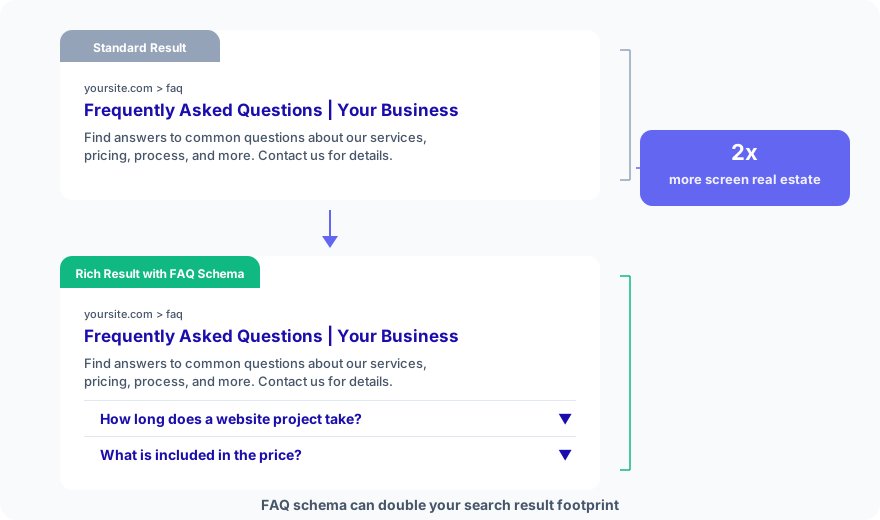
FAQ schema (FAQPage structured data) tells Google that your page contains questions and answers. When Google displays your FAQ schema, your search result expands with dropdown questions, taking up 2x more screen space than a standard result.
More screen space means higher click-through rates. FAQ schema is one of the easiest structured data implementations with one of the highest returns.
FAQ schema goes on every page that has a FAQ section, whether it is a dedicated FAQ page, a service page, or a blog post. The JSON-LD implementation takes 5 minutes per page.
4. Link FAQ Answers to Deeper Content
Do not let FAQ answers be dead ends. If someone asks “How much does a website cost?” your 2-sentence answer should link to your full cost guide. If they ask about your process, link to your website design requirements page.
Every FAQ answer is a mini internal linking opportunity. Use it.
5. Update FAQs Based on Data
Check Google Search Console to see which queries drive impressions to your FAQ pages. If a query gets impressions but low clicks, your answer might not match the question well. Rewrite the question to match the search query exactly.
Add new FAQs quarterly based on new sales conversations and support patterns. Remove FAQs that reference discontinued services or outdated information.
FAQ
Where should FAQ sections go on a website?
Put a FAQ section on every service page (3-5 questions specific to that service), on your main FAQ page (comprehensive, categorized), and at the end of relevant blog posts (2-3 questions matching People Also Ask queries). More FAQ placements mean more schema opportunities.
How many FAQ questions should a page have?
5-10 per service page, 20-50 on a dedicated FAQ page (organized by category), and 2-3 per blog post. Quality matters more than quantity. Every question should be one that real prospects actually ask.
FAQ pages are not an afterthought. They are a conversion tool, an SEO asset, and a support resource wrapped in one section. Build them from real questions, structure them for scanning, and add schema for search visibility.
Need FAQ sections added to your site? Get in touch about your FAQ sections.