Website Footer Design: 12 Elements That Earn Their Space
Your website footer is the safety net at the bottom of every page. When a visitor scrolls past your headline, past your services, past your testimonials, and reaches the footer, they are looking for something they did not find above. That makes the footer one of the most important design decisions on your entire site.
A Chartbeat study of 25 million website visits found that visitors scroll far more than most designers expect. No footer is “too far down.” People who reach it are highly engaged, just temporarily lost. Your job is to catch them.
Footer design is its own mini-project on every Frog Stone Media site. Here are the 12 elements that earn their space.
1. Secondary Navigation
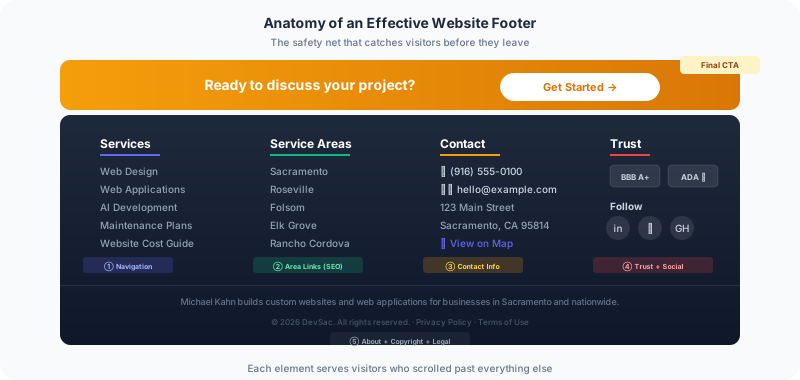
Your footer navigation should not duplicate your header menu. It should offer the paths that visitors are most likely to need after scrolling through an entire page without finding what they wanted.
Check your analytics for the most common site search queries. Those queries tell you what visitors cannot find. Add links to those destinations in your footer. On client sites, behavior flow reports also show where visitors try to go but drop off. Those dead-end paths become footer links.
A good footer navigation is organized by category with clear labels. Group your links into columns: Services, Resources, Company, Contact. Each column should have five to eight links maximum. More than that becomes a wall of text that helps nobody.
2. Full Contact Information
Your footer should include your phone number, email address, and physical address if you serve a local market. For local businesses, this is not optional. Google uses footer contact information as one of many signals for local search rankings.
Make the phone number tappable on mobile. Over 60% of local search happens on phones, and a visitor who has scrolled to your footer and sees your phone number is ready to call right now. Do not make them copy and paste it.
The DevSac footer includes full contact information because local businesses searching for a Sacramento web designer need to see that the business is actually here, not operating from a virtual office across the country.
3. Address with Map Link
Link your address to Google Maps or Apple Maps. On mobile, this turns into a one-tap directions button. On desktop, it opens the map so visitors can verify your location.
For businesses with local customers, this is also a trust signal. An actual address tells visitors and search engines that you are a real business in a real location. This is especially important in the web design industry, where many agencies are fully remote and prospects want to know if you are local.
4. Social Media Icons
Social icons belong in the footer, not the header. Putting social links in the header is an invitation for visitors to leave your site and go to a platform designed to keep them scrolling through other content. They are unlikely to come back.
In the footer, social icons serve a different purpose. Visitors who reach the bottom of your page and see social links are choosing to extend their relationship with your brand on another platform. That is a very different interaction than a header click that happens before the visitor has even read your content.

Keep the icons small and unobtrusive. Use only the platforms where you are actually active. Dead social profiles are worse than no social presence at all.
5. Trust Signals
Awards, certifications, association memberships, BBB ratings, security badges. These small logos leverage the halo effect: positive associations with known brands transfer to your brand.
Combine all your trust signals into a single row or grid. This “trust bar” goes on every Frog Stone Media site. The footer is ideal for trust signals because they provide reassurance at the exact moment a visitor is deciding whether to take action or leave.
6. Copyright and Legal Links
Every footer needs a copyright notice. It is a basic protection against content theft, and it signals that your site is current. Use a dynamic year so the copyright never goes stale. A footer showing “2022” in 2026 tells visitors the site is neglected.
Privacy policy and terms of use links belong here too. They are legally important for any site that collects data through forms, analytics, or cookies. Keep them as text links, not prominent buttons. Visitors who need them will find them.
7. A Brief About Statement
One to two sentences about your business, placed in the footer, accomplishes two things. It gives the visitor a final summary of who you are. And it gives you an opportunity to include your primary keyword in natural footer text that appears on every page.
Do not stuff keywords into your footer. Google has been penalizing keyword-stuffed footers since 2012. One natural mention of your core service and location is enough. “Michael Kahn builds custom websites and web applications for businesses in Sacramento and nationwide” covers both the human visitor and the search engine without feeling spammy.
8. Service Area Links
For local businesses, the footer is the best place to list the cities and regions you serve. Each city name can link to a dedicated area page, which strengthens your local SEO coverage and helps visitors from surrounding communities find your services.
On DevSac, the footer links to area pages for every city in the Sacramento metro area. A visitor from Roseville or Elk Grove can immediately see that DevSac serves their area and click through to a page that speaks to their specific market.
9. Email Signup
If you publish regular content, the footer is a reasonable place for a newsletter signup. About 24% of top marketing websites include a signup form in their footer.
The key is setting expectations. Tell the subscriber what they will receive, how often, and give some proof that it is worth subscribing. “Join 500+ Sacramento business owners who get monthly web design tips” is far more compelling than a lonely email field with a “Subscribe” button.
10. A Final Call to Action
Every page on your site should end with a clear next step. The footer CTA is your last chance to convert a visitor who scrolled through everything above without taking action.
Make it specific: “Get a Free Website Estimate” is stronger than “Contact Us.” Reduce the perceived commitment: “Schedule a 15-minute call” feels easier than “Request a Consultation.” Add it as a visually distinct block just above or within the footer so it stands out from the navigation links.
11. Dark Background for Visual Separation
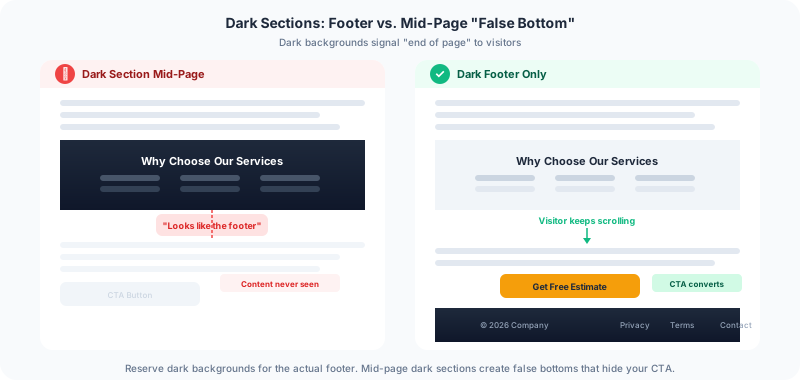
The convention of using a dark background for website footers exists for a reason. It tells visitors they have reached the bottom of the page. This is a functional signal, not just a design choice.
One caution: do not use dark background sections in the middle of your page content. Visitors may interpret a color switch as the footer and stop scrolling. Save the dark treatment for the actual footer to avoid creating “false bottoms” that hide content below.
12. What to Leave Out
Not everything belongs in a footer. Skip these:
Login links for internal tools. If employees need a login, they can bookmark the URL. Do not waste footer space on 0.1% of your visitors.
Social media widgets. Embedded Twitter feeds or Instagram grids in your footer add load time, visual clutter, and the risk of off-brand content appearing on every page.
Walls of legal text. Link to your privacy policy and terms. Do not paste the full text into the footer.
Too many links. If your footer has 50+ links, it is a sitemap, not a safety net. Prioritize the 15 to 20 most important destinations.
Your footer catches the visitors everyone else loses. If yours is an afterthought with just a copyright notice and a social icon row, you are leaving conversions on the table. Get in touch for an audit of your footer alongside the rest of your site.