How to Run a Website Content Audit That Actually Improves Your Site
Every website accumulates dead weight. Blog posts nobody reads. Service pages with outdated pricing. Landing pages from campaigns that ended two years ago. That dead weight hurts your SEO, confuses your visitors, and makes your site harder to manage.
A content audit fixes this. Every client site gets one before a redesign, and maintained sites get one quarterly. The process takes a few hours for a 50-page site, a full day for 200+ pages. The payoff is immediate: cleaner crawl budget, stronger internal linking, and better conversion rates on the pages that matter.
Here is the exact process.
What a Content Audit Actually Does
A content audit is a page-by-page evaluation of everything on your website. You pull traffic data, score each page against a set of criteria, and sort every page into one of three buckets: keep, kill, or clean up.
The goal is not to delete everything with low traffic. Some pages serve a business purpose even with minimal pageviews (your privacy policy, for example). The goal is to make intentional decisions about every page instead of letting content rot.
Two types of audits serve different purposes:
Quantitative audit: Export your analytics data, sort by pageviews and engagement. This gives you a performance snapshot. Fast, data-driven, great for identifying obvious winners and losers.
Qualitative audit: Score each page on accuracy, brand alignment, audience value, and business relevance. This takes longer but reveals strategic gaps. Essential before a redesign or messaging change.
Every project gets both. The quantitative data shows what is performing. The qualitative review shows what should be performing.
The 5-Step Content Audit Process

Step 1: Export 12 Months of Analytics Data
Open GA4, go to Reports, and pull page-level data for the past 12 months. You need four metrics for every page: pageviews, average engagement time, bounce rate, and conversions (if tracked).
Export to a spreadsheet. If your site has more than 500 pages, use the GA4 API or a tool like Screaming Frog to crawl the full URL list and merge it with your analytics data. The GA4 interface caps visible rows.
Step 2: Organize Pages by Content Type
Create separate tabs in your spreadsheet for each content type: services, blog posts, about/team, case studies, landing pages. Comparing a blog post’s traffic to a service page’s traffic is meaningless. Blog posts get organic discovery traffic. Service pages get navigation traffic. Different baselines, different expectations.
This step also makes delegation possible. If you have a team, assign each tab to the person who knows that content best.
Step 3: Score Each Page
For every page, evaluate these four metrics:
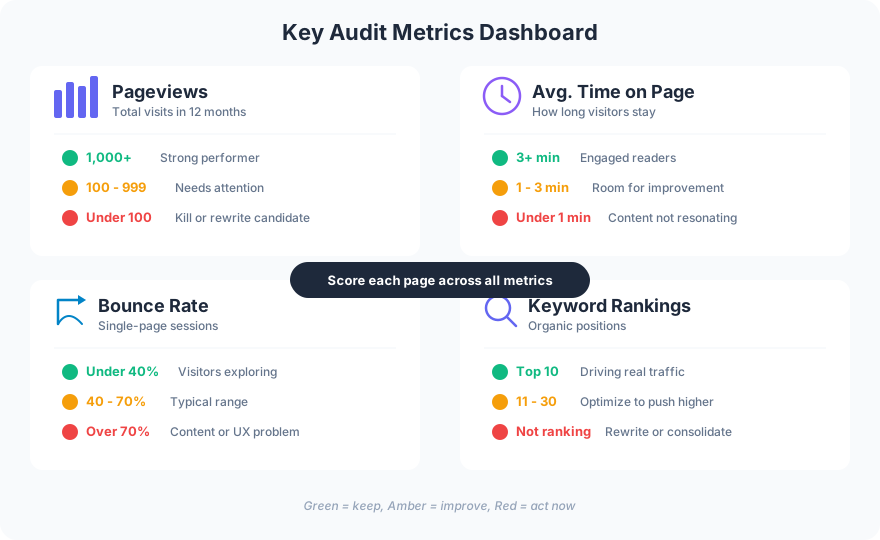
Color-code your spreadsheet as you go. Green for strong pages, amber for pages with potential, red for pages that are failing. By the time you finish, you have a visual map of your entire site’s health.
For qualitative scoring, add columns for: content accuracy (is it still true?), brand alignment (does it sound like you?), audience value (does it answer a real question?), and business relevance (does it support current offerings?). Rate each 1-5.
Step 4: Decide What to Keep, Kill, or Clean Up

This is where most audits stall. People are reluctant to kill content they spent time creating. Here is the rule: if a page has zero traffic for 12 months, does not rank for any keywords, and does not serve a legal or compliance purpose, it goes.
Before deleting anything, check keyword rankings. A page with 50 visits per year might rank position 15 for a valuable keyword. That page does not need deletion. It needs optimization. Rewrite the content, update the title tag, add internal links, and check again in 90 days.
For pages you kill, always set up 301 redirects to the most relevant remaining page. Never leave dead URLs returning 404 errors. That wastes the link equity those pages accumulated over time.
Step 5: Execute and Monitor
Build a task list from your audit spreadsheet. Prioritize by impact: pages with high traffic but poor engagement first (quick wins), then pages with good keywords but weak content (growth opportunities), then deletions and redirects (cleanup).
Set a calendar reminder to re-run the quantitative audit quarterly. Content degrades over time. Statistics go stale, links break, business offerings change. A quarterly check catches problems before they compound.
When to Run a Content Audit
Four situations demand an immediate audit:
-
Before a website redesign. You do not want to migrate bad content to a new site. Audit first, migrate only the good content.
-
After a business pivot. If your offerings changed, your content needs to match. Pages promoting discontinued services confuse visitors and waste crawl budget.
-
When traffic plateaus. If organic traffic has been flat for 6+ months, dead content might be dragging down your domain authority. Pages with little unique value are thin content that hurts your SEO, and pruning them concentrates your site’s authority on the pages that deserve it.
-
Annually as routine maintenance. Even healthy sites accumulate dead weight. A yearly audit is part of responsible website maintenance.
Common Content Audit Mistakes
Deleting pages without checking rankings. A page with low traffic might still rank for keywords. Deleting it throws away potential. Redirect or rewrite instead.
Auditing in isolation. Your content audit should inform your homepage structure, your navigation, and your internal linking. These systems are connected. A content audit that does not update your site architecture is half-finished.
Skipping the qualitative review. Numbers tell you what is happening. They do not tell you why. A page with high traffic and high bounce rate might have great SEO but terrible content. Only a qualitative review catches that.
Never following up. An audit without execution is a waste of time. The spreadsheet is not the deliverable. The improved website is the deliverable.
FAQ
What is a website content audit?
A website content audit is a systematic review of every page on your site, evaluating each page’s traffic performance, content quality, and business relevance. The output is a decision for every page: keep it as-is, update it, or remove it.
How often should I audit my website content?
Run a full audit annually and a quick quantitative check quarterly. If you are preparing for a redesign or have recently changed your business offerings, run one immediately regardless of your regular schedule.
What tools do I need for a content audit?
GA4 for traffic data, a spreadsheet for scoring, and a crawler like Screaming Frog to catch pages that analytics misses (pages with zero traffic will not appear in GA4 exports). A keyword ranking tool like SEMrush or Ahrefs helps you avoid deleting pages that still have SEO value.
A content audit is not glamorous work. It is the foundation that makes everything else on your site perform better. Clean up the dead weight, double down on what works, and your web design investment compounds instead of decays.
Need help auditing your site? Get in touch.