Internal Linking for SEO: How to Structure Links Across 100+ Page Sites
Internal links are the most underrated tool in SEO. They cost nothing. They take minutes to add. And they directly influence which of your pages rank and for what keywords. Across sites with 100+ pages and internal link architectures on multiple domains, most businesses leave this entirely to chance.
DevSac alone has 98 internal cross-links across 51 pages. Every service page links to supporting blog posts. Every blog post links back to relevant service pages. That is not busywork. It is the link architecture that tells Google which pages matter most and how they relate to each other.
Here is how internal linking works and how to build a strategy that scales.
How Internal Links Affect Rankings
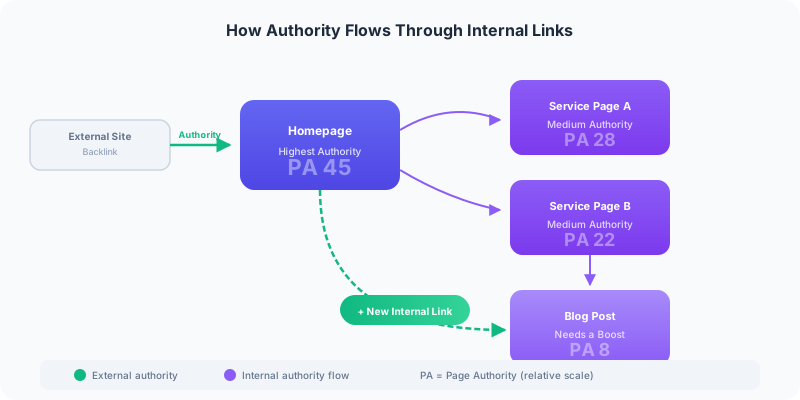
Authority flows through the internet through links. When an external website links to your homepage, that authority spreads to your other pages through your internal links. The pages you link to most frequently from your highest-authority pages get the biggest ranking boost.
Your homepage almost always has the most authority because it has the most backlinks. That makes every link from your homepage a vote of confidence that passes ranking potential to the destination page. A service page that gets linked from the homepage, the navigation, three blog posts, and two other service pages will outrank a service page that only appears in the navigation.
Internal links do not increase your domain authority. That only comes from external links. But they do distribute the authority you already have to the pages that need it most.
Three Types of Internal Links That Matter
1. Navigational Links (Sitewide)
Your navigation menu, footer links, and sidebar links appear on every page. These are the most powerful internal links because they point to the same destinations from every URL on your site.
Use these for your most important pages: core service pages, your contact page, and your main content hubs. On DevSac, the navigation links to web design, all service categories, and the contact page. The footer adds area pages for every Sacramento metro city. Every one of these navigational links passes authority from every page on the site.
2. Contextual Links (In-Content)
These are the links within your blog posts and page copy that point to other relevant pages. They are the most valuable type of internal link for SEO because they carry topical context. When a blog post about website design trends links to the web design service page using anchor text like “web design services,” Google understands the relationship between the content and the service.
Contextual links are where most websites fail. Blog posts get published without any internal links. Service pages describe what you do without linking to supporting content that proves you can do it. Every page should have at least two to three contextual internal links pointing to related pages on your site.
3. CTA Links (Conversion-Focused)
Call-to-action links at the end of blog posts and within service page content serve double duty. They guide visitors toward conversion, and they pass authority to your contact page and key service pages. Every blog post on DevSac ends with a link to the contact page. That is 46 internal links pointing to one conversion page.
How to Find Your Best Internal Linking Opportunities
Step 1: Identify Your Highest-Authority Pages
Open Google Search Console, go to Links, then External Links, then Top Linked Pages. Sort by linking domains. Your homepage will be first. Scan down for any interior pages with multiple linking domains.
These high-authority pages are your internal linking engines. Any link from these pages passes more authority than a link from a page with zero external backlinks.
Step 2: Find Pages That Need a Boost
In Search Console, go to Performance and sort by position. Look for pages ranking between positions 8 and 20. These are your low-hanging fruit. They are already ranking, which means Google considers them relevant, but they need a small push to reach the first page.
Now link from your high-authority pages to these almost-ranking pages. Use descriptive anchor text that includes the target keyword. If a page targets “website maintenance plans,” link to it with the text “website maintenance plans” rather than “click here” or “learn more.”
Step 3: Build Topic Clusters
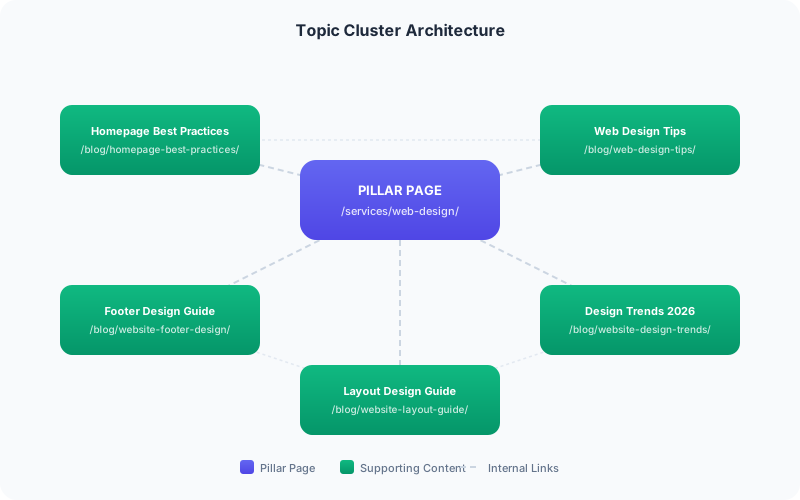
Group your content into topic clusters: one pillar page surrounded by supporting content. The pillar page covers the broad topic. The supporting pages cover specific subtopics. Every supporting page links to the pillar page and to related supporting pages.
On DevSac, the web design service page is the pillar. Blog posts about homepage best practices, web design tips, footer design, website layouts, and design trends are the supporting content. Each one links to the service page and cross-links to related posts. That cluster structure tells Google that DevSac has comprehensive coverage of web design as a topic.
10 Internal Linking Best Practices
-
Use descriptive anchor text. “Our web design services” is better than “click here.” The anchor text tells Google what the destination page is about.
-
Link from new content to old content. Every new blog post should include links to two or three existing relevant pages. This distributes fresh crawl activity to older content.
-
Link from old content to new content. When you publish a new service page, go back to existing blog posts on related topics and add links to the new page. This is the step most people skip.
-
Do not overlink. Two to three internal links per 500 words is a reasonable density. More than that starts to look manipulative and dilutes the authority passed through each link.
-
Prioritize contextual links over navigational links. A link within relevant content carries more topical weight than a link in a sidebar widget.
-
Fix orphan pages. Any page that has zero internal links pointing to it is invisible to Google’s crawl and is unlikely to rank. Run a site audit to find orphan pages and link to them from relevant content.
-
Do not use the same anchor text for different pages. If two different pages get linked with the same keyword phrase, Google has to guess which one to rank. Pick one target per keyword.
-
Link deep, not shallow. Link to specific service pages and blog posts rather than just your homepage or category pages. Deep links distribute authority where it is needed most.
-
Review your internal links quarterly. As you add content, the link architecture changes. A quarterly audit catches orphan pages, broken links, and missed opportunities.
-
Use keyword-rich anchor text naturally. The anchor text should read like a normal sentence. Forced keyword phrases that break the flow of your writing signal spam to readers and search engines.

The Compound Effect
Internal linking is not a one-time task. Every new piece of content creates new linking opportunities. When the homepage best practices guide went live, it was linked to the web design service page, the footer design post, and the web design tips article. Each of those pages now has one more internal link pointing to it, and the new page benefits from links pointing back.
Over time, this creates a compound effect. Sites with 50+ well-interlinked pages develop topical authority that is very difficult for competitors to replicate without the same content depth and link architecture.
If your site has content that is not ranking despite being well-written, the problem is often internal linking. Pages without incoming internal links are invisible to search engines. Request an audit of your link architecture to find the connections your site is missing.