What Thin Content Means for SEO (and How to Fix It)
Thin content is not a word count problem. A 200-word contact page is fine. A 2,000-word blog post that restates the same point five times is thin. Google’s definition, and the one that matters for SEO, is content that provides little or no unique value to the searcher. Across more than 100 business website audits, thin content is almost always present, usually invisible to the owner, and often responsible for ranking drops they can’t explain.
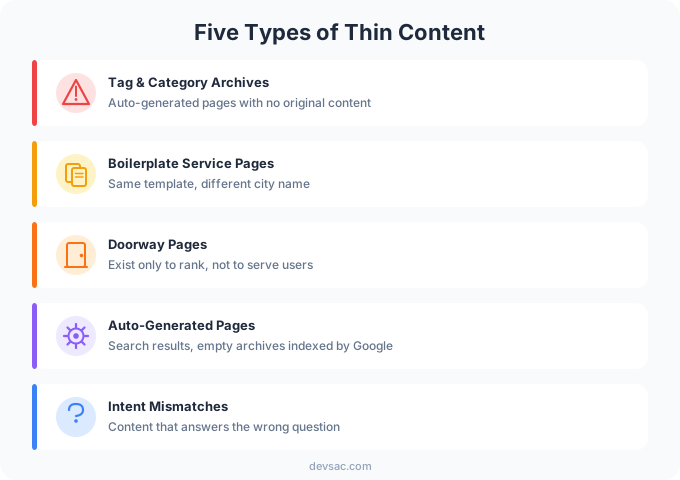
Five Types of Thin Content on Business Websites
Tag and category archive pages. WordPress creates these automatically for every tag and category you assign to a post. The archive page shows a list of post excerpts, no original writing, no unique value. Some WordPress sites have 200+ tag pages indexed by Google, each one cannibalizing the posts they’re supposed to organize. Most site owners don’t know these pages exist.
Boilerplate service pages. These are service or location pages built from a template where the only change is the city name or service type. “Plumbing Services in Sacramento” and “Plumbing Services in Roseville” with the same body copy, swapped city names, identical structure. Google recognizes the duplication immediately. These pages rarely rank and they split your crawl budget across pages that offer nothing distinct.
Doorway pages. A doorway page exists solely to rank for a keyword variation, with no intent to serve the user beyond getting them to click. They look like landing pages but they’re SEO traps. Some service-based sites carry 15 or 20 near-identical pages targeting slight variations of the same search query, each one weaker than a single authoritative page would have been.
Auto-generated pages. This category covers search results pages indexed by Google (site search showing up in crawl data), empty author archives from WordPress installs that only have one author, and pagination pages with little content. On one e-commerce site under review, Google had indexed 80+ internal search result pages. None of them ranked for anything useful. All of them pulled crawl budget away from the actual product pages.
Pages answering the wrong question. This is the most common and the hardest to catch. The content exists, it’s well-written, it covers a topic, but it doesn’t match what searchers actually want when they type that query. A page targeting “Sacramento web design cost” that talks about design philosophy instead of pricing is thin relative to the query. The content exists. The intent match doesn’t.

How to Find Thin Content on Your Site
Four tools for every audit:
Screaming Frog. Crawl your site and sort pages by word count. Anything under 300 words that isn’t a contact page, homepage, or intentionally short page is a candidate for review. Screaming Frog also surfaces duplicate title tags and meta descriptions, which are a reliable signal of boilerplate content.
GA4. Filter for pages with high impressions and low engagement rate. If a page is getting traffic but people are leaving immediately, either the content doesn’t match the query or it’s thin relative to what the searcher expected. Engagement rate below 30% on an informational page is a red flag.
Google Search Console. Look for pages with meaningful impressions but near-zero clicks. Low click-through rate at scale usually means either the title and description aren’t compelling, or the page ranks for queries that don’t actually match what’s on it. Both of those trace back to content quality.
Manual review of top 20 landing pages. Traffic data tells you what’s happening. Reading the pages tells you why. Pull your top 20 organic landing pages and read each one as if you’re the searcher who just clicked it. Ask whether you got what you came for. If the answer is no, the page is thin relative to the query even if it has 1,500 words. This matters for Core Web Vitals too, because engagement signals affect how Google scores your site over time.
For a structured approach to this process, the full content audit process covers how to score every page on your site and what to do with the results.
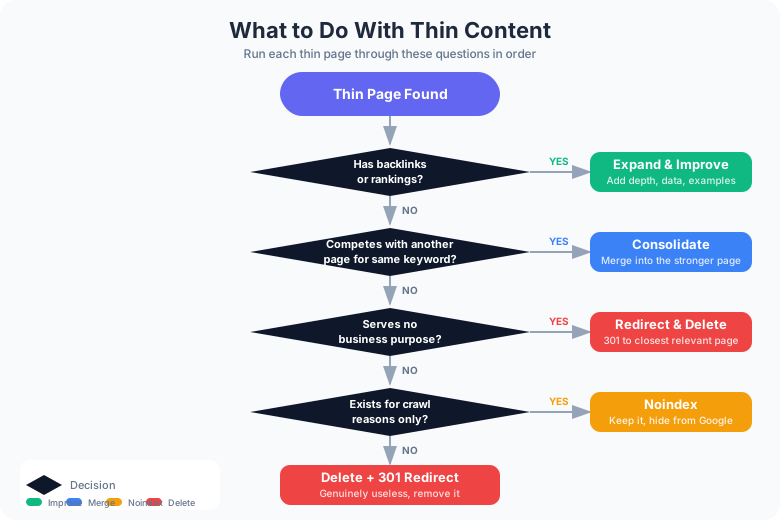
What to Do With Each Type
The fix depends on the situation. Here is how to decide:
| Situation | Action |
|---|---|
| Page has backlinks or rankings | Expand and improve |
| Two pages compete for same keyword | Consolidate into one |
| Page serves no business purpose | Redirect to relevant page, then delete |
| Page exists for crawl reasons only | Noindex |
| Page is genuinely useless | Delete and 301 redirect |
The consolidation case produces the biggest wins. A client had 40 location pages with identical copy except the city name. They were consolidated into 5 regional pages, each with unique local content: local project examples, regional notes, actual details that differ by area. Organic traffic to those pages increased. The pages that replaced them also ranked for more queries because they had depth the originals never had.
Tag archive pages almost always get noindexed. They’re useful for navigation, not for search. Adding noindex to your tag template in WordPress takes five minutes and stops Google from wasting crawl budget on empty archive pages.
Doorway pages get consolidated into one strong page. Split the ranking signals and unique content from each thin page into one authoritative page. You lose breadth and gain depth. Depth wins.
Auto-generated pages get noindexed or blocked in robots.txt. Search result pages should never be indexed. Empty author archives should be noindexed until there’s enough content to justify them.
Pages answering the wrong question need rewriting, not deletion. The URL has equity. The fix is aligning the content with actual search intent. That often means restructuring the page entirely rather than adding words to it.
Ongoing website maintenance should include a periodic check for new thin content, not just a one-time cleanup. WordPress sites accumulate new tag pages every time someone adds a post tag. E-commerce sites create new pagination and filter pages constantly. Thin content is not a problem you solve once.
If you suspect your site has thin content, a content audit identifies every page that needs attention. Get in touch to find out what to look at first.