Web Design Tips That Actually Work After 100+ Projects
Web design advice is everywhere. Most of it is generic. “Use whitespace.” “Make it mobile responsive.” “Add a call to action.” That is not wrong, but it is not useful either. Those tips skip over the specific decisions that determine whether a website converts visitors into customers.
After more than 100 website builds, a short list of design principles holds up on every project. These are not trends that change every year. They are research-backed fundamentals that work whether you are building a restaurant site or a SaaS platform.
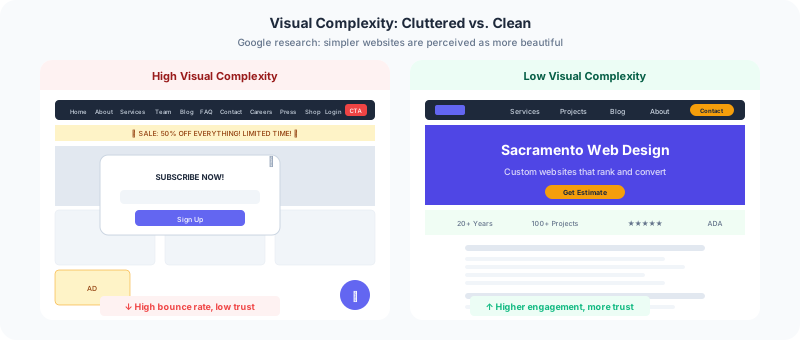
Keep Visual Complexity Low
A 2012 Google study on aesthetic judgment found that visually complex websites are perceived as less beautiful than simple ones. Not “minimalist” in the trendy sense, but genuinely simple: one or two focal points per scroll depth, clean spacing, and a consistent visual rhythm.
Every element on your page competes for attention. When a visitor lands on a page with a sidebar, a banner, a chatbot widget, a newsletter popup, and an auto-playing video, their brain has to process all of it before deciding what matters. That cognitive load drives people away.
The fix is straightforward. Show one thing at a time. Use a single-column layout where each section occupies the full width. Let each section have one job: introduce the business, show the work, present testimonials, or invite contact. Sites built through DevSac web design services follow this principle, and the scroll depth data consistently confirms that visitors engage deeper when there is less competing for their attention.
Use Standard Layouts
That same Google study found that “high prototypicality” correlates with perceived beauty. In plain language: websites that look like websites perform better than websites that try to reinvent navigation.
The standard layout has been consistent for over a decade: logo in the top left, horizontal navigation in the header, hero section below the nav, content flowing down in a single column, footer at the bottom. Users expect this structure. When you deviate from it, you are not being creative. You are making your visitors work harder.
Differentiate through your content, your voice, and your value proposition. Do not differentiate through unusual navigation patterns or non-standard page structures. A car with the steering wheel in the trunk is certainly unique, but nobody wants to drive it.
Write Descriptive Navigation Labels
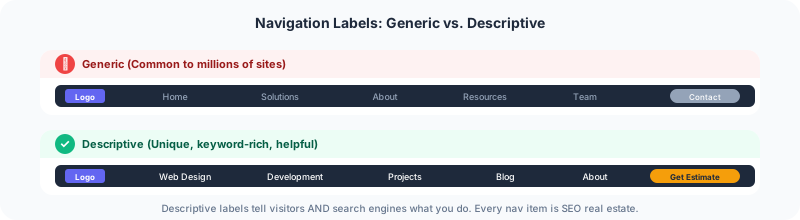
Navigation labels are some of the most visible text on your entire site. Visitors scan the menu within their first two seconds. Generic labels like “Solutions” or “What We Do” waste that attention.
Compare “Services” to “Web Design Services.” The first label tells Google nothing and tells your visitor nothing. The second label communicates exactly what you offer and includes a keyword that helps you rank. Every navigation item is an opportunity to describe your business.
Keep the navigation to five to seven items. For most businesses: what you do, who you are, proof of your work, helpful content, and how to get in touch. That covers every visitor intent without overwhelming them.
Use Real Photos, Not Stock
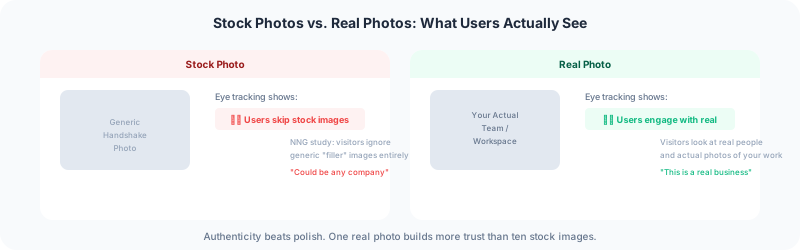
A Nielsen Norman Group study found that users literally ignore stock photos. Their eyes skip right over generic images of handshakes, conference rooms, and people staring at laptops. But when researchers used photos of real people, visitors actually looked at them.
The gap between stock and real is the gap between “this could be any company” and “this is a specific business with specific people.” One real photo of your actual workspace, your team, or your product in use builds more credibility than a $500 stock photo license.
For a solo practitioner, this means an actual photo and real projects on every page. For a team, it means real headshots with real names. Your people are your differentiator, and hiding them behind stock imagery is hiding your advantage.
Make Your CTA Contrast With Everything
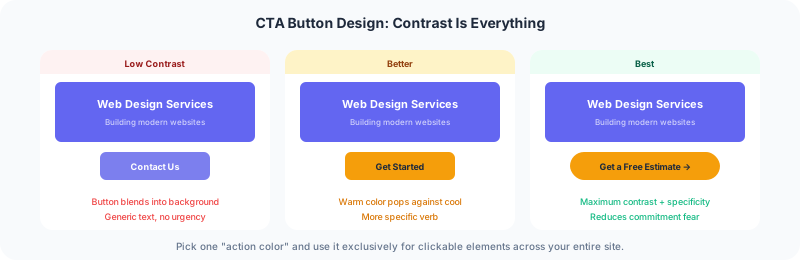
A button only works if visitors see it. The research on this is clear: CTA buttons need to contrast with the background, the surrounding text, and every other element nearby.
Pick one “action color” for your entire site. Use it exclusively for clickable elements: buttons, form submissions, important links. Never use this color for decorative elements. The Von Restorff Effect, demonstrated in the 1930s and confirmed in modern web studies, shows that items visually distinct from their surroundings are noticed and clicked at dramatically higher rates.
On DevSac, the action color is gold on dark green. That combination appears nowhere else except buttons and CTAs. The result is that every call to action is instantly identifiable without the visitor having to think about where to click.
Stop Hiding Content Behind Carousels
Image carousels and sliders remain popular because they solve an internal politics problem: every department gets space on the homepage. But the data is brutal. Click-through rates on the second slide are typically below 5%. By the third slide, engagement is near zero.
If a message is important enough to put on your homepage, it is important enough to be visible without clicking a tiny arrow. Stack your content vertically instead. Let visitors scroll through everything rather than clicking through a slideshow that hides 80% of your content.
The same principle applies to tabs and accordions. If content is hidden behind a click, most visitors will never see it. Scrolling is effortless. Clicking requires a decision. Make your visitors’ lives easier by keeping content visible.
Write Short Paragraphs With Simple Words
Long paragraphs get skimmed. Three-line paragraphs get read. This is not about dumbing down your content. Research from Nielsen Norman Group shows that writing at an 8th-grade reading level improves comprehension and task completion for all users, including PhDs.
Keep paragraphs to three or four lines maximum. Use common words instead of industry jargon. Break up long sections with descriptive subheadings that tell the scanner what each section covers.
Every vague subheading is a wasted opportunity. “Our Approach” could be “Custom Design and Development Process.” “What We Offer” could be “Web Design, SEO, and Ongoing Maintenance.” Specific subheads help visitors find what they need and help search engines understand your content.
Add Evidence Everywhere
Every marketing claim on your website should be supported by evidence. Not hidden on a testimonials page that gets 12 visits a month. Placed right next to the claim it supports.
If you say your process is thorough, add a client quote about how thorough it was directly below that section. If you say you deliver fast, show a stat about your average project timeline. If you say your sites perform well, link to a case study with real numbers.
Amazon dedicates 43% of product page space to reviews and evidence. That is not an accident. Social proof converts because humans are wired to follow what other people do. The more evidence you provide throughout your site, the more comfortable visitors feel about contacting you.
Answer Their Questions Before They Ask
The job of every page on your website is to answer the visitor’s questions. What do you do? How much does it cost? How long does it take? What makes you different from the alternative? What happens if it does not work out?
Every unanswered question increases the chance a visitor leaves. Joel Klettke demonstrated this at HubSpot: he interviewed customers, discovered their top questions and concerns, and rewrote the landing page to address every one of them. Conversion rates doubled.
Your homepage should answer the broadest questions. Your service pages should answer specific questions about each offering. Your blog should answer the questions your prospects type into Google. That is the entire content strategy in three sentences.
Beautiful design matters, but it is not what makes a website work. What makes a website work is helping visitors find what they came for. Every tip in this article serves that goal. If your site looks great but does not convert, the problem is almost always structural, not aesthetic. Get a review of your site and fix what is actually holding it back.