Multilingual Web Design: How to Build a Website in Multiple Languages
Building a website in one language is hard enough. Building one that works in multiple languages adds complexity to every decision: URL structure, content management, SEO, design, and cultural adaptation.
Frog Stone Media has built multilingual sites as part of its web design services for clients serving Spanish-speaking and English-speaking audiences in California. The technical implementation is straightforward when you plan it correctly. The mistakes happen when you skip the planning.
Three Approaches to Multilingual Websites

Translation Plugins (Cheapest, Lowest Quality)
Plugins like Google Translate or WPML auto-translate add a language switcher to your existing site. The content is translated automatically or through a plugin interface.
This works for simple brochure sites where approximate translation is acceptable. It does not work for sites where accuracy matters (legal, medical, financial) or where you need to rank in search engines for non-English keywords.
Subdirectories (Best for Most Businesses)
Structure your site as example.com/es/ for Spanish, example.com/fr/ for French. All languages live under one domain, sharing link equity and domain authority.
This is the default recommendation. One domain means one SEO campaign, one analytics property, and one set of backlinks benefiting all language versions. Google supports subdirectory targeting with hreflang tags.
Separate Domains (Enterprise Only)
Use country-code domains: example.de for Germany, example.co.jp for Japan. Each domain operates independently with its own content, SEO, and authority. The country domain strategy guide covers the tradeoffs of ccTLDs in detail.
This approach makes sense when you have fully separate business operations in each country with dedicated marketing teams. For most businesses, it splits your domain authority and doubles your workload without proportional benefit.
Implementation Checklist

Technical Requirements
Hreflang tags on every page. These HTML tags tell search engines which language and region each page targets. Without them, Google may serve the English version to Spanish-speaking searchers, or index the wrong language version entirely.
Language switcher in the header. Place it in a consistent, visible location. Use language names in their native script (Espanol, not Spanish) so visitors can identify their language regardless of which version they are currently viewing.
Translated URLs. /services/web-design/ should become /servicios/diseno-web/ in Spanish, not /es/services/web-design/. Translated URLs improve SEO in the target language and look more natural to native speakers.
Separate XML sitemaps per language. Submit each language’s sitemap to Google Search Console. This helps Google discover and index all language versions efficiently.
Content Requirements
Professional human translation. Machine translation catches the literal meaning but misses idioms, tone, and cultural context. “Get Started” translated literally into some languages sounds aggressive rather than inviting. Professional translators adapt the message, not just the words.
Localized images and examples. Photos of American office buildings do not resonate in Southeast Asian markets. Case studies from local businesses build more trust than foreign examples.
Culturally adapted CTAs. Direct calls to action (“Buy Now”) work in American English but can feel pushy in cultures that favor indirect communication. Adapt your CTA language to match cultural expectations.
Common Mistakes
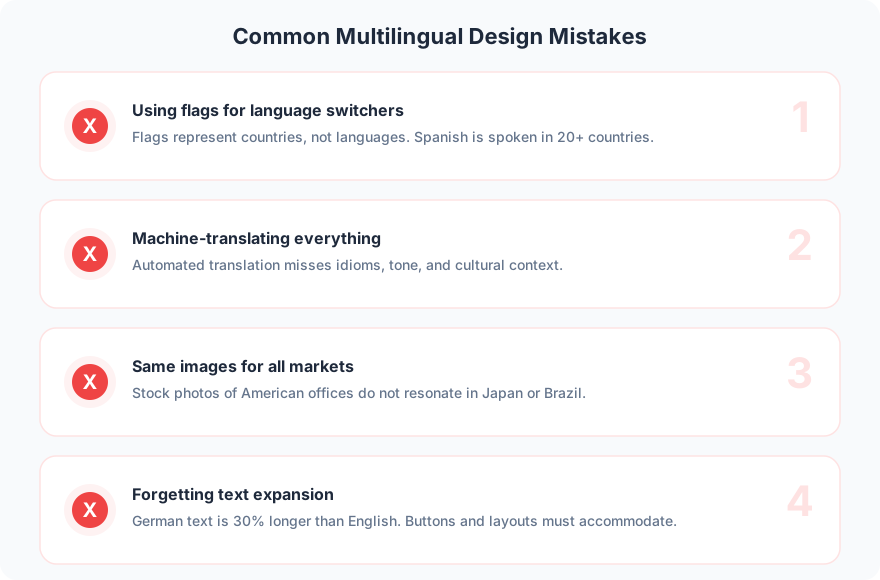
Using flags for language switchers. Flags represent countries, not languages. Spanish is spoken in 20+ countries. Which flag represents Spanish? A Mexican flag alienates Spanish visitors, and a Spanish flag alienates Mexican visitors. Use language names instead.
Machine-translating everything. Google Translate is good for understanding foreign text. It is not good for publishing professional content. Awkward translations damage trust and hurt SEO in the target language.
Same images for all markets. Visual preferences vary by culture. Colors have different associations. Gestures have different meanings. Localize your imagery alongside your text.
Forgetting text expansion. German text is typically 30% longer than English. Japanese text is often shorter. Button labels, navigation items, and form fields must accommodate these differences without breaking the layout.
FAQ
How much does a multilingual website cost?
Professional translation costs $0.10-0.30 per word. A 50-page website with 500 words per page (25,000 words) costs $2,500-7,500 per additional language for translation alone. Development of the multilingual infrastructure is a separate line item that scales with complexity. The website features guide breaks down how to scope features and budget realistically.
Should I translate my entire website or just key pages?
Start with your highest-value pages: homepage, top service pages, and contact page. Add blog content and secondary pages over time based on traffic data from your initial launch. Translating everything at once is expensive and much of it may not get traffic.
Do multilingual websites help with SEO?
Yes, if implemented correctly with hreflang tags, translated URLs, and unique content per language. You can rank for keywords in each language, effectively multiplying your organic search visibility across markets.
Multilingual web design is not just translation. It is adaptation: content, design, UX, and technical implementation all need to account for the target audience’s language and culture.
Building a website for multiple markets? Get in touch to plan your multilingual strategy.