Core Web Vitals: What They Are and How to Fix Them
Core Web Vitals are Google’s way of measuring how fast, responsive, and stable your website feels to real visitors. They became a ranking factor in 2021 and have only grown in importance since.
There are three metrics. Each one measures a different aspect of user experience. If any of them fail, Google considers your site to have a poor page experience, which affects your search rankings.
I optimize Core Web Vitals on every site I build through my web design process. Here is what each metric means, what scores to target, and how to fix the most common problems.
The Three Core Web Vitals
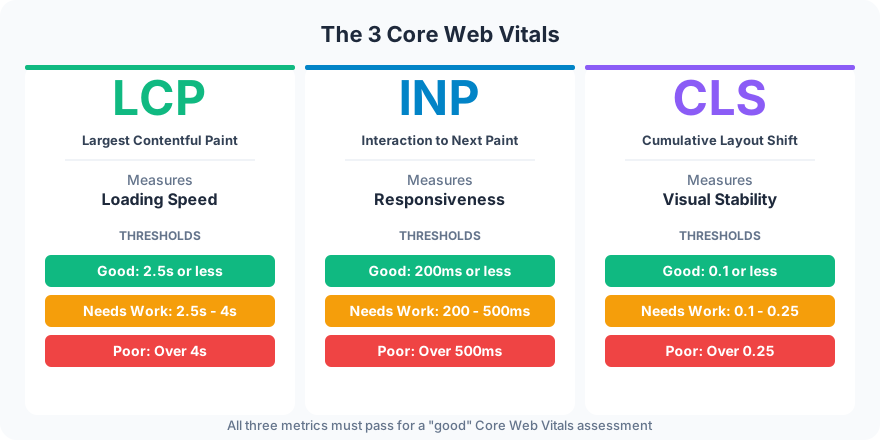
LCP (Largest Contentful Paint)
What it measures: How long it takes for the biggest visible element on the page (usually the hero image or headline) to finish loading.
Good score: 2.5 seconds or less. Between 2.5 and 4 seconds needs improvement. Over 4 seconds is poor.
LCP is the metric most people think of when they think of “page speed.” A slow LCP means visitors are staring at a blank or half-loaded page, which increases bounce rate.
INP (Interaction to Next Paint)
What it measures: How quickly your page responds when a visitor clicks, taps, or types. INP replaced FID (First Input Delay) in March 2024 because it measures responsiveness throughout the entire visit, not just the first interaction.
Good score: 200 milliseconds or less. Between 200 and 500ms needs improvement. Over 500ms is poor.
INP problems are caused by heavy JavaScript that blocks the main thread. If your site feels “sluggish” when clicking buttons or filling out forms, INP is the metric that captures it.
CLS (Cumulative Layout Shift)
What it measures: How much the page layout shifts while loading. When an image loads late and pushes text down, or an ad inserts above your content, that is layout shift.
Good score: 0.1 or less. Between 0.1 and 0.25 needs improvement. Over 0.25 is poor.
CLS is the most frustrating metric from a user perspective. You start reading a paragraph, the page jumps, and suddenly you are looking at something else. Or worse, you try to click a button and a layout shift moves it, making you click the wrong thing.
How to Fix Each Metric
Fixing LCP
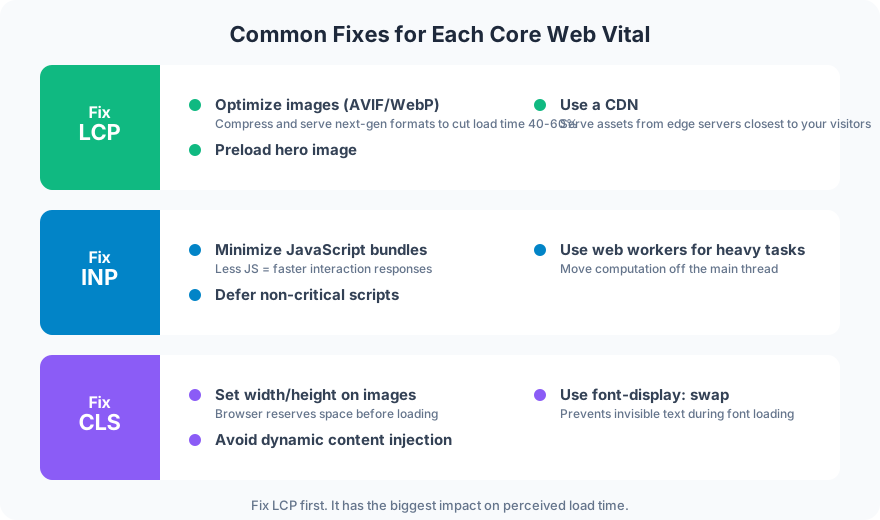
Optimize images. This is the #1 fix. Convert images to AVIF or WebP format, serve appropriately sized images (not a 4000px image in a 800px container), and add loading="lazy" to images below the fold. I use AVIF at quality 90 for every image on this site.
Preload the hero image. Add <link rel="preload"> for your largest above-the-fold image so the browser starts downloading it immediately instead of waiting for CSS to request it.
Use a CDN. Serving files from a data center near the visitor instead of from a single origin server cuts latency. Cloudflare’s free plan handles this for most sites. A CDN is one of several infrastructure decisions covered in my guide to building scalable websites.
Fixing INP
Minimize JavaScript bundles. Ship less JavaScript. Remove unused libraries, split code into smaller chunks, and defer scripts that are not needed immediately. Every kilobyte of JavaScript delays interactivity.
Defer non-critical scripts. Analytics, chat widgets, social media embeds, and tracking pixels do not need to load before the page is interactive. Add defer or async attributes to non-essential scripts.
Use web workers for heavy tasks. If your site runs complex calculations (filtering, sorting, data processing), move them to a web worker so they do not block the main thread.
Fixing CLS
Set width and height on images. This reserves space in the layout before the image loads, preventing the content below from jumping when the image appears. Every <img> tag should have explicit width and height attributes.
Avoid dynamic content injection. Banners, cookie notices, and email signup popups that insert themselves above existing content cause layout shifts. Place dynamic content in reserved spaces or use overlays instead.
Use font-display: swap. Custom fonts that load slowly can cause invisible text (FOIT) or layout shifts when they replace fallback fonts. font-display: swap shows the fallback font immediately and swaps in the custom font when ready.
Tools for Measuring Core Web Vitals

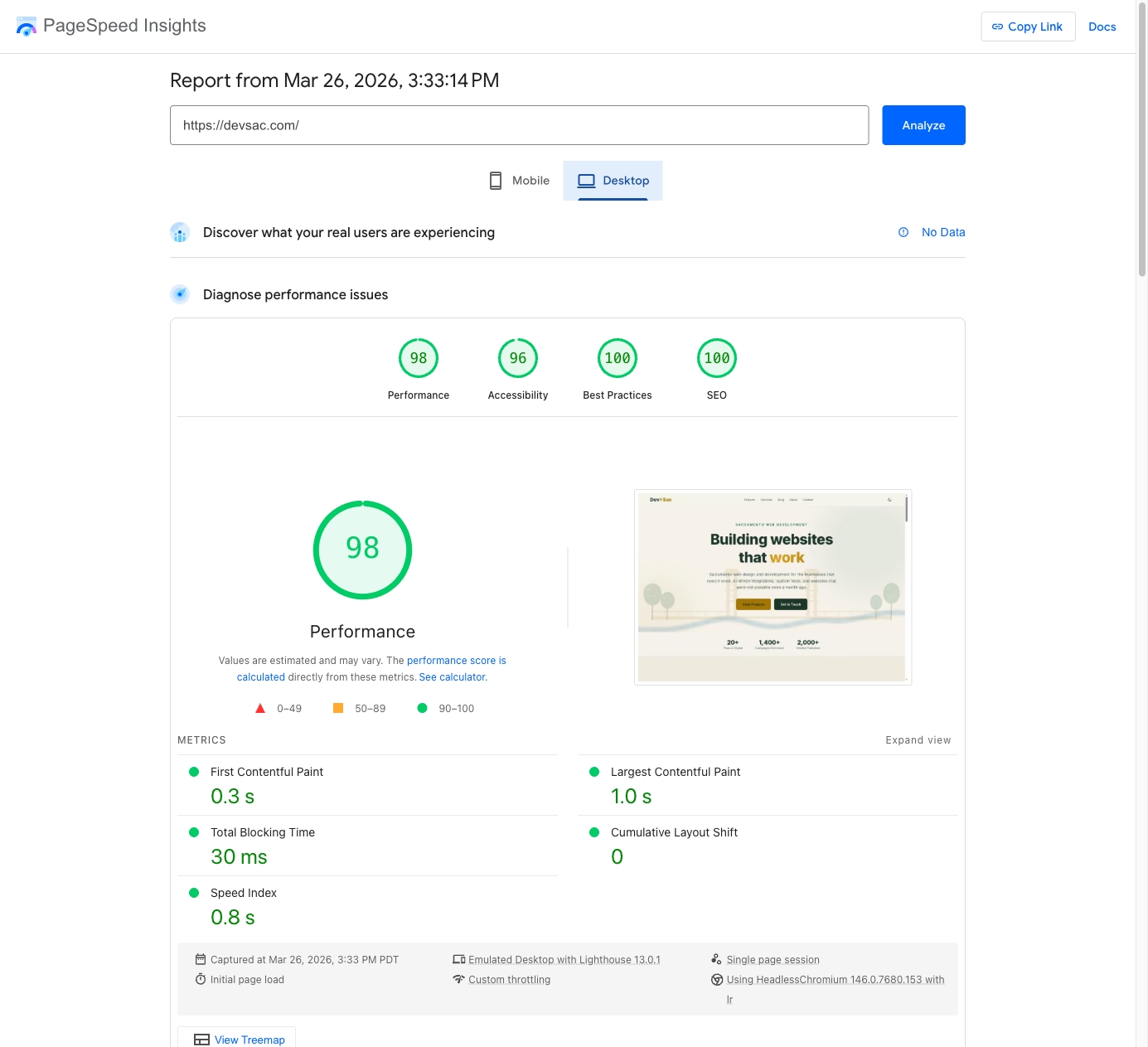
PageSpeed Insights provides both lab data (simulated test) and field data (real user measurements). Field data is more accurate because it reflects actual visitor experiences across different devices and connections.
Google Search Console shows Core Web Vitals performance across your entire site, grouping pages by status (good, needs improvement, poor). This is the best tool for identifying site-wide patterns.
Chrome DevTools lets you debug specific issues in real-time. The Performance tab shows exactly what is blocking your main thread and causing slow LCP or poor INP.
Web Vitals Extension adds a live overlay to any page showing real-time LCP, INP, and CLS scores. Install it in Chrome for quick spot-checks.
FAQ
Do Core Web Vitals affect SEO rankings?
Yes. Core Web Vitals are a confirmed Google ranking factor within the “page experience” signal. Sites with good Core Web Vitals have a ranking advantage over sites with poor scores, all else being equal. The impact is moderate but measurable.
How often should I check Core Web Vitals?
Monthly for active sites. Check Google Search Console’s Core Web Vitals report to spot regressions. Major causes of regression: new third-party scripts, unoptimized images added to CMS content, and plugin updates that add JavaScript. I include performance monitoring in my website launch checklist so regressions get caught early.
What is a good Core Web Vitals score?
All three metrics should be “Good”: LCP under 2.5 seconds, INP under 200ms, CLS under 0.1. Aim for these thresholds on at least 75% of page loads (the 75th percentile, which is what Google measures).
Core Web Vitals are not abstract technical metrics. They measure how your website feels to real visitors. Fast, responsive, and stable sites rank higher, convert better, and keep visitors engaged longer.
Need help optimizing your site’s performance? Let’s audit your Core Web Vitals.