How to Change Your Domain Name Without Destroying Your SEO
Changing your domain name is one of the riskiest things you can do to a website’s search rankings. Every URL changes. Every backlink points to an address that no longer exists. Google has to recrawl, reindex, and re-evaluate every page. Domain migrations for businesses ranging from local Sacramento companies to multi-location enterprises follow the same pattern every time: traffic drops, then recovers, but only if you execute the migration correctly.
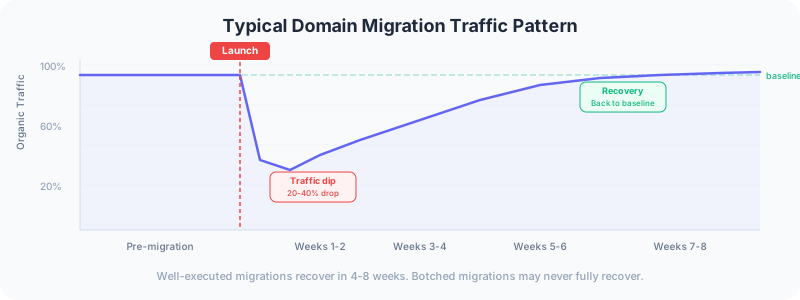
The short answer to “can I change my domain without affecting SEO?” is no. You will see a traffic dip. The goal is not to avoid the dip entirely but to minimize it and recover fully within four to eight weeks. Well-executed migrations have recovered in five weeks. Botched migrations have lost traffic for good because critical steps were skipped.
Here is the process to follow when a domain change is unavoidable.
Why Domain Changes Hurt Rankings
When you change your domain, every URL on your site changes. Google treats each URL as a separate entity with its own ranking signals. Your old domain has accumulated backlinks, crawl history, and trust signals over months or years. The new domain starts with none of that.
A 301 redirect tells Google that a page has permanently moved. Google will transfer most of the ranking signals from the old URL to the new one, but that transfer is not instant and not 100 percent. Industry estimates put the signal loss from a 301 redirect at roughly 10 to 15 percent, though Google has said this loss is minimal for well-configured redirects.
The real risk is not the redirect itself. The real risk is missing pages, broken redirect chains, and forgetting to update all the places that reference your old domain. Those mistakes compound and can turn a temporary dip into a permanent decline.
Before the Migration: Preparation
1. Audit Your Current SEO Performance
Before touching anything, document your baseline. You need numbers to compare against after the migration.
Pull from Google Search Console:
- Total clicks and impressions per week for the last 90 days
- Top 50 pages by organic traffic
- Top 100 keywords by clicks
- All pages with external backlinks (Links report)
Pull from Google Analytics:
- Organic sessions per week
- Top landing pages by organic traffic
- Conversion rates from organic traffic
- Revenue or lead volume from organic traffic
Export all of this to a spreadsheet. This is your baseline. After migration, you will compare weekly numbers against this data to track recovery.
2. Vet Your New Domain
Before committing to a new domain name, check its history. A domain with a spammy past can carry penalties that transfer to your site.
What to check:
- Wayback Machine: Look at what the domain was used for previously
- Google Search: Search
site:newdomain.comto see if Google has indexed anything - Backlink profile: Use Search Console or an SEO tool to check for toxic backlinks
- Domain authority: A clean domain with no history is better than one with bad history
Avoid hyphens, numbers, and double letters. They make domains harder to type and remember. If the domain has a keyword in it naturally, that is a minor SEO benefit, but do not force it.
3. Build Your Redirect Map
This is the most important technical document in the entire migration. Every URL on your old site needs a corresponding destination on the new site.
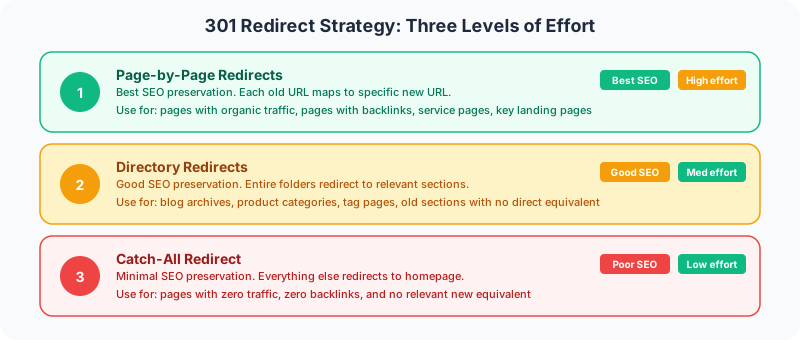
The redirect map is a spreadsheet with three columns: old URL, new URL, and priority level.
High priority (page-by-page redirects):
- Pages with organic traffic (top 50 from your audit)
- Pages with external backlinks
- Service pages and key landing pages
- Any page that ranks in the top 20 for a target keyword
Medium priority (directory redirects):
- Blog categories or tag pages
- Old product catalogs or archive pages
- Pages with minimal traffic but some backlinks
Low priority (catch-all redirect):
- Everything else redirects to the new homepage or the most relevant section
On a recent migration for a Sacramento professional services firm, the redirect map had 340 entries. The top 40 pages (by traffic and backlinks) got individual redirects. The blog archive got a directory redirect. Everything else caught the homepage redirect. Total traffic recovered to 95 percent of baseline within six weeks.
4. Preserve Keyword Relevance
If you are rewriting content during the rebrand, make sure the new pages maintain keyword relevance for the terms the old pages ranked for. Check Search Console for each high-traffic page to see which keywords drive clicks to it.
The new page should include:
- The primary keyword in the title tag and H1
- Secondary keywords in the body text
- Similar word count (do not dramatically reduce content length)
- Same topical focus (do not repurpose a “web design” page into a “marketing” page)
This connects to the approach to internal linking across sites. The link architecture that supported your old rankings needs to be rebuilt on the new domain.
During the Migration: Launch Day
5. Implement 301 Redirects
Every redirect must be a 301 (permanent), not a 302 (temporary). A 302 tells Google the move is temporary and not to transfer ranking signals. This is the most common mistake in domain migrations.
Implement redirects at the server level (.htaccess for Apache, nginx config for Nginx) rather than through JavaScript or meta refresh tags. Server-level redirects are the most reliable and pass the most link equity.
Test every high-priority redirect manually. Load the old URL and verify it lands on the correct new URL with a single redirect, not a chain of multiple redirects.
6. Update Google Search Console
- Add and verify the new domain in Search Console
- Use the “Change of Address” tool to notify Google of the migration
- Submit the new sitemap
- Keep the old domain’s Search Console property active for at least six months to monitor crawl errors
7. Update Internal Links
Every internal link on the new site should point to new domain URLs directly, not through redirects. Too many internal redirects slow down crawling and waste link equity.
Run a crawl of the new site with Screaming Frog or a similar tool and fix any internal links that still reference the old domain.
After the Migration: Recovery
8. Monitor Traffic Weekly
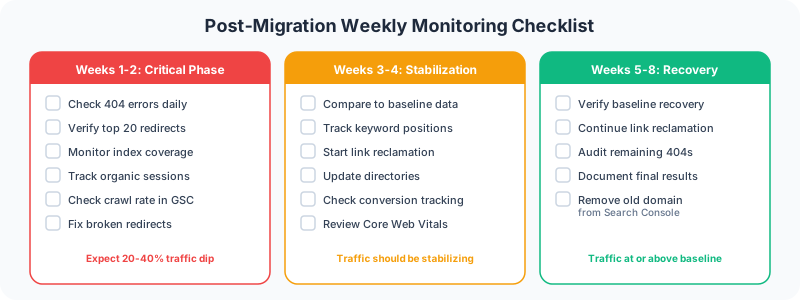
Check these metrics every week for the first eight weeks:
- Organic sessions compared to your baseline
- Index coverage in Search Console (are all pages being indexed?)
- Crawl errors (404s, redirect errors, server errors)
- Keyword positions for your top 20 target keywords
- Backlink counts (are links being attributed to the new domain?)
A healthy recovery looks like this: traffic drops 20 to 40 percent in week one, stabilizes in weeks two through four, and returns to baseline by week six through eight. If traffic has not started recovering by week four, something is wrong with the redirects.
9. Reclaim Your Backlinks
Some of your most valuable backlinks come from sites you have relationships with: industry directories, partner websites, guest post bios, media mentions. Reach out to these contacts and ask them to update the link to your new domain.
A direct link to your new domain is worth more than a link that passes through a redirect. Prioritize link reclamation for:
- Top referring domains (by authority or traffic)
- Industry directories and listings
- Google Business Profile
- Social media profiles
- Email signatures and marketing materials
10. Update Third-Party Tools
Every tool that references your old domain needs updating:
- Google Analytics (keep the same property, update the domain)
- Google Tag Manager (update triggers that reference the domain)
- Email marketing platform
- CRM system
- Advertising accounts (Google Ads, social media ads)
- Review platforms
- Business directories
Missing any of these creates data gaps that make it harder to measure your recovery.
When to Change Your Domain (and When Not To)
A domain change is worth the SEO risk when:
- Your business has rebranded and the old name no longer represents you
- Your domain has a penalty or toxic backlink history you cannot clean up
- You are merging two businesses onto a single domain
- Your current domain is genuinely confusing or hard to spell
A domain change is NOT worth the risk when:
- You just want a “better” or “shorter” domain name
- You are redesigning the site (you can redesign without changing domains)
- You want to add a keyword to your domain (the SEO benefit is negligible)
- Your current domain has strong authority and backlinks
Every domain migration should start with this question: is the business reason strong enough to justify four to eight weeks of reduced search traffic? If the answer is not clearly yes, keep the domain you have.
FAQ
How long does it take to recover SEO after a domain change?
With proper 301 redirects, keyword preservation, and link reclamation, most sites recover to 90-100 percent of baseline traffic within four to eight weeks. Complex sites with thousands of pages can take up to twelve weeks. Sites that skip critical steps (especially redirects) may never fully recover.
Do 301 redirects pass all SEO value?
No. Industry estimates suggest 301 redirects pass 85-95 percent of link equity. Google has stated that the loss is minimal for properly configured redirects, but some signal loss is inevitable. This is why link reclamation (getting sites to link directly to your new domain) matters.
Should I keep my old domain after migrating?
Yes. Keep the old domain registered and maintain the 301 redirects for at least two years. Backlinks from external sites will continue pointing to old URLs for years. If you let the old domain expire, those links become dead ends and you lose the link equity entirely.
Can I change my domain and redesign at the same time?
You can, but avoid it when possible. Changing the domain and the content simultaneously makes it harder to diagnose problems. If traffic drops, you cannot tell whether the issue is the redirect, the new content, or both. Ideally, migrate the domain first with the existing content, wait for traffic to recover, then redesign.
A domain migration is a calculated risk. Done correctly, you lose a few weeks of traffic and come back at full strength. Done poorly, you lose months or years of accumulated SEO value. The redirect map, Search Console configuration, and link reclamation are the three steps that separate a successful migration from a disaster. Spend the time to get them right.
Planning a rebrand or domain change? Get in touch to make sure your SEO survives the move.