How to Design a Button That Gets Clicked: 7 Tips
A button is the smallest design element with the biggest impact on your bottom line. Conversion rates have doubled on client sites after nothing more than a button redesign. No layout changes, no new copy, just a better button.
Here are seven tips that apply to every project.
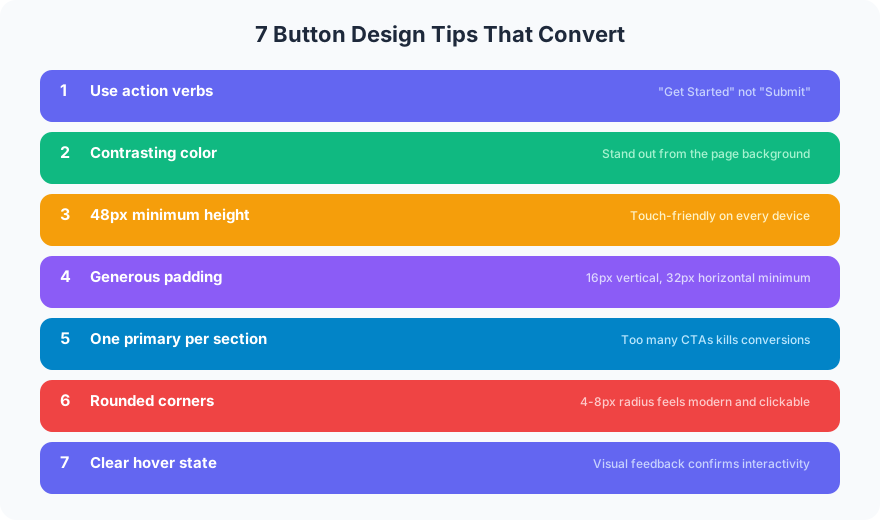
1. Use Action Verbs, Not Labels
“Submit” tells users nothing. “Get My Free Quote” tells them exactly what happens next. Every button should start with a verb: Get, Start, Download, Schedule, Send. Buttons with first-person action phrases (“Get My Report”) convert 90% better than generic labels according to Unbounce testing data.
2. Pick a Contrasting Color
Your button needs to pop against the page background. A simple test: squint at the page. If the button disappears, the contrast is too low. Orange buttons on white backgrounds outperform gray buttons every time. The button does not need to match your brand palette exactly. It needs to be visible.
3. Set a 48px Minimum Height
Google’s Material Design guidelines specify 48px as the minimum touch target. Treat that as a floor, not a ceiling. Most primary CTAs on client projects land between 48px and 56px tall. Anything smaller frustrates mobile users and tanks tap accuracy.
4. Add Generous Padding
A cramped button looks like an afterthought. Set horizontal padding to at least 24px on each side, often 32px or more. The text inside should breathe. Compare “Get Started” squeezed into a tight box versus the same text with 32px of horizontal padding. The padded version looks intentional and clickable.
5. One Primary CTA Per Section
When everything is a priority, nothing is. Each section of your page gets one primary button. Secondary actions (like “Learn More”) get a ghost or text-link treatment. One SaaS landing page had three equally styled buttons above the fold. Reducing it to one primary and two text links made click-through on the primary CTA jump 35%.
6. Round the Corners
Sharp 90-degree corners feel aggressive. A border-radius of 4px to 8px softens the button without making it look like a pill. 6px is a good default for most projects. CXL research found that rounded buttons draw the eye inward toward the label, while sharp corners push attention to the edges.
7. Build a Hover State
Static buttons feel dead. A hover state, whether it is a color shift, a subtle shadow, or a slight scale-up, confirms the element is interactive. Keep hover transitions under 200ms. Anything slower feels sluggish. A 150ms background-color transition is a solid default.
These seven principles work together. A well-designed button combines clear copy, visual contrast, proper sizing, breathing room, focused hierarchy, soft edges, and responsive feedback. For a deeper dive into writing the text that goes inside those buttons, read the guide to calls to action that convert.
FAQ
What is the best color for a CTA button?
There is no universal “best” color. The best color is the one with the highest contrast against your page background. Orange, green, and red all perform well in A/B tests, but only when they stand out from surrounding elements. Test your specific palette.
How big should a button be on mobile?
Google recommends a minimum touch target of 48x48 pixels. Aim for 48px to 56px in height with at least 24px of horizontal padding. This ensures comfortable tapping on phones without making the button dominate the layout.
Ready to redesign buttons that actually convert? Get in touch for an audit of your current CTAs with specific, data-backed recommendations.