Best Church Websites: 7 Designs That Get It Right
Most church websites fail at the one thing they need to do: help a first-time visitor decide to show up on Sunday. The homepage is cluttered with announcements for existing members. The service times are buried three clicks deep. The mobile experience is broken. And the visitor who Googled “churches near me” clicks back to the search results in under 10 seconds.
The best church websites treat the site as a digital front door. Here are seven that get it right, and what you can learn from each one.
What Great Church Websites Have in Common
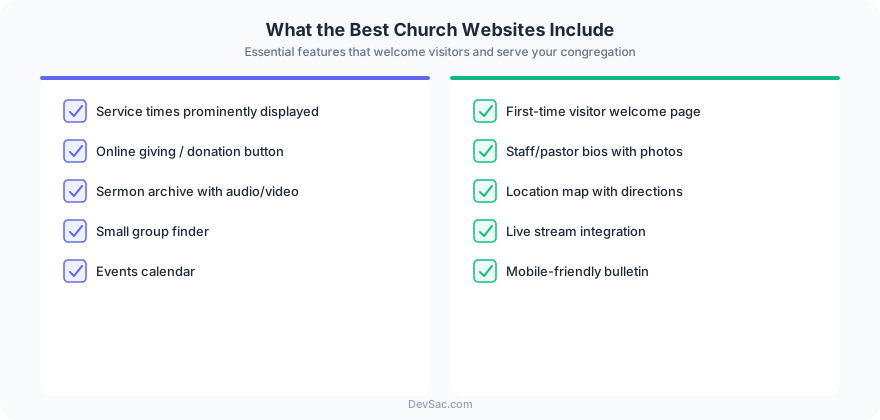
Before the examples, the pattern. After reviewing dozens of church websites, the ones that convert visitors share five traits:
-
Service times and location visible without scrolling. First-time visitors need this information immediately. Not behind a “Plan Your Visit” link. On the homepage, above the fold.
-
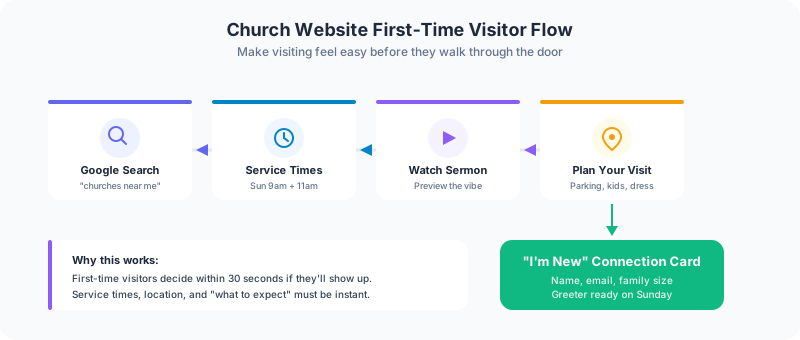
A clear “I’m New” path. A dedicated button or page that speaks directly to first-time visitors: what to expect, where to park, what to wear, where the kids go. Every question a nervous first-timer has, answered before they ask.
-
Mobile-first design. 68% of church website traffic comes from mobile devices. If your site was designed for desktop and scaled down, you are losing the majority of your visitors. The navigation, the giving button, the sermon player all need to work on a phone screen.
-
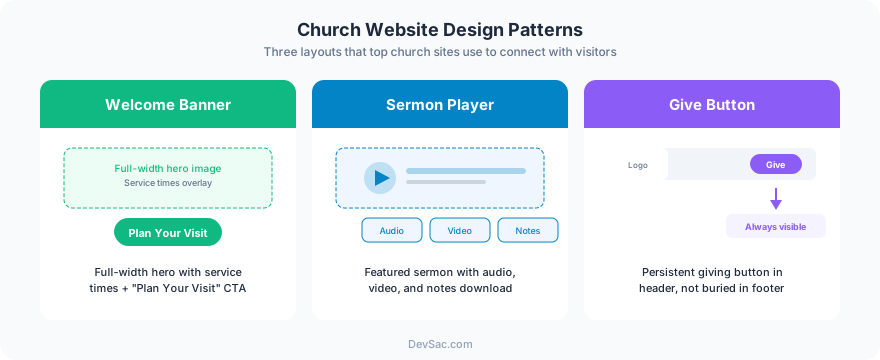
Online giving that works. Churches that moved giving online saw 32% higher average donations compared to cash-only giving. The give button should be in the main navigation, and the giving page should take fewer than 30 seconds to complete a transaction.
-
Sermon content that is findable. Most churches have years of sermon content that nobody can find. A searchable archive with series grouping, speaker filtering, and audio/video playback turns a one-time Sunday experience into ongoing engagement throughout the week.
1. Life.Church

Life.Church runs one of the most visited church websites in the world. The homepage opens with a fullscreen video background and a single call to action: find a location. Service times display instantly when you pick a campus. The “I’m New” page is a full experience guide with photos, video walkthroughs, and a step-by-step first visit timeline.
What to steal: The location finder pattern. If your church has multiple campuses or services, a location picker that immediately shows service times removes friction for new visitors.
2. Elevation Church
Elevation Church’s site prioritizes content consumption. The sermon archive is front and center with series artwork, episode numbers, and both video and audio options. The design is media-company quality, not “church template” quality. Navigation is minimal: Watch, Locations, Give, Connect. Four actions, no clutter.
What to steal: Treating sermon content like a media library. Series artwork, consistent formatting, and easy filtering make people actually browse and watch instead of ignoring a wall of text links.
3. Church of the Highlands
Highlands demonstrates how a large multi-campus church can still feel personal online. Each campus has its own page with local leadership, specific service times, and campus-specific events. The “Next Steps” pathway is clearly mapped: attend, connect, serve, give. Each step links to a specific action.
What to steal: The step pathway. Giving visitors a clear sequence of actions (visit, join a group, volunteer, give) turns passive visitors into active members. Most church websites present all options equally, which is the same as presenting none.
4. Crossroads Church
Crossroads takes a content-first approach. The homepage reads more like a magazine than a church bulletin. Featured articles, video content, and upcoming events create a reason to visit the site outside of Sunday. The design is clean, modern, and photo-heavy without feeling stock-photo generic.
What to steal: Content that gives people a reason to come back during the week. A church website that only matters on Saturday night when people are checking service times is missing the engagement opportunity.
5. North Point Community Church
North Point’s site is built around Andy Stanley’s content brand. The sermon archive is deeply organized with multiple series, standalone messages, and topic-based collections. What stands out is the integration between the website and their app. QR codes on the site drive app installs, and the app drives people back to web content. The two channels reinforce each other.
What to steal: The web-to-app bridge. If your church has a mobile app, the website should actively drive installs. If you do not have an app, the website needs to do everything an app would, including push notification opt-ins for event reminders and new content alerts.
6. Saddleback Church
Saddleback’s site handles the challenge of translating Rick Warren’s global brand into a local church experience. The multi-language support (English, Spanish, Mandarin, Korean) is not an afterthought. Each language gets a fully localized experience, not just machine-translated text. The small group finder is a standout feature: search by topic, day, location, and age group to find a group that fits.
What to steal: The group finder. Small groups are where retention happens. Making it easy for someone to find and join a group directly from the website, without emailing the church office, removes a barrier that stops most visitors from connecting.
7. Transformation Church
Transformation Church’s website matches their brand energy. Bold typography, vibrant colors, high-quality photography, and video that plays immediately. The giving experience is seamless: a dedicated giving page with one-time and recurring options, plus a text-to-give number. The design feels current and intentional, not templated.
What to steal: Brand consistency between the in-person and online experience. If your church is warm and energetic on Sunday morning but your website looks like it was built in 2015, there is a disconnect that visitors notice.
Common Mistakes to Avoid
The bulletin board homepage. Announcements, event lists, and ministry updates targeted at existing members. First-time visitors do not care about the potluck signup. Lead with what newcomers need.
Background music or auto-playing video with sound. Nothing makes someone close a tab faster than unexpected audio. Use video backgrounds on mute or static hero images.
Outdated event information. If your homepage still promotes the Easter service from last year, visitors assume the site (and possibly the church) is inactive. Use dynamic event feeds or keep the homepage evergreen.
No mobile giving. If the giving page requires zooming, pinching, or switching to landscape mode, you are leaving donations on the table. Mobile giving should be three taps: amount, payment method, confirm.
Building a Church Website That Works
The churches above have large teams and big budgets. But the principles apply to a 200-person congregation just as much as a megachurch. Clear navigation, mobile-first design, visible service information, online giving, and a path for new visitors. These are not expensive features. They are design decisions.
If your church needs a website that turns visitors into members, church websites from Frog Stone Media prioritize the visitor experience, online giving integration, and sermon content that people actually find and watch. Get in touch to talk about your church’s digital front door.



