When Should You Rebuild Your Website?
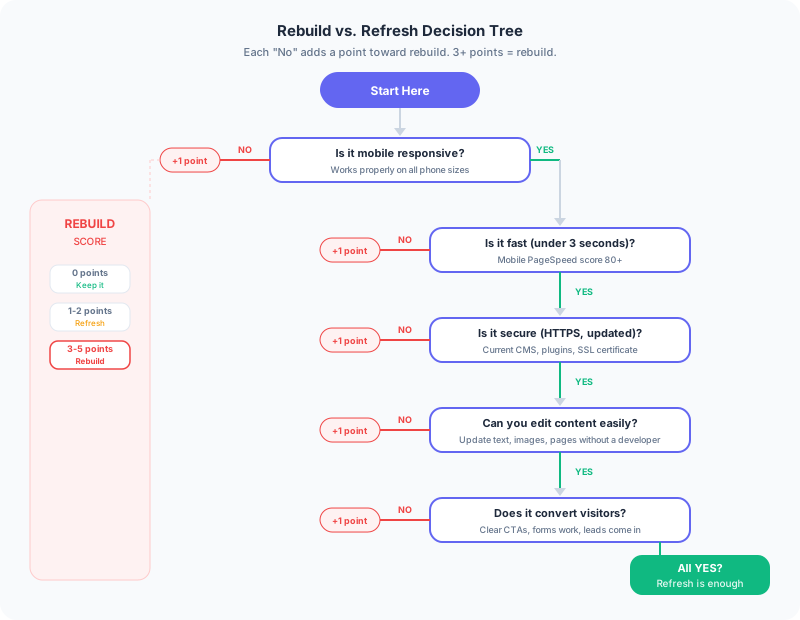
You should rebuild your website when the underlying platform is outdated, insecure, or too slow to fix with optimization alone. Not every website problem requires a full rebuild. Sometimes a redesign, a speed optimization, or a content refresh is enough. But when the foundation is so outdated that fixing individual problems costs more than starting over, a rebuild is the better investment. Here is how to tell the difference.
What Are the Signs You Need a Full Website Rebuild?
Your site is not mobile-responsive. If your website does not work properly on phones, you need a rebuild. As of 2025, over 60% of all web traffic comes from mobile devices, and Google uses mobile-first indexing, meaning it primarily evaluates the mobile version of your site for rankings. Retrofitting responsiveness onto a site designed for desktops is harder than building new.
Your site loads in more than 4 seconds. Slow sites lose visitors and rank lower. If the slowness is caused by your platform (an old WordPress theme with heavy plugins, a page builder with bloated code), optimization will not save you. A modern static site built with tools like Astro or Next.js will be faster by default.
Your CMS is a security risk. Old WordPress installations with outdated plugins are the most common target for website attacks. If your site is running PHP 7, has plugins that have not been updated in years, or has been hacked before, it is time to rebuild on a more secure foundation.
The design looks like it is from 2015. Web design trends change, and visitors notice. Thin fonts, stock photo hero images, hamburger menus on desktop, and tiny body text all signal an outdated site. Some Sacramento business sites still run on WordPress themes from 2014 with sliders that take 8 seconds to load. Your website is often the first impression your business makes. An outdated design tells visitors that your business is outdated too.
You cannot make basic changes. If updating your phone number requires a developer, or adding a blog post breaks the layout, or your contact form stopped working and nobody knows why, the site has become too fragile to maintain. A rebuild gives you a fresh, maintainable foundation.
When Is a Website Refresh Enough Instead of a Rebuild?
The design is fine but the content is stale. If your site looks modern and works well but the blog has not been updated in two years and the services page mentions offerings you no longer provide, you need a content refresh, not a new site.
Speed is slow but fixable. Sometimes compressing images, removing unused plugins, and enabling caching can cut load times in half. If the underlying architecture is sound, optimization is cheaper than a rebuild.
You need to add a few new pages. Adding a blog, a testimonials page, or a new service page usually does not require a full rebuild. A good developer can extend an existing site.
SEO is underperforming. Poor search rankings are usually a content and technical SEO problem, not a design problem. Fixing title tags, meta descriptions, heading structure, and site speed often improves rankings without touching the design. Start with the fundamentals in the Sacramento local SEO guide before assuming you need a full rebuild.
The Cost of Waiting
Websites do not stay still. They either improve or decay. An old, slow, insecure site costs you in ways that are hard to measure: visitors who leave before the page loads, customers who go to a competitor with a better online presence, and search rankings that drop as Google rewards faster, more modern sites.
Some Sacramento business owners have spent years patching an old site when a rebuild would have paid for itself in the first six months through better conversions and search visibility. The sunk cost of the old site makes people reluctant to start over, but maintaining a bad foundation is more expensive over time. If you are weighing the investment, the Sacramento website pricing guide covers what a rebuild actually costs in this market.
How Do You Decide Between a Rebuild and a Refresh?
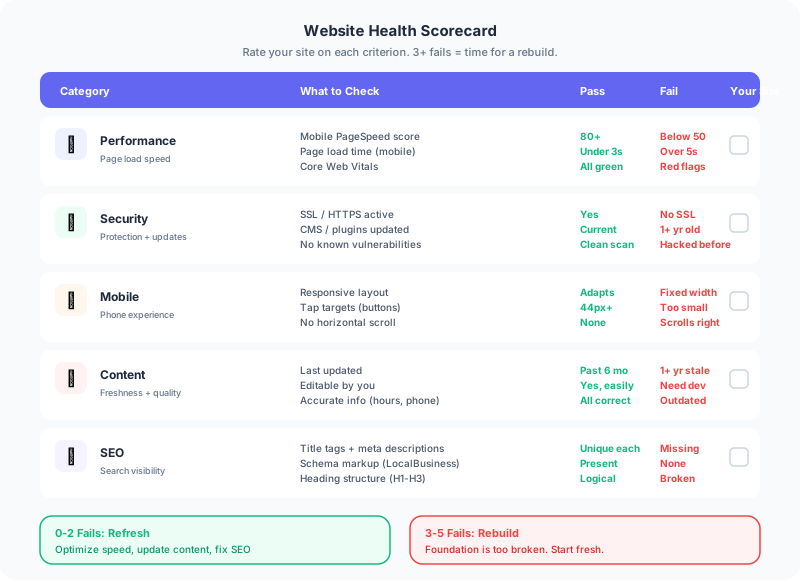
Run your site through Google PageSpeed Insights (pagespeed.web.dev) and check your mobile score. Look at your analytics for bounce rate and time on site. Compare your site to your top three competitors on a phone. If your site is noticeably slower, harder to use, or less professional than the competition, a rebuild is worth the investment.
If your site scores above 80 on mobile PageSpeed, works well on phones, and looks professional, you need content and SEO work, not a rebuild.
What a Modern Rebuild Looks Like
A rebuild in 2026 should produce a site that loads in under 2 seconds on mobile, scores 90+ on PageSpeed Insights, works perfectly on every screen size, has proper SEO fundamentals built in, and is easy to maintain.
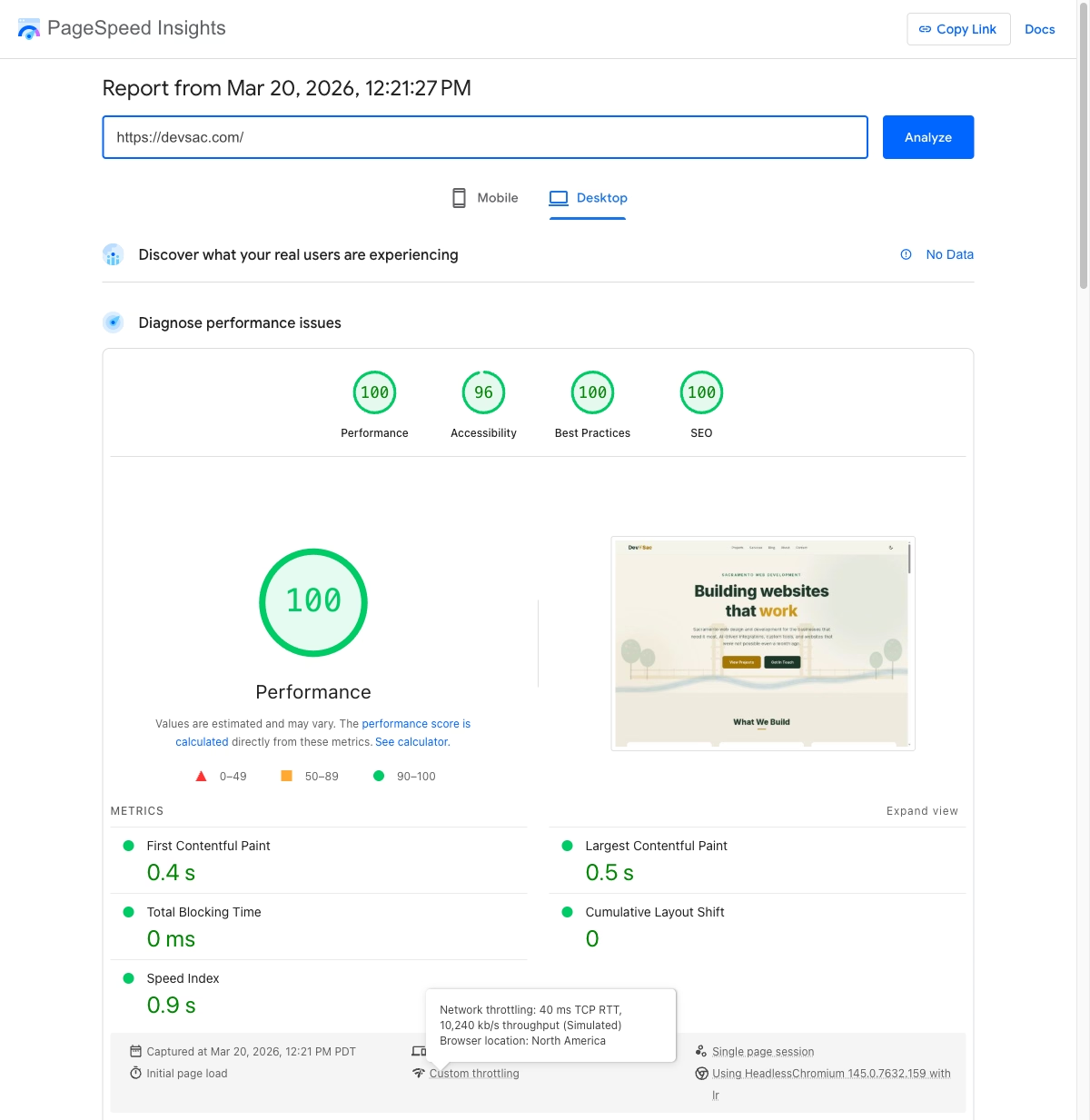
Most rebuilds through DevSac web design services use Astro because it generates static HTML that is inherently fast, secure, and lightweight. No database to get hacked, no plugins to update, no PHP to patch. The projects page shows examples of sites built this way, including Van Briggle Pottery’s e-commerce catalog and the SacGroceries price comparison app.
 The pricing guide covers what a rebuild costs in the Sacramento market.
Ready to evaluate whether your site needs a rebuild? The contact page is the best place to start.