Why Website Maintenance Is Not Optional
Your website is not a billboard. It is software running on a server, and software that does not get maintained breaks. Not “might break eventually.” Breaks. The only question is whether you notice before your customers do.
Frog Stone Media manages websites for clients and runs its own portfolio of sites and web applications. Here is what website maintenance actually involves, what happens when you skip it, and what it should cost.
What Happens When You Skip Maintenance
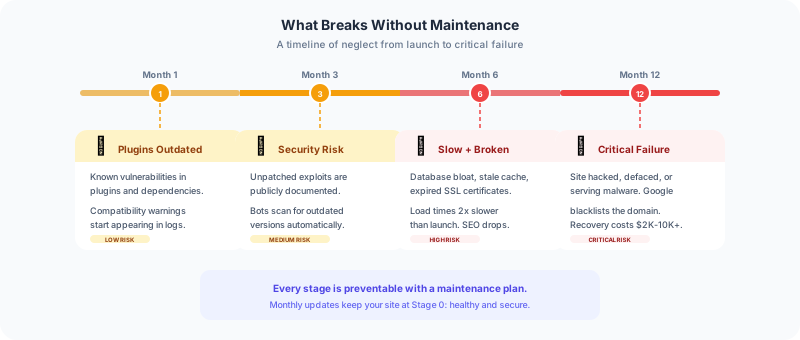
Security breaches. WordPress powers 43% of the web, and every outdated plugin is a potential entry point for attackers. In 2023, over 17,000 WordPress sites were compromised per month through known vulnerabilities that had patches available. The sites that got hacked were not running exotic software. They were running outdated versions of popular plugins.
The same applies to any website with a CMS, server-side code, or dependencies. If you are not updating, you are accumulating vulnerabilities.
Broken functionality. PHP updates, server configuration changes, SSL certificate expirations, API deprecations. Any of these can break a website that was working yesterday. One client had their contact form stop working for three weeks because a server PHP upgrade broke a plugin dependency. Three weeks of lost leads because nobody was monitoring the site.
Performance degradation. Databases grow. Log files accumulate. Cache layers get stale. Without regular optimization, a website that loaded in 2 seconds at launch loads in 5 seconds a year later. That performance hit costs you Google rankings and customer patience.
SEO damage. Broken links, expired SSL certificates, slow load times, and crawl errors all hurt your search rankings. Google Search Console reports these issues, but only if someone is looking at the reports. Unmonitored SEO issues compound over time and can drop your rankings significantly before you notice the traffic decline.
What Proper Maintenance Covers
Security Updates
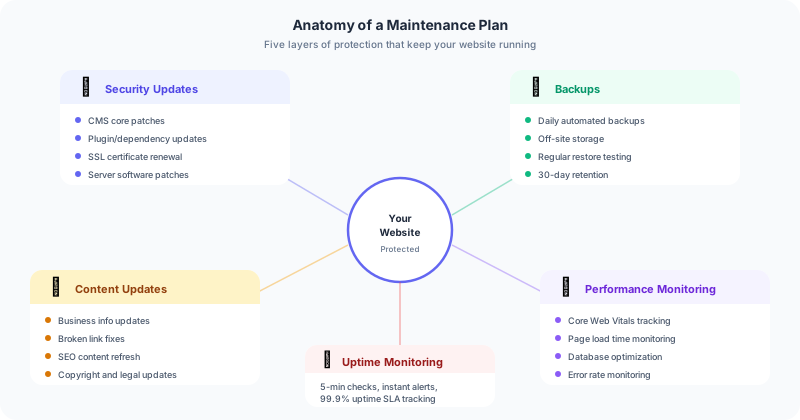
Every CMS, plugin, theme, and server-side dependency gets security patches. Applying these updates promptly is the single most important maintenance task. This means:
- WordPress core updates (minor security patches applied immediately, major versions tested before applying)
- Plugin updates (checked for compatibility, applied within 48 hours of release)
- Theme updates
- Server software updates (PHP, MySQL, web server)
- SSL certificate renewal (should be automated, but needs monitoring)
Backups
Automated daily backups stored off-site. Not on the same server as the website. If the server is compromised, on-server backups are compromised too.
A proper backup system includes:
- Daily automated backups of files and database
- Off-site storage (separate hosting provider or cloud storage)
- Regular restore testing (a backup you have never tested is not a backup)
- 30-day retention minimum
Performance Monitoring
Tracking load times, uptime, and Core Web Vitals over time. Performance issues are gradual. You do not notice your site getting 100ms slower each month until it is 2 seconds slower than when it launched.
Monitoring should include:
- Uptime checks (every 5 minutes minimum)
- Page load time tracking
- Core Web Vitals (LCP, FID, CLS)
- Error rate monitoring
- Database query performance
Content Updates
Keeping your website current is not just about publishing new blog posts. It is about:
- Updating business hours, pricing, and service descriptions
- Replacing outdated statistics and claims
- Fixing broken internal and external links
- Updating copyright years and team information
- Refreshing content for SEO relevance
A website with a 2024 copyright notice in 2026 tells visitors (and Google) that nobody is paying attention.
SEO Maintenance
Search engine optimization is not a one-time setup. It is ongoing:
- Monitoring Google Search Console for crawl errors, indexing issues, and manual actions
- Reviewing analytics for traffic drops that indicate ranking losses
- Updating meta descriptions and title tags as content evolves
- Submitting updated sitemaps after content changes
- Monitoring Core Web Vitals scores
What Drives the Cost
Website maintenance pricing depends on the complexity of the site:
Basic sites (5-15 pages, minimal functionality): The smallest plan covers hosting, security updates, backups, uptime monitoring, and monthly reporting.
Business sites (15-50 pages, forms, integrations): The next level adds content updates, SEO monitoring, performance optimization, and priority support.
Complex sites (50+ pages, e-commerce, custom functionality): The top level includes everything above plus database optimization, advanced security monitoring, staging environment for testing updates, and dedicated support hours.
Maintenance plans for clients cover security updates, daily backups, uptime monitoring, and monthly reporting. The Growth plan adds content updates, priority support, and SEO monitoring. Every plan is quoted after a free site health audit.
DIY vs. Professional Maintenance
If you are technical and willing to spend 2-4 hours per month on updates, monitoring, and optimization, you can maintain your own site. Set up automated backups (UpdraftPlus for WordPress, or cron jobs for custom sites), use an uptime monitor (UptimeRobot has a free tier), and schedule monthly update sessions.
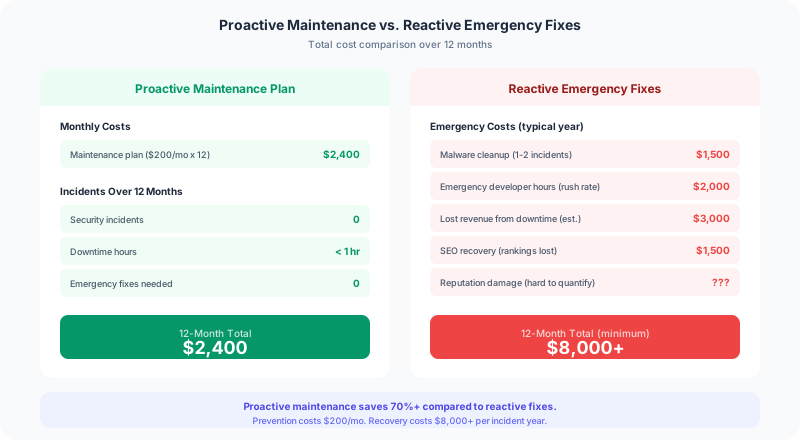
If you are not technical or your time is worth more than $50/hour, professional maintenance is the better investment. A missed security update that leads to a breach costs far more than a year of maintenance fees. A broken contact form that goes unnoticed for a month costs you in lost leads.
The real question is not whether you can afford maintenance. It is whether you can afford to skip it.
The Bottom Line
A website is an asset that depreciates without maintenance. Security vulnerabilities accumulate. Performance degrades. Content becomes outdated. SEO rankings slip. The businesses that treat their website as ongoing infrastructure (not a one-time project) are the ones that see consistent returns from their web presence.
If your website is running without a maintenance plan, it is a matter of when something breaks, not if. Check out maintenance plans that keep your site secure, fast, and current, or get in touch to discuss what your site needs.