Website Content Templates: Plan Every Page Before You Write
The fastest way to write bad content is to start with a blank page. No keyword target, no outline, no promotion plan. You write whatever comes to mind, publish it, and wonder why nobody reads it.
Every piece of content here starts from a template. Not a rigid script, but a framework that forces the important questions before a single paragraph gets written. What keyword is this targeting? What pages will it link to? How will it get promoted after it publishes?
Here are the content templates for every page type.
The Content Planning Template
Before writing any page, fill out this planning framework. It takes 10 minutes and saves hours of rewriting.

Target keyword. Every page on your site should target one primary keyphrase. Run it through a keyword tool (SEMrush, Ahrefs, or even Google’s autocomplete) to confirm search volume and difficulty. Add 3-5 related terms to use naturally throughout the content.
Title and meta. Write these before the content. Your SEO title should be under 60 characters, include the primary keyword, and communicate a clear benefit. Your meta description should be under 155 characters and compel the click. Your URL slug should be short and keyword-rich.
Outline. Map out your H2 headings, key points per section, and a word count target. An outline prevents rambling and ensures you cover every important subtopic. Aim for 5-7 H2 sections per blog post.
Promotion plan. Decide how you will promote this content before you write it. Will you email it to your list? Share it on social media? Reach out to someone mentioned in the article? The best content does not win. The best promoted content wins.
Internal links. Identify 2-3 internal links to service pages and 1-2 links to related blog posts. Plan these in advance so the links feel natural, not forced.
CTA. Know how this content ends before you start. Every page ends with a specific call to action, not a summary paragraph.
Templates by Page Type
Different page types follow different content structures. Here are the four most-used templates.

Service Page Template (800-1,500 words)
- Problem statement. What pain does your prospect have? Lead with their language, not yours.
- Your solution. How you solve this problem. Be specific about your approach.
- Proof. Testimonials, case study excerpts, relevant numbers.
- Process. What happens after they contact you? 3-5 steps.
- FAQ. 3-5 questions from actual prospect conversations.
- CTA. “Get a free quote” or “Start your project.”
Blog Post Template (800-1,500 words)
- Hook. A specific problem, surprising stat, or contrarian take. No “In today’s digital world” openings.
- Core insight. The main idea in 1-2 paragraphs.
- Evidence and framework. Supporting data, examples, and an actionable framework (checklist, steps, comparison).
- Practical application. How the reader applies this to their situation.
- FAQ. 2-3 questions matching People Also Ask results.
- CTA. Link to a service page or contact page.
Case Study Template (500-800 words)
- Challenge. What the client was struggling with. Use specific numbers.
- Approach. What you did. Focus on methodology, not tools.
- Results. Measurable outcomes. Percentage improvements, revenue generated, time saved.
- Testimonial. A direct quote from the client about the experience.
Landing Page Template (300-600 words)
- Headline. Clear value proposition in under 10 words.
- Benefits. 3-4 bullets, each starting with a verb.
- Social proof. Review ratings, client count, or a short testimonial.
- Form. 3-4 fields maximum. Name, email, phone, message.
The Pre-Publish Checklist
Before hitting publish, run through this checklist. It catches embarrassing mistakes on every third article.
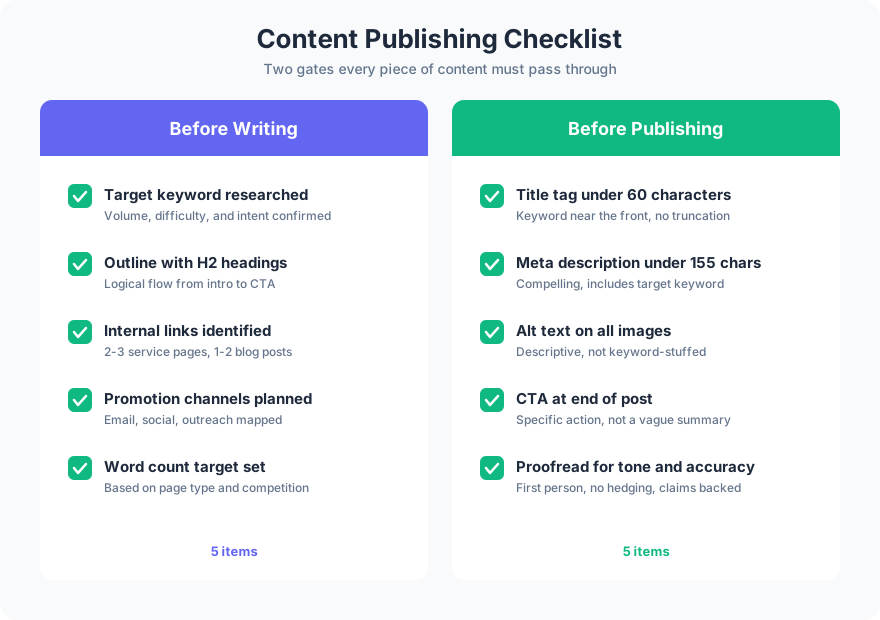
Before writing: Target keyword researched and confirmed. Outline with H2 headings drafted. Internal link targets identified. Promotion channels planned. Word count target set.
Before publishing: Title tag under 60 characters. Meta description under 155 characters. Alt text on all images. CTA at the end (not a summary). Proofread for tone, accuracy, and readability.
Why Templates Work
Templates do not make your content generic. They make your content complete. Without a template, you will forget to add internal links, skip the meta description, publish without a CTA, or write 3,000 words when 1,000 would have been better.
The template handles the structural thinking so you can focus on the creative thinking: the insights, the examples, the voice that makes your content different from everyone else’s.
FAQ
Do content templates make all articles sound the same?
No. The template handles structure (keyword, outline, links, CTA). The content (insights, examples, voice, expertise) is what makes each article unique. Two articles can follow the same template and read completely differently because the substance is different.
How long should a blog post be?
800-1,500 words for most topics. Length should follow content, not a word count target. If you can cover the topic thoroughly in 800 words, stop there. If it requires 1,500 words, write 1,500. Never pad content to hit an arbitrary number. Templates help prevent thin content by ensuring every page has enough substance to rank before you publish it.
What is the most important part of a content template?
The target keyword. Without a keyword target, you are writing for yourself instead of your audience. Every other element (title, outline, internal links) flows from knowing what query you are trying to answer.
Templates are the difference between content that performs and content that fills space. Start with the planning framework, choose the right page type template, and run the checklist before publishing.
Need help building a content strategy for your website? Get in touch to plan it.