MCP Servers: How AI Tools Connect to Your Business Data
AI assistants are useful for general questions. They become powerful when they can access your actual business data. That is what MCP (Model Context Protocol) servers do: they give AI tools like Claude a structured way to read your databases, query your APIs, and interact with your business systems.
The MCP server built for ContentMK exposes 15 tools and 4 resources, letting Claude work directly with WordPress article data, tag management, and content analysis. Here is what MCP servers are, how they work, and why they matter for businesses building AI workflows.
What MCP Actually Is
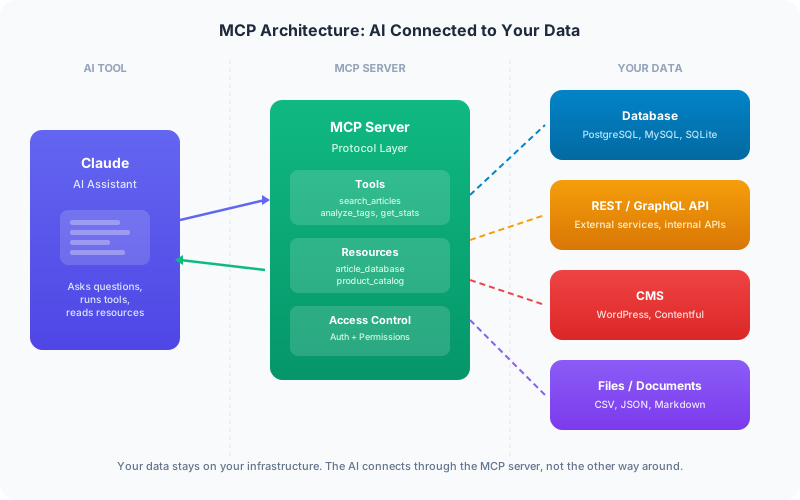
Model Context Protocol is an open standard created by Anthropic that defines how AI assistants connect to external data sources. Think of it as a universal adapter between AI tools and your business systems.
Without MCP, getting AI to work with your data means copy-pasting information into chat windows, uploading files, or building custom integrations for each AI tool. With MCP, you build one server that any MCP-compatible AI tool can connect to.
The protocol defines three things:
- Tools: Actions the AI can take (search products, create invoice, update CRM record)
- Resources: Data the AI can read (customer database, product catalog, documentation)
- Prompts: Pre-built instructions for common tasks (generate report, analyze data, draft response)
How It Works in Practice
Here is a concrete example from ContentMK. The MCP server exposes tools like:
search_articles— find articles by keyword, status, or tagget_article_stats— retrieve word count, readability score, and SEO metricssuggest_internal_links— find linking opportunities between articlesanalyze_tags— identify duplicate and similar tags using fuzzy matching
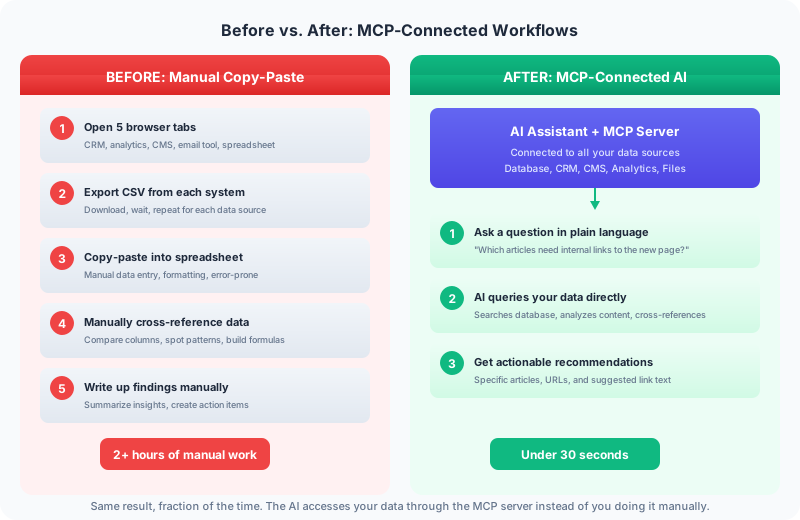
When Claude connects to this MCP server, it can answer questions like “Which articles about Sacramento need internal links to the new web design page?” by actually querying the article database, scanning content for keyword matches, and returning specific suggestions with article titles and URLs.
Without MCP, that question requires exporting articles to a spreadsheet, manually searching for keywords, and building a link map by hand. With MCP, the AI does the database query, the content analysis, and the recommendation in one conversation.
Why This Matters for Businesses
Your AI assistant becomes useful for real work. Generic AI is good at writing and answering questions. AI connected to your business data can audit your inventory, analyze your customer patterns, draft responses using your knowledge base, and automate workflows that currently require manual data gathering.
You build the integration once. An MCP server works with Claude, and as more AI tools adopt the protocol, the same server works with all of them. You are not locked into one AI vendor.
Your data stays in your control. MCP servers run on your infrastructure. The AI tool connects to your server, not the other way around. You control what data is exposed, what actions are allowed, and who has access. For businesses with sensitive data (healthcare, legal, financial), this architecture is critical.
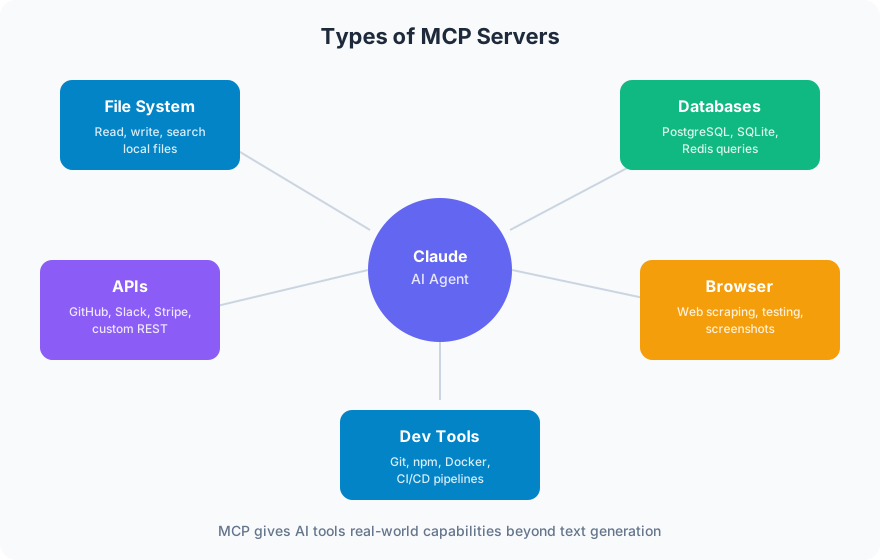
It scales with your AI usage. Start with one MCP server that exposes your product catalog. Add another for your CRM. Add another for your analytics. Each server is independent, and AI tools can connect to multiple servers simultaneously.
Real Use Cases
Content management at scale. ContentMK’s MCP server lets Claude audit 2,200+ articles for SEO issues, find internal linking opportunities, and identify duplicate tags, all without leaving the conversation. The AI has direct access to the article database and can provide specific, actionable recommendations.
Customer support. An MCP server connected to your knowledge base and ticketing system lets an AI assistant draft responses using your actual documentation, check order status, and escalate issues based on your routing rules.
Data analysis. Connect an MCP server to your analytics database and ask questions in plain language: “What was our conversion rate for organic traffic from Sacramento last month?” The AI queries the database, does the calculation, and explains the result.
Development workflows. MCP servers can expose codebase search, documentation lookup, and deployment status. Developers get AI assistance that understands their specific project, not generic coding help.
Building an MCP Server
An MCP server is a Node.js (or Python) application that implements the MCP protocol. The complexity depends on what you are connecting to:
Simple (1-2 days): Expose a read-only connection to a database or API. The AI can search and retrieve data but not modify anything. Good for analytics, reporting, and knowledge base access.
Moderate (1-2 weeks): Read and write capabilities with authentication and access control. The AI can update records, create entries, and trigger workflows. Requires careful permission design.
Complex (2-4 weeks): Multiple data sources, custom business logic, real-time updates, and integration with existing authentication systems. This is a full integration project.
The protocol itself is well-documented and straightforward to implement. The complexity is in the business logic: what data to expose, what actions to allow, how to handle errors, and how to keep the AI from doing things it should not.
Getting Started
If your business uses AI tools and has data that would make those tools more useful, an MCP server is the bridge. Start with a read-only server that exposes one data source (your product catalog, your knowledge base, your CRM) and see how it changes your AI workflows.
Frog Stone Media builds MCP servers that connect AI tools to business data. From simple read-only connections to full-featured servers with tools, resources, and access control. Get in touch about connecting your data to AI.