Homepage Header and Hero Section: What Goes Where
The header and hero section take up the first 600 to 900 pixels of your homepage. That is the only real estate guaranteed to be seen by every visitor. Across more than 40 headers built in the last three years, the pattern that converts best is remarkably consistent.
The Header Bar
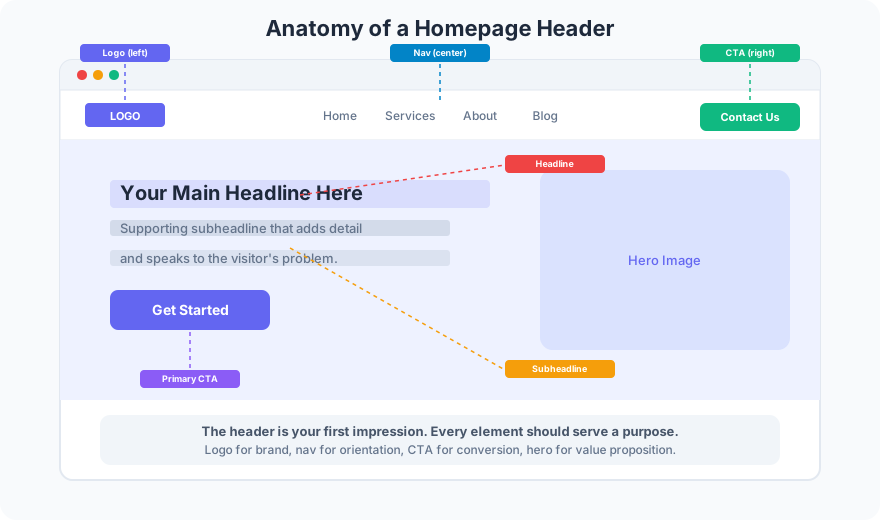
The header sits at the very top. It contains three elements in a specific order.
Logo on the left. Users expect it there. Nielsen Norman Group eye-tracking studies confirm that top-left logos are found 89% faster than centered logos. Link the logo to your homepage. Every time.
Navigation in the center or right. Keep it to 5 to 7 items maximum. A site with 11 nav links was tested against one with 6. The simplified nav increased page-per-session by 24%. Every link in your nav should answer the question: “Does a first-time visitor need this?”
CTA button on the far right. This is a small, high-contrast button: “Get a Quote,” “Contact Us,” “Start Free Trial.” It stays visible on every page, not just the homepage. Style it differently from the nav links, usually a filled button against text-only nav items.
The Hero Section
Below the header, the hero section is where you make your pitch. It has four components.
Headline. This is the single most important line of text on your entire website. It answers one question: “What do you do for me?” Write headlines in 6 to 12 words. Specific beats clever. “Sacramento Web Design That Brings In Leads” outperforms “Where Creativity Meets Innovation” every single time.
Subheadline. Two sentences maximum. The subheadline adds context the headline cannot carry alone. If the headline says what you do, the subheadline says how or why it matters. Keep subheadlines under 25 words.
Primary CTA button. This is the big, bold button that drives your most valuable action. It matches the language of the visitor’s intent: “See My Work,” “Get Your Free Estimate,” “Schedule a Call.” Make it at least 48px tall with generous padding. One primary button. Not two, not three.
Supporting visual. A hero image, illustration, or short video that reinforces the headline. Avoid generic stock photos of people shaking hands. Show your actual work, your product, or your team. Authentic visuals build trust faster than polished stock imagery.
What to Leave Out
Too many headers are cluttered with phone numbers, social media icons, search bars, and promotional banners. Every extra element dilutes attention. If your phone number matters, put it in the header on mobile only, where tap-to-call is useful. Social icons belong in the footer. Search bars only earn header space on content-heavy sites with 50+ pages.
For a full breakdown of layout conventions that visitors expect, read the guide on web design standards every site should follow.
FAQ
Should the header be sticky or static?
Sticky headers work well on long pages, especially on mobile. Headers are sticky on 90% of Frog Stone Media builds. The key is keeping the sticky version compact: reduce the logo size, collapse padding, and keep only the nav and CTA visible.
What background works best for a hero section?
Dark overlays on photos work, but solid colors with offset images convert better in testing. A clean background with a clear headline and visible CTA outperforms busy hero images. If you use a photo, add a dark gradient overlay to keep text readable.
Need a header and hero section built for conversions? Get in touch for a layout tailored to your business goals.